import kiln

def draw():
    kiln.background(20)
    kiln.fill(255, 107, 82)
    kiln.translate(200, 150)
    kiln.circle(0, 0, 30)      # at the new origin
    kiln.circle(80, 0, 15)     # 80 to its right

show(draw)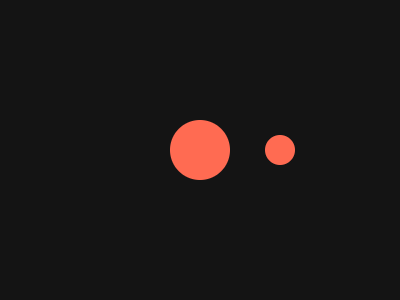
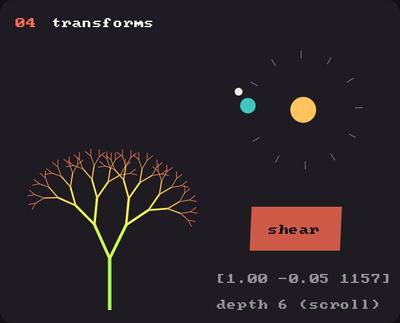
Showcase panel 04: with transform(), rotate, scale, shear, a fractal tree.
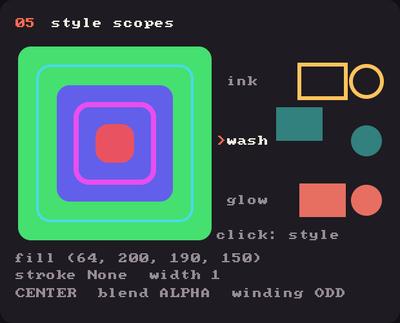
Showcase panel 05: with style() and style() (click it).
Try it live: run uv run python examples/showcase.py, then hover panel 04 and click panel 05, or see the showcase.
Instead of computing where every shape goes, move the coordinate system and draw as if nothing happened. translate, rotate and scale change what (0, 0) means, which way x points and how big a unit is. Everything you draw after them is carried along. (We use circles here; the same moves carry every shape.)
translate(x, y) moves the origin. A circle at (0, 0) now appears there.
import kiln
def draw():
kiln.background(20)
kiln.fill(255, 107, 82)
kiln.translate(200, 150)
kiln.circle(0, 0, 30) # at the new origin
kiln.circle(80, 0, 15) # 80 to its right
show(draw)
translate also accepts a z. Kiln is 2D, so it is ignored.
rotate(angle) turns the axes around the origin, by an angle in radians (math.radians(degrees) converts). Positive is clockwise on screen, because y points down. After a 90 degree turn, the x axis points down, so a circle drawn at (80, 0) lands below the origin.
import kiln

def draw():
    kiln.background(20)
    kiln.translate(200, 100)
    kiln.fill(90)
    kiln.circle(80, 0, 10)       # before turning: to the right
    kiln.rotate(math.radians(90))
    kiln.fill(255, 107, 82)
    kiln.circle(80, 0, 10)       # after: below the origin

show(draw)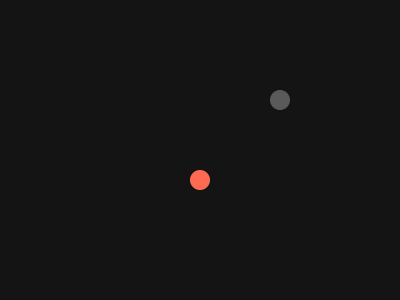
To rotate around a point, translate there first, then rotate. Transforms stack up in the order you write them, each one working in the axes left by the previous ones.
import kiln

def draw():
    kiln.background(20)
    kiln.translate(200, 150)
    for i in range(12):
        kiln.fill(255, 107 + i * 10, 82)
        kiln.circle(100, 0, 8 + i)
        kiln.rotate(math.radians(30))

show(draw)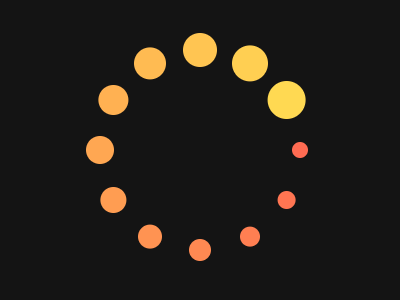
scale(s) makes everything s times bigger from the origin, and scale(sx, sy) stretches each axis separately. Outlines and lines keep their stroke width on screen however you scale, rotate or stretch, even when one axis grows more than the other.
import kiln

def draw():
    kiln.background(20)
    kiln.fill(None)
    kiln.stroke(255, width=2)
    kiln.translate(40, 150)
    for i in range(1, 6):
        kiln.scale(1.5)
        kiln.circle(5, 0, 4)       # grows, the ring stays 2 points thick

show(draw)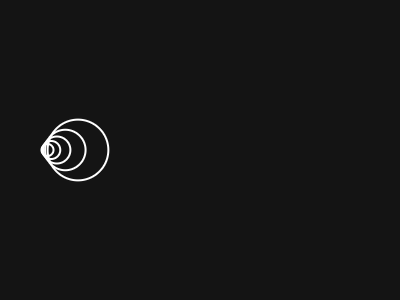
with transform(): save the coordinate systemTransforms pile up. with kiln.transform(): saves the current coordinate system and returns to it at the end of the block, so each shape can move around freely and leave no trace.
import kiln

def draw():
    kiln.background(20)
    kiln.translate(200, 150)
    for i in range(8):
        with kiln.transform():
            kiln.rotate(math.radians(i * 45))
            kiln.translate(110, 0)
            kiln.fill(80 + i * 22, 120, 255 - i * 22)
            kiln.circle(0, 0, 20)
    kiln.fill(255)
    kiln.circle(0, 0, 12)

show(draw)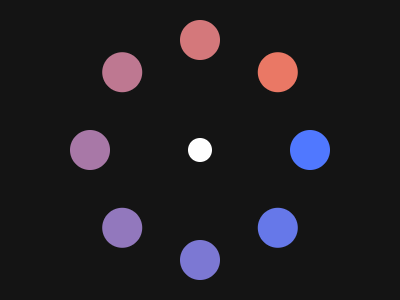
with transform() blocks nest. A moon’s block sits inside its planet’s: the planet’s transform carries the moon along for free.
import math
import kiln

class Orbits(kiln.App):
    def setup(self):
        self.t = 0.0

    def update(self):
        self.t += 2 * math.pi / 120     # one turn in 120 frames

    def draw(self):
        kiln.background(15)
        kiln.translate(200, 150)
        kiln.fill(255, 200, 80)
        kiln.circle(0, 0, 22)
        for planet in range(3):
            with kiln.transform():
                kiln.rotate(self.t * (planet + 1) + planet * 2)
                kiln.translate(55 + planet * 30, 0)
                kiln.fill(255, 107, 82)
                kiln.circle(0, 0, 9)
                with kiln.transform():          # the moon
                    kiln.rotate(self.t * 5)
                    kiln.translate(20, 0)
                    kiln.fill(220)
                    kiln.circle(0, 0, 4)

show_video(Orbits(), frames=120, fps=40)
A function can save the transform, grow and call itself (and uses with style(), explained just below, for the blossoms). Each branch is a line drawn upward (negative y), a little thinner at every level, with a dot to round off the joint; then two smaller branches are tilted left and right.
import kiln

def branch(length, depth):
    width = 1.5 + depth * 1.2
    kiln.stroke(width=width)
    kiln.line(0, 0, 0, -length)
    kiln.circle(0, 0, width / 2)   # round the elbow
    kiln.translate(0, -length)
    if depth == 0:
        with kiln.style():               # a blossom, without recolouring the branches
            kiln.fill(255, 150, 190)
            kiln.circle(0, 0, 4)
        return
    for angle in (-25, 25):
        with kiln.transform():
            kiln.rotate(math.radians(angle))
            branch(length * 0.72, depth - 1)

def draw():
    kiln.background(20)
    kiln.fill(210, 170, 120)
    kiln.translate(200, 290)
    branch(70, 6)

show(draw)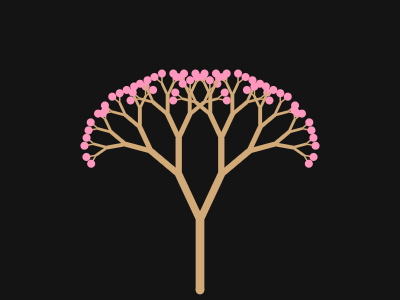
with style()Fill, stroke, stroke width, tint, rect mode, blend mode, winding rule and curve resolution are the style. with kiln.style(...): saves them, applies the settings you pass, and restores them at the end of the block, so a helper can set what it likes without disturbing the caller. Called without with, style(...) just applies the settings. current_style() returns a Style copy you can keep, and style(saved) applies one.
import kiln

def halo(x, y):
    with kiln.style():
        kiln.fill(None)
        kiln.stroke(255, 220, 120, width=3)
        kiln.blend(kiln.Blend.ADD)
        kiln.circle(x, y, 40)

def draw():
    kiln.background(20)
    kiln.fill(230, 70, 50)
    kiln.circle(130, 150, 30)
    halo(130, 150)
    kiln.circle(270, 150, 30)    # still red, filled, normal blending

show(draw)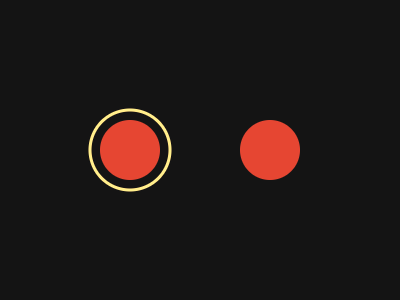
A spiral of spinning circles: each step turns a little and moves outward, and the whole thing breathes.
import math
import kiln

class Spiral(kiln.App):
    def setup(self):
        self.t = 0.0

    def update(self):
        self.t += 2 * math.pi / 90

    def draw(self):
        kiln.background(12)
        kiln.translate(200, 150)
        kiln.rotate(self.t / 3)
        kiln.blend(kiln.Blend.ADD)
        for i in range(60):
            with kiln.transform():
                kiln.rotate(math.radians(i * 137.5))              # the golden angle
                kiln.translate(i * 2.2, 0)
                green = 60 + 80 * (0.5 + 0.5 * math.sin(self.t + i * 0.2))
                kiln.fill(120 + i * 2, green, 255 - i * 3, 200)
                kiln.circle(0, 0, 3 + 4 * (0.5 + 0.5 * math.sin(self.t * 2 - i * 0.3)))

show_video(Spiral(), frames=90, fps=30)