Noise and randomness

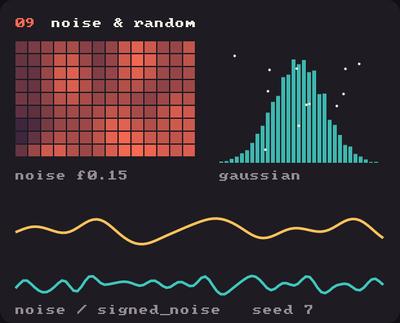
Showcase panel 09: noise, signed_noise, seeds, gaussians.

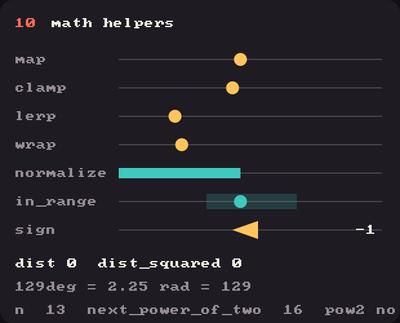
Showcase panel 10: map, clamp, lerp, wrap, normalize and more.

Showcase panel 09: noise, signed_noise, seeds, gaussians.
Showcase panel 10: map, clamp, lerp, wrap, normalize and more.
Try it live: run uv run python examples/showcase.py, then hover panels 09 and 10, or see the showcase.

Random numbers make a sketch lively. Noise makes it feel alive: smooth, drifting, natural. This page goes from one to the other.

Random scatter

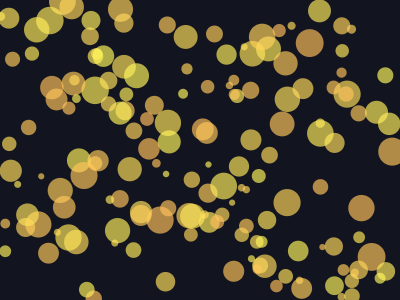
kiln.random(max) gives a number from 0 up to max, and kiln.random(min, max) gives one between the two. random_seed makes the sequence repeatable, so a sketch you like keeps looking the same.

import kiln

kiln.random_seed(3)
dots = [(kiln.random(400), kiln.random(300), kiln.random(3, 14)) for _ in range(160)]

def draw():
    kiln.background(18, 20, 32)
    for x, y, r in dots:
        kiln.fill(255, 190 + kiln.random(60), 90, 170)
        kiln.circle(x, y, r)

show(draw)

Every dot is independent of its neighbours, which is why it looks like static.

Noise is random with a memory

kiln.noise(x) returns a value between 0 and 1, and nearby inputs give nearby outputs. Multiply your coordinates by a small number to choose how big the features are: 0.01 gives hills about a hundred pixels wide. Give it two numbers for 2D noise, three for 3D, four for 4D. signed_noise is the same thing in the range -1 to 1.

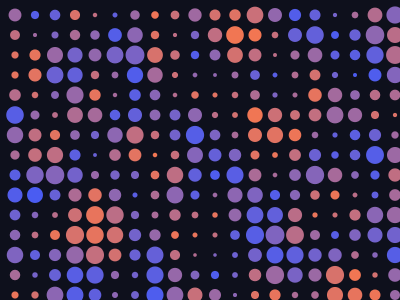
A grid of circles whose size and colour come from a 2D noise field. The noise call takes numpy arrays, so the whole grid is computed at once.

import numpy as np
import kiln

xs, ys = np.meshgrid(np.arange(15, 400, 20), np.arange(15, 300, 20))
size = kiln.noise(xs * 0.012, ys * 0.012)
tint = kiln.noise(xs * 0.012 + 40, ys * 0.012 + 40)

def draw():
    kiln.background(14, 16, 28)
    for x, y, s, t in zip(xs.ravel(), ys.ravel(), size.ravel(), tint.ravel()):
        kiln.fill(kiln.lerp(60, 255, t), kiln.lerp(90, 120, t), kiln.lerp(255, 70, t))
        kiln.circle(x, y, kiln.map(s, 0, 1, 1, 10))

show(draw)

kiln.map(value, in_min, in_max, out_min, out_max) is how you turn a noise value into whatever range you need, and kiln.lerp blends between two numbers.

Flow through time

A third noise coordinate makes the field move. Feed in a slowly growing time as the third argument and the whole landscape drifts smoothly.

import numpy as np
import kiln

class Flow(kiln.App):
    def setup(self):
        self.xs, self.ys = np.meshgrid(np.arange(10, 400, 20), np.arange(10, 300, 20))
        self.t = 0.0

    def update(self):
        self.t += 0.03

    def draw(self):
        kiln.background(14, 16, 28)
        n = kiln.noise(self.xs * 0.01, self.ys * 0.01, self.t)
        for x, y, v in zip(self.xs.ravel(), self.ys.ravel(), n.ravel()):
            kiln.fill(kiln.lerp(70, 255, v), 150, kiln.lerp(255, 90, v), 230)
            kiln.circle(x, y, kiln.map(v, 0, 1, 0, 11))

show_video(Flow(), frames=90, fps=30)

Try this

Noise can steer motion, not just size. Each dot here walks along a direction read from 3D noise (position and time), so the swarm streams like a current.
import math
import numpy as np
import kiln

class Drift(kiln.App):
    def setup(self):
        kiln.random_seed(11)
        self.p = np.array([[kiln.random(400), kiln.random(300)] for _ in range(70)])
        self.t = 0.0

    def update(self):
        self.t += 0.01
        angle = kiln.noise(self.p[:, 0] * 0.006, self.p[:, 1] * 0.006, self.t) * math.tau * 2
        self.p += np.column_stack([np.cos(angle), np.sin(angle)]) * 2.2
        self.p %= (400, 300)

    def draw(self):
        kiln.background(14, 16, 28)
        for i, (x, y) in enumerate(self.p):
            kiln.fill(255, kiln.lerp(120, 220, i / 70), 110, 200)
            kiln.circle(x, y, 4)

show_video(Drift(), frames=120, fps=30)

Change the 0.006 to make the currents tighter or broader, and the 2.2 to change the speed.