import kiln

with record():
    synth = kiln.Synth()
    synth.note_on(220)
    wait(0.6)
    synth.note_off()
    wait(0.3)
![Showcase panel 21: silent until clicked: a Synth note (x sets the pitch), a Pluck, and a bar of Kick, Snare and HiHat in a Sequencer with its playhead and a Reverb on the master, with master.spectrum() and master.level() drawn live; needs kiln-gl[sound].](../media/showcase-21.jpg)
Showcase panel 21: silent until clicked: a Synth note (x sets the pitch), a Pluck, and a bar of Kick, Snare and HiHat in a Sequencer with its playhead and a Reverb on the master, with master.spectrum() and master.level() drawn live; needs kiln-gl[sound].
Try it live: run uv run python examples/showcase.py, then click panel 21, or see the showcase.
Kiln sketches can make sound. You play an instrument from Python, with notes and knobs, and Kiln turns that into sound in compiled code on its own thread. Your draw() can be as busy as it likes: the sound never stutters.
Sound is an optional part of Kiln. Install it once:
pip install "kiln-gl[sound]" # or: uv add "kiln-gl[sound]"In a sketch, sound plays live through your speakers. On this page every example is recorded instead: with record(): captures what happens inside it, and wait(seconds) lets that much time go by. Press play under each one to hear it (each recording is raised to a comfortable listening level).
A Synth is an instrument. note_on(220) starts a note at 220 Hz (the A below middle C), and note_off() lets it go.
import kiln
with record():
synth = kiln.Synth()
synth.note_on(220)
wait(0.6)
synth.note_off()
wait(0.3)That’s all it takes. Creating the first instrument starts the sound engine and opens your speakers; there is nothing to set up. The instrument keeps sounding for as long as you keep it, so in a sketch store it on self.
The number you give note_on is the pitch in hertz, vibrations per second. Doubling it goes up an octave, so 220, 440 and 880 are all the note A. Here is a scale, one note after another:
import kiln

scale = [220.0, 247.0, 277.0, 294.0, 330.0, 370.0, 415.0, 440.0]  # A major

with record():
    synth = kiln.Synth()
    for freq in scale:
        synth.note_on(freq)
        wait(0.18)
        synth.note_off()
        wait(0.06)
To bend a note, make the synth play one note at a time with polyphony=1. Then a new note_on while a note is still held doesn’t start another note: the held one slides to the new pitch. That is how you bend a note with the mouse:
import kiln

with record():
    synth = kiln.Synth(polyphony=1)
    synth.note_on(110)
    for step in range(60):
        synth.note_on(110 * 2 ** (step / 30))   # two octaves up, held all the way
        wait(1 / 60)
    wait(0.3)
    synth.note_off()
    wait(0.2)
The synth’s raw sound is buzzy and bright. It goes through a low-pass filter, which lets the low frequencies through and darkens everything above its cutoff. Turn the cutoff down and the sound gets darker; turn it up and it opens. Controls are plain attributes:
import kiln

with record(view="spectrogram"):
    synth = kiln.Synth()
    synth.note_on(110)
    for step in range(80):
        synth.cutoff = 150 * 1.05 ** step   # 150 Hz up to about 7 kHz
        wait(0.025)
    synth.note_off()
    wait(0.2)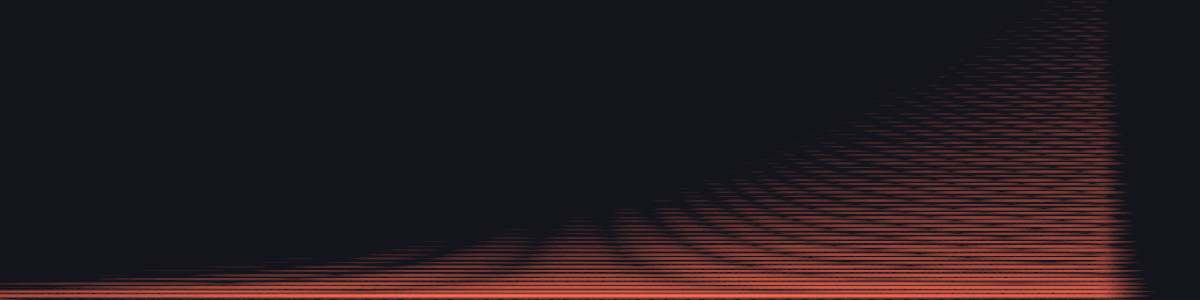
The picture is a spectrogram: time runs left to right, pitch goes up, and brightness is loudness. The bright band at the bottom is the note and its first harmonics; the filter opens upward. synth.control_change("cutoff", 800) does the same as synth.cutoff = 800, for when the name is in a variable.
Every control glides to its new value over about 5 ms, so changing it every frame, straight from the mouse, never clicks. volume is a control too, from 0 to 1.
note_on opens a gate and note_off closes it. The sound fades in over 5 ms and, when the gate closes, fades out in 0.15 seconds, so notes start and stop cleanly (both are settings; see Envelopes below). Short gates make a rhythm:
import kiln

with record():
    synth = kiln.Synth()
    synth.cutoff = 900
    for step in range(16):
        synth.note_on(55 if step % 4 == 0 else 110)
        wait(0.07)
        synth.note_off()
        wait(0.08)
In a sketch, notes usually come from the mouse or the keyboard. Here is a simpler version of examples/10_synth.py, where left to right is pitch and up and down is cutoff:
import kiln

class SynthExample(kiln.App):
    def setup(self):
        self.synth = kiln.Synth()

    def update(self):
        self.synth.cutoff = kiln.map(kiln.mouse.y, kiln.window.height, 0, 200, 8000)

    def mouse_pressed(self, x, y, button):
        self.synth.note_on(kiln.map(x, 0, kiln.window.width, 55, 880))

    def mouse_released(self, x, y, button):
        self.synth.note_off()
When the window closes, Kiln releases every note still held, each with its own release, so a note you forgot to turn off doesn’t keep sounding in the REPL or a notebook after the sketch ends.
A Synth is built like the analog synthesizers of the 1970s and 80s. Two oscillators make a raw tone, a filter carves it, and an amplifier shapes each note’s loudness. Envelopes and an LFO move those settings while a note plays. Every part is a control, set the same way as cutoff.
Each oscillator has a waveform. A sine is pure; a triangle is soft and flute-like; a saw is bright and buzzy; a pulse is hollow and reedy. Here they are one after another, with the second oscillator off and the filter wide open:
import kiln

with record(view="spectrogram"):
    synth = kiln.Synth()
    synth.osc2_level = 0        # just oscillator 1
    synth.cutoff = 20000        # the filter wide open
    for wave in ["sine", "triangle", "saw", "pulse"]:
        synth.osc1_wave = wave
        synth.note_on(220)
        wait(0.45)
        synth.note_off()
        wait(0.1)
In the spectrogram each waveform is a stack of harmonics: one strong line for the sine (the faint ones above it are the filter’s analog warmth), a few fading odd ones for the triangle, every harmonic for the saw, the odd ones for the square pulse. Kiln draws these waveforms band-limited, so even high notes stay clean instead of growing the whistling “aliases” of cheap digital oscillators.
pulse_width changes the pulse from square (0.5) to thin and nasal (0.1). sub_level adds a square sub-oscillator an octave below, and noise_level adds hiss (noise_color = "pink" for a softer rumble).
Two oscillators a few cents apart drift in and out of phase, and that slow beating is the classic thick analog sound. detune sets how far oscillator 2 sits above oscillator 1, in cents (hundredths of a semitone); 700 cents is a fifth. Here is one oscillator, then two 12 cents apart:
import kiln

with record():
    synth = kiln.Synth()
    synth.cutoff = 1500
    for detune, level, seconds in [(0, 0.0, 0.5), (12, 0.8, 1.4)]:
        synth.detune = detune
        synth.osc2_level = level
        synth.note_on(110)
        wait(seconds)
        synth.note_off()
        wait(0.1)
You can see the beating in the second note: its loudness swells and dips. Real analog oscillators never hold perfectly still either, and neither do Kiln’s: each one wanders slowly by up to drift cents (3 by default), so no two notes are exactly alike.
resonance boosts the frequencies right at the cutoff. Sweep the cutoff with the resonance up and you hear the classic “wow” as the peak rides through the harmonics:
import kiln

with record(view="spectrogram"):
    synth = kiln.Synth()
    synth.resonance = 0.85
    synth.note_on(55)
    for step in range(80):
        synth.cutoff = 80 * 1.06 ** step     # 80 Hz up to about 8 kHz
        wait(0.025)
    synth.note_off()
    wait(0.1)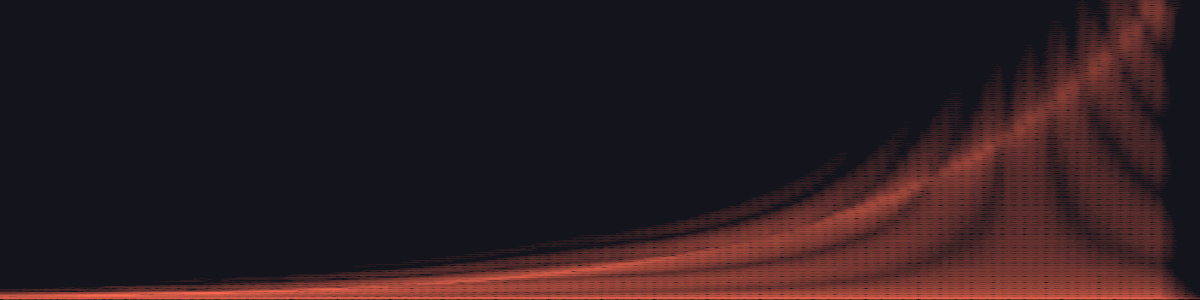
The bright curve climbing through the picture is the resonant peak. At a resonance near 1 the filter starts to sing on its own, a pure whistle at the cutoff, even with no oscillators at all.
filter_type chooses the filter. The default "ladder" is modelled on the Moog ladder filter: a steep 24 dB per octave low-pass with a round, fat resonance. "lp", "bp" and "hp" are a gentler 12 dB state-variable filter, which keeps the lows (low-pass), only a band around the cutoff (band-pass), or only the highs (high-pass):
import kiln

with record(view="spectrogram"):
    synth = kiln.Synth()
    synth.cutoff = 1000
    synth.resonance = 0.5
    for filter_type in ["ladder", "lp", "bp", "hp"]:
        synth.filter_type = filter_type
        synth.note_on(110)
        wait(0.4)
        synth.note_off()
        wait(0.1)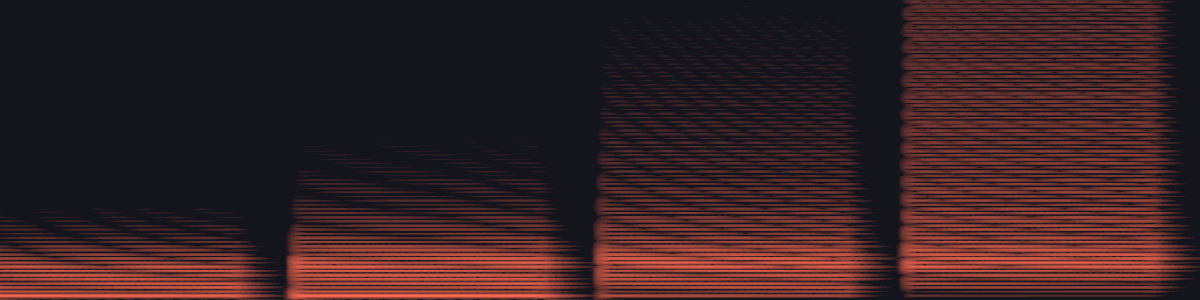
keytrack makes the cutoff follow the note, so high notes are as bright as low ones.
An envelope is a shape that plays once per note: attack (how fast it rises), decay (how fast it falls to the sustain level), sustain (the level while you hold the note) and release (how fast it fades after note_off). The times are in seconds. The amp envelope shapes loudness. A pluck has a fast attack and no sustain; a pad swells in slowly and lingers:
import kiln

with record():
    synth = kiln.Synth()
    synth.attack, synth.decay, synth.sustain, synth.release = 0.002, 0.3, 0.0, 0.1
    synth.note_on(220)
    wait(0.5)
    synth.note_off()
    synth.attack, synth.decay, synth.sustain, synth.release = 0.4, 0.3, 0.7, 0.5
    synth.note_on(220)
    wait(0.9)
    synth.note_off()
    wait(0.6)
The curves are exponential, like the charging capacitor of an analog envelope: quick at first, then easing in.
The filter has its own envelope: filter_attack, filter_decay, filter_sustain and filter_release. filter_env_amount says how many octaves it opens the cutoff at its peak. A low cutoff, some resonance and a short filter decay make the squelchy bass of acid house:
import kiln

with record(view="spectrogram"):
    synth = kiln.Synth()
    synth.cutoff = 150
    synth.resonance = 0.75
    synth.filter_env_amount = 5          # opens 5 octaves at the peak
    synth.filter_decay, synth.filter_sustain = 0.18, 0.0
    synth.release = 0.05
    for step in range(12):
        synth.note_on([55, 55, 110, 82.4][step % 4])
        wait(0.11)
        synth.note_off()
        wait(0.04)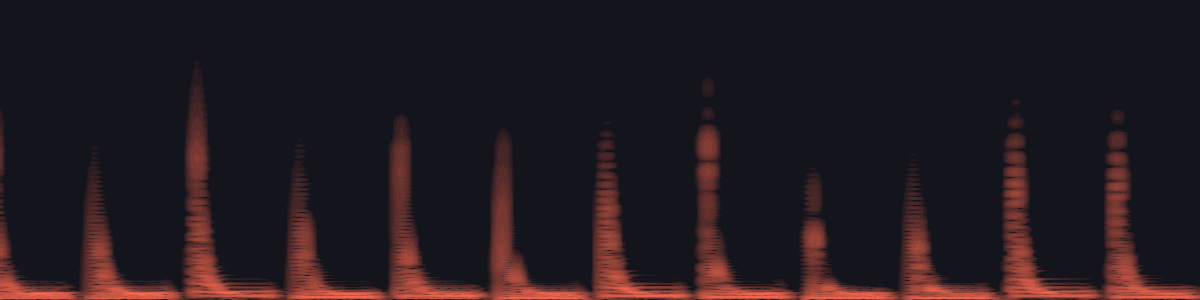
Each note’s harmonics flare up and close again. pitch_env_amount lets the same envelope bend the pitch, in semitones, for zaps and drum-like blips.
An LFO (low-frequency oscillator) is a slow wave that wobbles something else. lfo_rate is its speed in Hz and lfo_shape its wave ("sine", "triangle", "saw", "square" or "sample_hold", random steps). Point it at the pitch for vibrato, at the cutoff for a wah, or at the pulse width for a shimmering chorus:
import kiln

with record(view="spectrogram"):
    synth = kiln.Synth()
    synth.osc2_level = 0
    synth.note_on(330)
    synth.lfo_rate, synth.lfo_to_pitch = 6, 0.3          # vibrato: 0.3 semitones
    wait(0.8)
    synth.lfo_to_pitch = 0
    synth.lfo_rate, synth.lfo_to_cutoff = 4, 2           # wah: 2 octaves
    synth.resonance = 0.6
    wait(0.8)
    synth.lfo_to_cutoff, synth.resonance = 0, 0
    synth.osc1_wave, synth.cutoff = "pulse", 6000
    synth.lfo_rate, synth.lfo_to_pwm = 1.5, 0.4          # pulse-width modulation
    wait(1.0)
    synth.note_off()
    wait(0.1)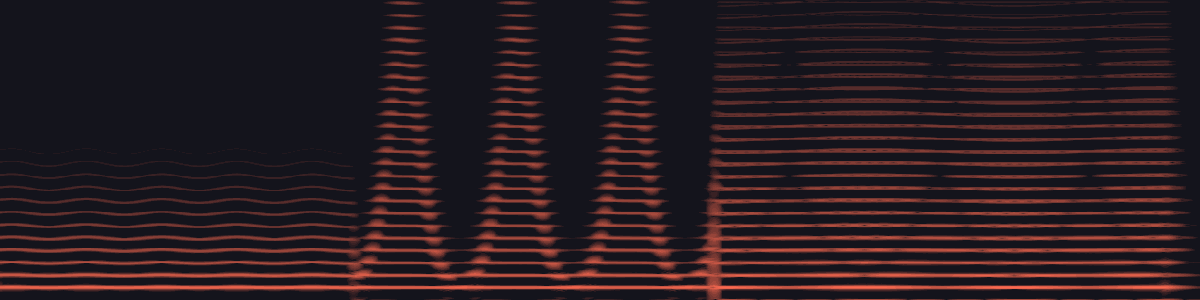
drive pushes the sound harder into the filter, from warm (0) to fuzzy (1). Like an overdriven analog circuit, it rounds the peaks off and adds new harmonics. The filter’s resonance gets tamed a little along the way, as on a real ladder:
import kiln

with record(view="spectrogram"):
    synth = kiln.Synth()
    synth.osc1_wave = "sine"
    synth.osc2_level = 0
    synth.cutoff = 8000
    synth.note_on(110)
    for step in range(64):
        synth.drive = step / 63             # 0 to 1 over 1.6 seconds
        wait(0.025)
    synth.note_off()
    wait(0.1)
The sine starts almost pure, and harmonic after harmonic lights up above it as the drive rises. glide is the last knob: on a Synth(polyphony=1), a note played while another is held slides from it over that many seconds, like a Minimoog’s portamento.
A sketch that plays itself: every few frames it picks a note from a pentatonic scale (any two of these notes sound good together), and noise slowly moves the filter. The sound below is this sketch’s first four seconds. Change the scale, the rhythm or the noise speed, and listen.
import kiln

SCALE = [220.0, 247.0, 277.0, 330.0, 370.0, 440.0]  # A major pentatonic


class Wander(kiln.App):
    def setup(self):
        kiln.random_seed(7)
        self.synth = kiln.Synth()

    def update(self):
        frame = kiln.clock.frame
        self.synth.cutoff = 300 + 4000 * kiln.noise(frame * 0.015)
        if frame % 10 == 0:
            self.synth.note_on(SCALE[int(kiln.random(len(SCALE)))])
        elif frame % 10 == 7:
            self.synth.note_off()

    def draw(self):
        kiln.background(18, 16, 24)
        kiln.fill(255, 107, 82)
        kiln.circle(200, 150, self.synth.cutoff / 40)


record_app(Wander(), frames=240)
An instrument can hold several notes at once. Call note_on once for each note, and they sound together as a chord:
import kiln

with record():
    synth = kiln.Synth()
    synth.volume = 0.3                    # three notes add up: leave them room
    for freq in (220.0, 277.0, 330.0):    # A major: A, C sharp and E
        synth.note_on(freq)
    wait(1.0)
    synth.note_off()                      # no pitch: let go of every note
    wait(0.4)
note_off with a pitch lets go of just that note, so you can build a chord up one note at a time and take it apart again while the low note keeps ringing. The sound swells as each note joins and thins out as they leave:
import kiln

with record():
    synth = kiln.Synth()
    synth.volume = 0.25
    synth.cutoff = 1500
    for freq in (110.0, 165.0, 220.0, 277.0, 330.0):   # build up, from the bass
        synth.note_on(freq)
        wait(0.3)
    for freq in (330.0, 277.0, 220.0, 165.0):          # let go from the top
        synth.note_off(freq)
        wait(0.3)
    synth.note_off()
    wait(0.4)
A Synth holds up to 8 notes; that number is its polyphony. When you play one more, the oldest held note lets go to make room, so a fast run of notes never piles up. Set it when you create the synth: kiln.Synth(polyphony=2) keeps only the last two notes, and kiln.Synth(polyphony=1) is the one-note, sliding synth from the Pitch section. Notes are never lost: ten note_on calls in one frame play ten notes, and a note that starts and stops in the same frame still sounds.
Kiln also keeps the whole sound within a budget, so it never stutters: at most 16 notes sound per instrument (held ones and fading tails together, so polyphony goes up to 16) and 24 across all of them. Beyond that, the quietest fading tail, or else the oldest held note, fades out within 5 ms, and a pile of new notes in one frame waits a few milliseconds for room. In practice you only meet it with very long releases.
import kiln

with record():
    synth = kiln.Synth(polyphony=2)
    synth.volume = 0.3
    for freq in (220.0, 277.0, 330.0, 440.0, 554.0, 659.0):   # a rising arpeggio
        synth.note_on(freq)                                   # only the last two ring on
        wait(0.2)
    wait(0.4)
    synth.note_off()
    wait(0.4)
A kiln.Gui panel makes sliders and choices, and each one is a Parameter. Bind one to a control and the sound follows it: synth.bind("cutoff", cutoff) reads the slider now, then every move of it (and every preset load) reaches the synth the way synth.cutoff = ... does, gliding over the same few milliseconds. There is nothing to write in update or draw.
import kiln
from _render import show

class Panel(kiln.App):
    def setup(self):
        self.synth = kiln.Synth()
        self.gui = kiln.Gui("Synth", width=240)
        cutoff = self.gui.slider("cutoff", 1400.0, 120.0, 9000.0, format="{:.0f} Hz")
        resonance = self.gui.slider("resonance", 0.35, 0.0, 0.95)
        wave = self.gui.choice("wave", ["sine", "triangle", "saw", "pulse"], "saw")
        self.synth.bind("cutoff", cutoff)            # a number drives a number
        self.synth.bind("resonance", resonance)
        self.synth.bind("osc1_wave", wave)           # a choice drives a choice

    def draw(self):
        kiln.background(18, 16, 24)
        kiln.fill(255, 107, 82)
        kiln.circle(380, 150, self.synth.cutoff / 50)   # it reads back what the slider set

show(Panel(), size=(520, 300), pixel_ratio=2, with_gui=True)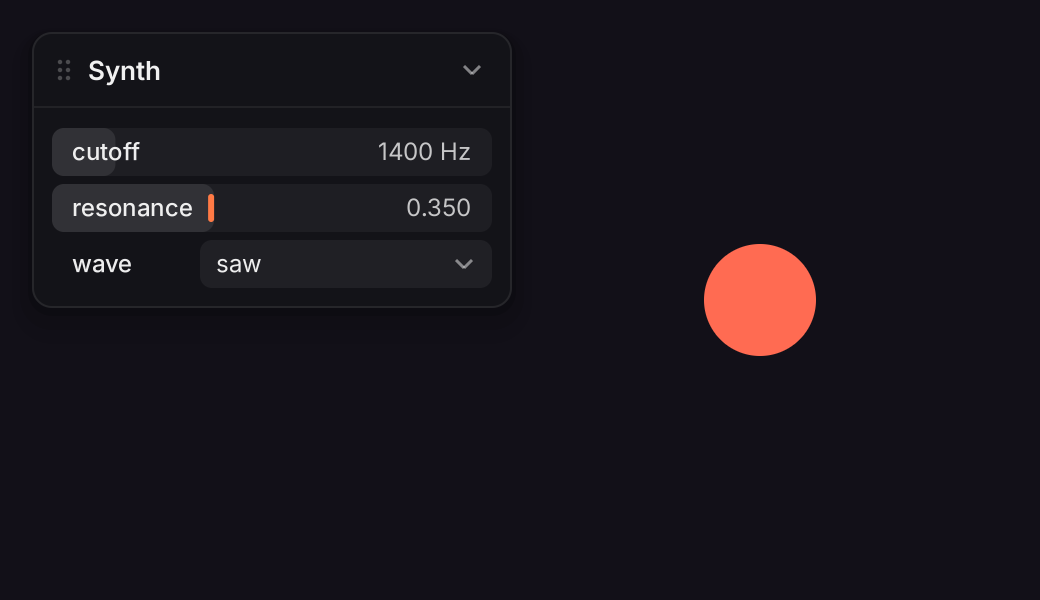
A choice Parameter drives a control that picks an option (osc1_wave, filter_type) and a number Parameter drives a numeric one, clamped to its range; any other pairing raises a TypeError when you bind. Binding a control again replaces the first binding, and synth.unbind("cutoff") ends one. Effects bind the same way (delay.bind("feedback", p)). A binding lasts as long as the synth does: delete the synth and the slider lets go. Hiding a panel changes nothing, because its Parameters keep working.
To play notes from keys or the mouse, kiln.note_to_freq turns a MIDI number or a name into the Hz that note_on takes: synth.note_on(note_to_freq("C#3")). The full example, examples/20_gui_synth.py, adds a keyboard and draws the spectrum and waveform of what you play.