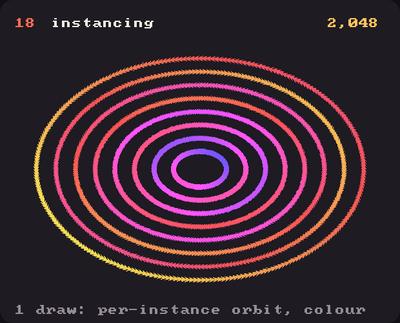
Showcase panel 18: 2,048 arrows in one instanced draw, each with its own colour and orbit (Vbo.upload_attribute, draw(instances=)); hover to turn them to the mouse.
Try it live: run uv run python examples/showcase.py, then hover panel 18, or see the showcase.
Four thousand creatures, each with its own colour, size, speed and wriggle, drawn with one command to the GPU. The trick is instancing: you give the GPU one shape, and a table with one row per copy, and it draws the shape once for every row. Your vertex shader reads the copy’s row and puts that copy where it belongs.
This page builds on raw shaders and on the named attributes of the Meshes tutorial.
One shape, many copies
A Vbo holds the shape: here, a little fish made of 30 vertices. The table of copies is given as per-instance attributes: instance_attributes={"center": xy, "heading": a} holds one center and one heading per fish, and the vertex shader reads them as in vec2 center; and in float heading;, new values for each copy. gl_InstanceID numbers the copies, 0 to 4,095; we use it for the colour and the size.
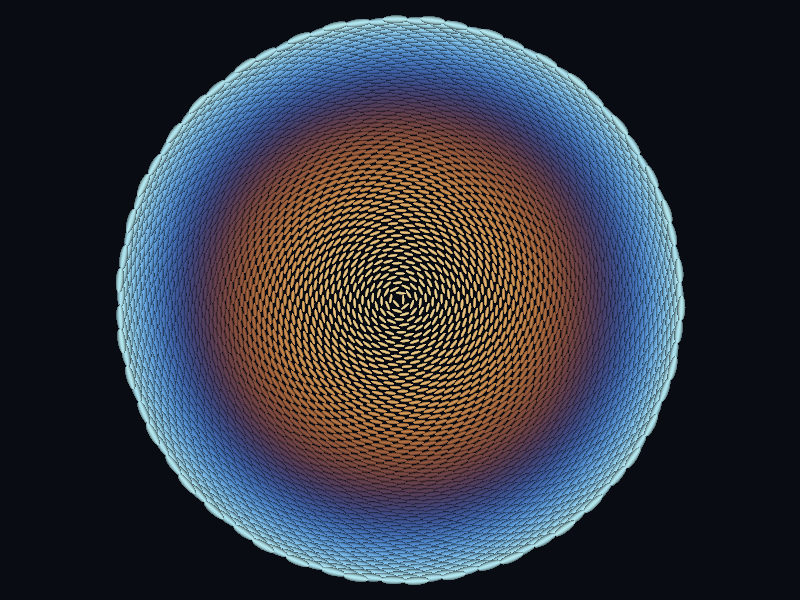
Under the raw shader, vbo.draw() draws as many copies as the per-instance attributes have rows (or vbo.draw(instances=n)). Placed on a sunflower’s spiral, 4,096 fish:
import numpy as npimport kiln# A fish along x, head at +1 and tail at -1, three rows of vertices across its body.along = np.linspace(-1, 1, 10)width =0.32* np.sqrt(np.clip(1- along**2, 0, 1)) +0.28* np.clip(-along -0.7, 0, 1)across = np.repeat([[-1.0, 0.0, 1.0]], len(along), axis=0)body = np.column_stack((np.repeat(along, 3), (across * width[:, None]).ravel()))cell = (np.arange(len(along) -1) *3)[:, None] + np.array([0, 3, 1, 1, 3, 4, 1, 4, 2, 2, 4, 5])fish = kiln.Mesh(vertices=body, indices=cell.ravel())fish.attributes["side"] = across.ravel() # per vertex: -1 and 1 on the edges, 0 on the spineSPIRAL_VERTEX ="""in vec4 position;in float side;in vec2 center; // per instance: one for each fishin float heading;uniform mat4 modelViewProjectionMatrix;out vec3 v_color;out float v_side;void main() { float k = float(gl_InstanceID) / 4096.0; // 0 at the middle, 1 at the rim v_color = 0.6 + 0.35 * cos(6.2832 * (k * 0.8 + vec3(0.0, 0.12, 0.25))); v_side = side; float c = cos(heading), s = sin(heading); vec2 p = mat2(c, s, -s, c) * position.xy * (2.5 + 4.0 * k) + center; gl_Position = modelViewProjectionMatrix * vec4(p, 0.0, 1.0);}"""SPIRAL_FRAGMENT ="""in vec3 v_color;in float v_side;out vec4 fragColor;void main() { fragColor = vec4(v_color * (1.0 - 0.6 * v_side * v_side), 1.0); }"""i = np.arange(4096)r =2.2* np.sqrt(i +0.5) # a sunflower: r ~ sqrt(i), the golden angletheta = i * np.pi * (3- np.sqrt(5))centers = np.column_stack((200+ r * np.cos(theta), 150+ r * np.sin(theta)))class Spiral(kiln.App):def setup(self):self.shader = kiln.Shader(vertex=SPIRAL_VERTEX, fragment=SPIRAL_FRAGMENT)self.school = kiln.Vbo( fish, instance_attributes={"center": centers, "heading": theta + np.pi /2} )def draw(self): kiln.background(10, 12, 20)withself.shader:self.school.draw() # 4,096 fish, one draw callshow(Spiral(), size=(400, 300), pixel_ratio=2)
The fish’s side attribute is per vertex, as in the Meshes tutorial; center and heading are per instance. A Vbo holds both kinds, and a vertex shader reads both the same way.
Twelve numbers per fish
A real creature needs more than a position. These fish carry twelve floats each, in six per-instance attributes; dreamfauna’s creatures, which this page imitates, carry about the same:
Attribute
GLSL
What it does
center
vec2
where the fish is
heading
float
which way it swims, in radians
size
float
its length, in points
phase
float
where it is in its wriggle
tint
vec4
its colour and opacity
wiggle
vec3
how far the body bends, how fast the wave runs, how bright it glows
The vertex shader bends each fish with a travelling sine wave along its body, turns it to its heading and scales it; the fragment shader fades the colour towards the edges with the per-vertex side, so each fish glows softly. Every frame, numpy moves all 4,096 fish, and we hand the new rows to the Vbo with upload_attribute (below).
Rewriting the whole table every frame is cheap: 4,096 rows of 12 floats are 196 KB, and the upload takes a few tens of microseconds. Even a rewrite after the Vbo was already drawn in the same frame doesn’t wait for the GPU: Kiln writes it into a fresh copy of the buffer while the earlier draw keeps reading its own, so you can draw the swarm, change it and draw it again. (Kiln keeps up to 16 copies of an attribute per frame; past that, or for new data that outgrows the buffers, it renders the frame so far first. A partialwrite_attribute after a same-frame draw still waits, about a tenth of a millisecond.)
Try this
A galaxy of 4,096 glowing fish: each circles the middle at its own distance, the inner ones faster, and wriggles as it swims. Try kiln.Blend.ALPHA instead of ADD, let the mouse pull the galaxy’s centre, or draw the swarm twice with a second upload_attribute in between for a ghostly echo.
SWARM_VERTEX ="""in vec4 position;in float side; // per vertex: -1 to 1 across the bodyin vec2 center; // per instance from here onin float heading;in float size;in float phase;in vec4 tint;in vec3 wiggle; // bend, wave speed, glowuniform mat4 modelViewProjectionMatrix;out vec4 v_color;out float v_side;void main() { vec2 p = position.xy; float tail = 1.0 - p.x; // 0 at the head, 2 at the tail p.y += wiggle.x * 0.25 * tail * sin(phase - p.x * 3.0 * wiggle.y); float c = cos(heading), s = sin(heading); p = mat2(c, s, -s, c) * (p * size) + center; v_color = vec4(tint.rgb * wiggle.z, tint.a); v_side = side; gl_Position = modelViewProjectionMatrix * vec4(p, 0.0, 1.0);}"""SWARM_FRAGMENT ="""in vec4 v_color;in float v_side;out vec4 fragColor;void main() { float soft = 1.0 - v_side * v_side; // bright spine, dark edges fragColor = vec4(v_color.rgb * soft, v_color.a * soft);}"""N =4096W, H =480, 300class Galaxy(kiln.App):def setup(self): rng = np.random.default_rng(8)self.radius = np.abs(rng.normal(0, 1, N)) *45+ rng.uniform(28, 75, N)self.angle = rng.uniform(0, 2* np.pi, N)self.lane = rng.normal(0, 1, N)self.speed = rng.uniform(0.7, 1.3, N) warm, cool = np.array([1.0, 0.55, 0.3]), np.array([0.35, 0.7, 1.0]) mix = np.clip((self.radius -28) /140, 0, 1)[:, None] tint = (warm * (1- mix) + cool * mix) * rng.uniform(0.6, 1.0, (N, 1))self.rows = { # 12 floats per fish"center": np.zeros((N, 2)),"heading": np.zeros(N),"size": rng.uniform(5, 10, N),"phase": rng.uniform(0, 2* np.pi, N),"tint": np.column_stack((tint, np.full(N, 0.4))),"wiggle": np.column_stack((rng.uniform(0.5, 1.2, N), rng.uniform(0.7, 1.3, N), rng.uniform(0.6, 1.0, N))), }self.shader = kiln.Shader(vertex=SWARM_VERTEX, fragment=SWARM_FRAGMENT)self.swarm = kiln.Vbo(fish, instance_attributes=self.rows)def update(self): t = kiln.clock.frame /30self.angle +=0.9*self.speed / (self.radius +20) # inner fish circle faster r =self.radius +6* np.sin(3*self.angle +2* t +self.lane) c, s = np.cos(self.angle), np.sin(self.angle)self.rows["center"] = np.column_stack((W /2+1.45* r * c, H /2+0.8* r * s))self.rows["heading"] = np.arctan2(0.8* c, -1.45* s) # along the orbitself.rows["phase"] =self.rows["phase"] +0.35*self.speedfor name, values inself.rows.items(): # all 4,096 rows, every frameself.swarm.upload_attribute(name, values, divisor=1)def draw(self): kiln.background(6, 8, 18) kiln.blend(kiln.Blend.ADD)withself.shader:self.swarm.draw()show_video(Galaxy(), size=(W, H))
What it costs
On an M3 Pro, the swarm above takes about half a millisecond a frame, rewrite included: the GPU draws 4,096 fish of 36 triangles each in one call, and Python only does numpy sums over the 4,096 rows. Drawing them as 4,096 separate Vbo.draw calls gives the same picture (Kiln’s tests check it pixel for pixel), but costs 4,096 draw calls.