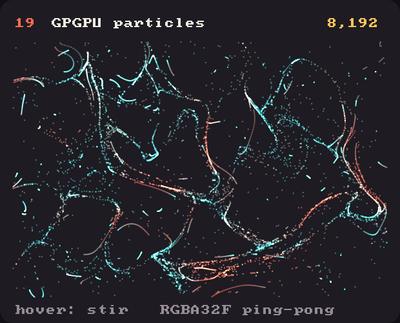
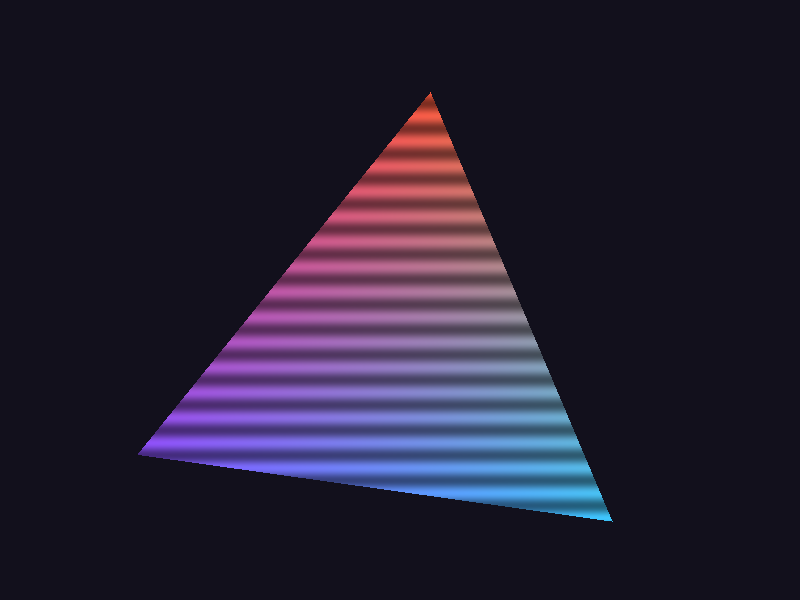
Showcase panel 19: 8,192 particles stepped on the GPU: ping-pong RGBA32F Fbos, a step material and a raw Shader that draws them from the position texture (hover to stir).
Try it live: run uv run python examples/showcase.py, then hover panel 19, or see the showcase.
A quarter of a million particles, each following its own path through a swirling flow, every frame, in about a millisecond. Python can’t loop over that many things sixty times a second, and it doesn’t have to: the GPU can move them all at once, if we store the particles in a picture.
That trick is called GPGPU (general-purpose computing on the GPU), and it takes three ideas, each one a section below:
Particles live in a texture. One pixel per particle, its four channels holding x, y and the velocity. A float Fbo keeps any number, exactly.
One draw moves them all. Drawing a rectangle over that Fbo runs a shader once per pixel, so once per particle: that shader is the simulation step.
Points read their position from the texture. A Vbo of N points, drawn with your own vertex shader, looks up particle number gl_VertexID and puts the point there.
The third idea needs a raw shader, a whole GPU program of your own, so let’s start there.
Raw shaders: a whole program of your own
The Shaders tutorial colours things with a material, one shade() function that Kiln builds into its own shaders. A raw shader is the other kind: a complete vertex shader and fragment shader, each with its own main(), as in plain OpenGL. Kiln draws Vbos and Meshes with it. The vertex shader places each vertex, the fragment shader colours each pixel.
Kiln hands your program the Vbo’s data through inputs with fixed names, and fills in a few uniforms if you declare them. You declare only the ones you use:
You declare
You get
in vec4 position;
The Vbo’s vertices (x, y, z, and w = 1). vec2 or vec3 work too.
in vec4 color;
Its colours, 0-1, straight alpha; white if it has none.
in vec2 texcoord;
Its texture coordinates, 0-1; (0, 0) if it has none.
in vec3 normal;
(0, 0, 1) for now.
uniform mat4 modelViewProjectionMatrix;
Puts position on screen with the current translate/rotate/scale. Also modelViewMatrix and projectionMatrix, separately.
uniform mat4 textureMatrix;
The identity, for ported GL code.
uniform vec4 globalColor;
The current fill colour, 0-1.
uniform vec2 resolution;
The size of what you draw into, in pixels (as gl_FragCoord counts).
uniform float pixelRatio;
Pixels per point: 2 on a Retina display, 1 inside an Fbo.
uniform float time; and uniform vec2 mouse;
Seconds since the start, and the mouse in points.
Your fragment shader writes a normal, straight-alpha colour, and Kiln blends it with the current blend mode, as for everything else it draws. Any other uniform is yours, set from Python with shader["name"] = value, and textures with shader["name"] = texture. Set time, mouse, resolution or pixelRatio yourself the same way and your value wins; declare one with another type (uniform vec3 resolution;, as Shadertoy does) and it is yours alone, never filled.
A texture read in a raw shader comes back as stored: an Fbo’s colour is premultiplied by its alpha, and float data is untouched. That is what a state texture wants. If you instead draw an Fbo’s colour with your own shader under the default blend mode, un-premultiply it first, or translucent pixels come out too dark. Both stages have a helper:
A texture is a grid of pixels with four channels each. Usually those are red, green, blue and alpha, but nothing stops us from storing x, y, vx, vy instead: one pixel per particle. A 256 × 256 texture holds 65,536 particles.
Colours are bytes, 0 to 255, which is no good for positions. An Fbo with TextureFormat.RGBA32F stores 32-bit floats, the same numbers numpy uses, any size, any sign. And texture.upload fills it from a numpy array:
SIDE =256state = np.zeros((SIDE, SIDE, 4), np.float32) # one row of the array = one row of pixelsstate[..., 0:2] = positions # x, ystate[..., 2:4] = velocities # vx, vyfbo = kiln.Fbo(SIDE, SIDE, kiln.TextureFormat.RGBA32F)fbo.texture.upload(state)
Particle i is the pixel at column i % SIDE, row i // SIDE, counting from the top-left, like the numpy array.
One draw moves them all
To move every particle, draw a rectangle that covers the whole Fbo into the Fbo, with a material. The GPU runs shade() once for each pixel, so once for each particle, all in parallel. Each run reads its own particle with texelFetch (the texel at m.position, the pixel it is writing) and returns the particle’s next state as its “colour”.
Two settings make it a computation rather than a drawing:
Blend.REPLACE: the result is written as is, instead of being blended with what was there. (Kiln also reads the input as stored, so nothing gets divided by an alpha that is really a velocity.)
A float Fbo: nothing is rounded or clamped to 0-1.
Here is one step of x += v on 16 particles, checked against numpy:
from kiln.testing import render_framesSTEP ="""uniform sampler2D state; // x, y, vx, vy per pixelvec4 shade(Material m) { vec4 s = texelFetch(state, ivec2(m.position), 0); s.xy += s.zw; // x += v return s;}"""class OneStep(kiln.App):def setup(self): rng = np.random.default_rng(1)self.before = rng.uniform(-10, 10, (4, 4, 4)).astype(np.float32) f32 = kiln.TextureFormat.RGBA32Fself.a, self.b = kiln.Fbo(4, 4, f32), kiln.Fbo(4, 4, f32)self.a.texture.upload(self.before)self.step = kiln.Shader(STEP)def draw(self):self.step["state"] =self.a # read from a...withself.b, self.step: # ...write into b kiln.blend(kiln.Blend.REPLACE) kiln.rect(0, 0, 4, 4)self.after =self.b.read()check = OneStep()render_frames(check, size=(64, 64))expected = check.before.copy()expected[..., :2] += expected[..., 2:]print("largest difference from numpy:", np.abs(check.after - expected).max())
largest difference from numpy: 0.0
Exactly zero: the GPU computes in the same 32-bit floats as numpy.
Ping-pong
The step reads from one Fbo and writes into another. Why not just one? A GPU can’t read and write the same image in one draw: some pixels would see their neighbours’ new values and others the old ones. Kiln stops you:
shader['state']: it would sample the Fbo being drawn into (a feedback loop); draw into a second Fbo and swap them each step (ping-pong)
So we keep two state Fbos and swap them after every step: read A, write B; then read B, write A; and so on, back and forth like a ping-pong ball. In Python the swap is one line, self.state.reverse().
Drawing them: a Vbo of points
Now the particles move, but they are still pixels in an Fbo. To see them, make a Vbo of N points. Its vertices don’t matter (zeros will do): what matters is that it has N of them, numbered 0 to N - 1 in gl_VertexID. A raw vertex shader turns that number into a pixel of the state texture, reads the particle, and puts the point where the particle is. N needn’t fill the texture: pad the texture to whole rows, and the Vbo’s N decides which texels are particles (the padding texels are never read).
Here are 65,536 sparks in a fountain. The step adds gravity, bounces off the floor and sends sparks that leave back to the nozzle; the points glow additively.
SIDE =256N = SIDE * SIDE # 65,536 sparksFOUNTAIN ="""uniform sampler2D state;uniform float frame;float random(vec2 id, float salt) { return fract(sin(dot(id + salt, vec2(12.9898, 78.233))) * 43758.5453);}vec4 shade(Material m) { vec2 id = floor(m.position); vec4 s = texelFetch(state, ivec2(id), 0); s.w += 0.09; // gravity s.xy += s.zw; // move if (s.y > 290.0 && s.w > 0.0) { // bounce, losing energy s.w *= -0.45; s.z *= 0.8; } if (s.x < 0.0 || s.x > 400.0 || random(id, frame) < 0.006) { float a = (random(id, frame + 1.0) - 0.5) * 0.6; float speed = 5.2 + 1.6 * random(id, frame + 2.0); s = vec4(200.0, 285.0, speed * sin(a), -speed * cos(a)); // back to the nozzle } return s;}"""SPARK_VERTEX ="""uniform sampler2D state;uniform mat4 modelViewProjectionMatrix;uniform float pixelRatio;out vec3 v_color;void main() { ivec2 size = textureSize(state, 0); vec4 s = texelFetch(state, ivec2(gl_VertexID % size.x, gl_VertexID / size.x), 0); float heat = clamp(length(s.zw) / 6.0, 0.0, 1.0); v_color = mix(vec3(0.9, 0.2, 0.05), vec3(1.0, 0.85, 0.5), heat); gl_Position = modelViewProjectionMatrix * vec4(s.xy, 0.0, 1.0); gl_PointSize = 2.0 * pixelRatio;}"""SPARK_FRAGMENT ="""in vec3 v_color;out vec4 fragColor;void main() { float d = length(gl_PointCoord - 0.5) * 2.0; // round, soft points fragColor = vec4(v_color, 0.35 * max(1.0 - d * d, 0.0));}"""def nozzle(rng, n):"""Sparks already in flight, so the first frame looks like the hundredth.""" a = rng.uniform(-0.3, 0.3, n) speed = rng.uniform(5.2, 6.8, n) v = np.column_stack([speed * np.sin(a), -speed * np.cos(a)]) t = rng.uniform(0, 120, n)[:, None] p = np.array([200.0, 285.0]) + v * t +0.5* np.array([0.0, 0.09]) * t * treturn p, v + np.array([0.0, 0.09]) * tclass Fountain(kiln.App):def setup(self): p, v = nozzle(np.random.default_rng(2), N) state = np.concatenate([p, v], axis=1).astype(np.float32).reshape(SIDE, SIDE, 4) f32 = kiln.TextureFormat.RGBA32Fself.state = [kiln.Fbo(SIDE, SIDE, f32), kiln.Fbo(SIDE, SIDE, f32)]self.state[0].texture.upload(state)self.step = kiln.Shader(FOUNTAIN)self.points = kiln.Vbo(vertices=np.zeros((N, 2)), mode=kiln.PrimitiveMode.POINTS)self.sparks = kiln.Shader(vertex=SPARK_VERTEX, fragment=SPARK_FRAGMENT)def update(self): src, dst =self.stateself.step["state"] = srcself.step["frame"] = kiln.clock.framewith dst, self.step: kiln.blend(kiln.Blend.REPLACE) kiln.rect(0, 0, SIDE, SIDE)self.state.reverse() # ping-pongdef draw(self): kiln.background(10, 8, 14) kiln.blend(kiln.Blend.ADD)self.sparks["state"] =self.state[0]withself.sparks:self.points.draw()show_video(Fountain(), size=(400, 300), width=320)
Python does almost nothing here: per frame, two draws and a swap. The GPU does 65,536 little simulations and draws 65,536 points.
Two details are worth knowing. texelFetch in a Kiln shader counts pixels from the top-left, like numpy, so particle i sits at (i % size.x, i / size.x) in every shader and in your array. And random(id, frame) gives each particle, each frame, its own random number, from nothing but its pixel and the frame number.
Try this: a quarter of a million particles in a curl-noise flow
Now everything at once, and bigger: 229,376 particles in a 512 × 448 state texture, drifting through curl noise. Noise gives a smooth hilly landscape; its curl turns it into a flow that swirls around the hills and never piles up, like water. Each particle eases its velocity toward the flow, so the streams curve smoothly, and now and then respawns at a random place.
The particles are drawn additively into a float canvas Fbo that fades a little every frame, which leaves glowing trails, and the canvas is shown through a tone-mapping material that rolls bright light off smoothly instead of clipping it.
On an Apple M3 Pro the step and the draw of a quarter of a million particles take about a millisecond per frame together; Kiln’s test suite checks that 250,000 of them fit well inside a 60 fps frame.
Things to try:
Change 2.2 (the size of the swirls) and 0.003 (how fast the flow drifts).
Push 0.1 toward 1 for particles that turn sharply, or toward 0 for heavy, lazy ones.
Make the fade alpha 40 smaller for long silk trails, or larger for sparks.
Add the mouse: a uniform vec2 target; in FLOW, set from kiln.mouse.x and kiln.mouse.y, and pull v toward it.
Store more per particle: a second state Fbo pair for colour or age, read with a second sampler2D in the same step.