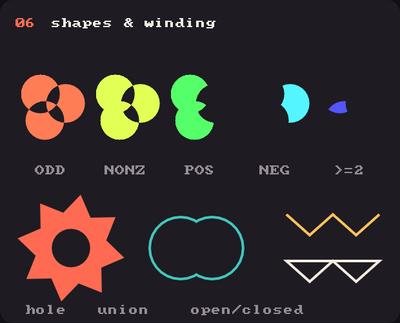
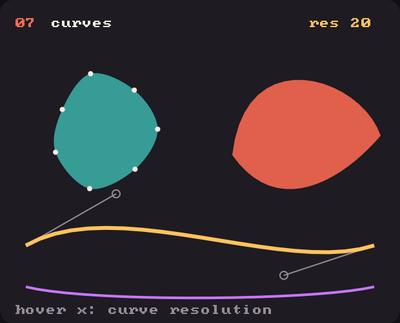
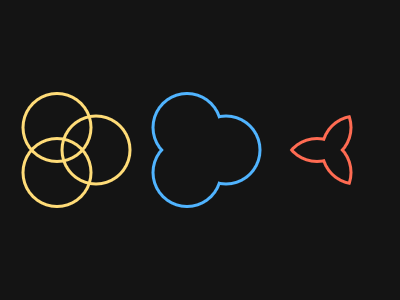
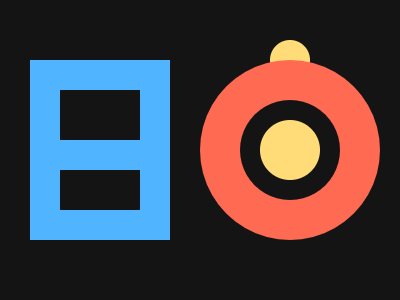
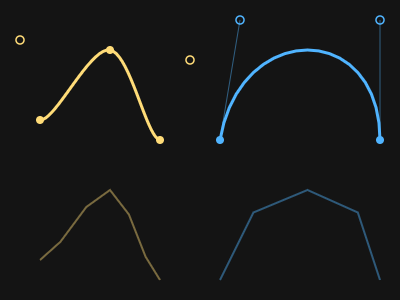
Showcase panel 06: polygon winding rules, holes, union, open and closed paths. Showcase panel 07: Catmull-Rom curves and beziers, curve resolution.
Try it live: run uv run python examples/showcase.py, then hover panels 06 and 07, or see the showcase.
Circles and rectangles only go so far. With a with kiln.shape(): block and a few vertex(x, y) calls inside it, you can draw any outline you can describe: polygons, stars, letters with holes, smooth curves and living blobs. Like every other shape, they follow fill() and stroke() and the transform, and their edges are just as smooth.
Polygons
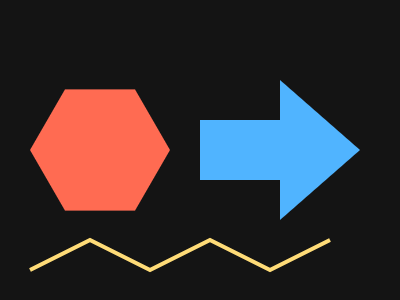
List the corners in order, and Kiln fills the inside. Concave shapes work too. With fill(None) and a stroke() you get the outline instead: shape(close=True) closes it back to the first point, and shape() leaves it open.
vertices(points) adds a whole list (or a NumPy array of shape (n, 2)) at once. Outline corners are mitred: sharp and pointy, until a corner is so sharp that the point would shoot off, and then it is cut flat (bevelled).
Stars and winding rules
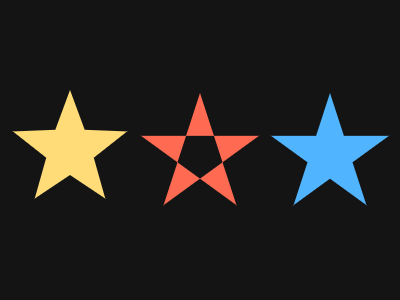
A star alternates between an outer and an inner radius. A pentagram, drawn by jumping to every second point, crosses itself. Which parts of a self-crossing shape are “inside” is decided by the winding rule: with the default Winding.ODD the middle, which the outline goes around twice, stays empty; with NONZERO it is filled.
import mathimport kilndef star(cx, cy, points, r_out, r_in):with kiln.shape():for i inrange(2* points): r = r_out if i %2==0else r_in a =-math.pi /2+ i * math.pi / points kiln.vertex(cx + r * math.cos(a), cy + r * math.sin(a))def pentagram(cx, cy, r):with kiln.shape():for i inrange(5): a =-math.pi /2+ i *2* math.tau /5 kiln.vertex(cx + r * math.cos(a), cy + r * math.sin(a))def draw(): kiln.background(20) kiln.winding(kiln.Winding.ODD) kiln.fill(255, 220, 120) star(70, 150, 5, 60, 25) kiln.fill(255, 107, 82) pentagram(200, 155, 62) kiln.winding(kiln.Winding.NONZERO) kiln.fill(80, 180, 255) pentagram(330, 155, 62)show(draw)
The rule shapes outlines too. Under fill(None) with a rule other than ODD, Kiln outlines the boundary of what that rule would fill: NONZERO traces the union of overlapping contours and ABS_GEQ_TWO only the part where they overlap. With ODD every contour is outlined as drawn.
import mathimport kilndef petals(cx, cy):with kiln.shape(close=True):for k inrange(3): a0 = k * math.tau /3if k: kiln.next_contour(True)for i inrange(40): a = i * math.tau /40 kiln.vertex(cx +26* math.cos(a0) +34* math.cos(a), cy +26* math.sin(a0) +34* math.sin(a))def draw(): kiln.background(20) kiln.fill(None) kiln.stroke(width=3) modes = [kiln.Winding.ODD, kiln.Winding.NONZERO, kiln.Winding.ABS_GEQ_TWO] colours = [(255, 220, 120), (80, 180, 255), (255, 107, 82)]for i, (mode, colour) inenumerate(zip(modes, colours)): kiln.winding(mode) kiln.stroke(*colour) petals(70+ i *130, 150)show(draw)
Holes
next_contour() starts a new outline inside the same shape. Under the default rule, an outline inside another one cuts a hole, whichever way round you draw it.
import mathimport kilndef ring(cx, cy, r, n=48):return [(cx + r * math.cos(i * math.tau / n), cy + r * math.sin(i * math.tau / n)) for i inrange(n)]def draw(): kiln.background(20) kiln.fill(255, 220, 120) kiln.circle(290, 150, 30) # drawn first: it shows through the ring's hole kiln.circle(290, 60, 20) # and the ring covers most of this one kiln.fill(80, 180, 255)with kiln.shape(): kiln.vertices([(30, 60), (170, 60), (170, 240), (30, 240)]) kiln.next_contour() kiln.vertices([(60, 90), (140, 90), (140, 140), (60, 140)]) kiln.next_contour() kiln.vertices([(60, 170), (140, 170), (140, 210), (60, 210)]) kiln.fill(255, 107, 82)with kiln.shape(): kiln.vertices(ring(290, 150, 90)) kiln.next_contour() kiln.vertices(ring(290, 150, 50))show(draw)
Curves and beziers
There are two kinds of smooth path, and the small circles below show the points you give each one.
curve_vertex(x, y) draws a Catmull-Rom curve that passes through your points. The first and the last point only steer the ends, so they are not on the curve (hollow circles).
bezier_vertex(cx1, cy1, cx2, cy2, x, y) runs from the previous point to (x, y), pulled towards two control points (hollow) that it does not touch.
curve_resolution(n) sets how many points make each stretch (20 by default). The faint copy at the bottom uses 4.
import kilndef dot(x, y, filled):# filled in the curve's stroke colour, or hollow ink = kiln.current_style().strokewith kiln.style(fill=ink if filled elseNone, stroke=Noneif filled else ink, stroke_width=1.5): kiln.circle(x, y, 4)def draw(): kiln.background(20) kiln.fill(None) kiln.stroke(width=3) kiln.curve_resolution(20) pts = [(20, 40), (40, 120), (110, 50), (160, 140), (190, 60)] kiln.stroke(255, 220, 120)with kiln.shape():for x, y in pts: kiln.curve_vertex(x, y)for i, (x, y) inenumerate(pts): dot(x, y, 0< i <len(pts) -1) kiln.stroke(80, 180, 255) start, c1, c2, end = (220, 140), (240, 20), (380, 20), (380, 140)with kiln.shape(): kiln.vertex(*start) kiln.bezier_vertex(*c1, *c2, *end) kiln.stroke(80, 180, 255, 120, width=1) kiln.line(*start, *c1) kiln.line(*end, *c2) kiln.stroke(80, 180, 255)for p, on_curve in [(start, True), (c1, False), (c2, False), (end, True)]: dot(*p, on_curve) kiln.stroke(width=2) kiln.curve_resolution(4) kiln.stroke(255, 220, 120, 110) kiln.translate(0, 140)with kiln.shape():for x, y in pts: kiln.curve_vertex(x, y) kiln.stroke(80, 180, 255, 110) kiln.bezier(*start, *c1, *c2, *end)show(draw)
curve and bezier draw one stretch in a single call. Like the other shapes they follow the fill and the stroke, so use fill(None) and a stroke() when you want a line.
A living blob
Put a vertex every few degrees around a circle and push each one in or out with noise. Moving through the noise over time makes the outline breathe.
import mathimport kilnclass Blob(kiln.App):def setup(self):self.t =0.0def update(self):self.t +=0.02def draw(self): kiln.background(14, 16, 28) kiln.fill(255, 107, 82)with kiln.shape():for i inrange(120): a = i * math.tau /120 r =70+60* kiln.noise(math.cos(a) +1, math.sin(a) +1, self.t) kiln.vertex(200+ r * math.cos(a), 150+ r * math.sin(a))show_video(Blob(), frames=90, fps=30)
Tips
Self-crossing fills cost more. A simple shape, even with a couple of hundred points, takes about a millisecond or less. Where contours cross or touch, Kiln splits the edges at every contact to apply the winding rule exactly, and that costs O(edges²) or more: a scribble of 20 points that crosses itself everywhere fills in about 5 ms, 80 points in 60 to 100 ms. Random-walk polygons and noise blobs that fold over themselves are fine a few at a time; for hundreds per frame, keep them small or make them not cross.
Outlines under ODD are cheap, whatever the shape: they are stroked as drawn. Outlines under the other rules pay a tenth or so of the fill cost.
Try this: a tide pool
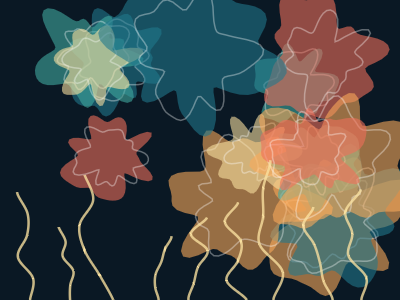
Layered translucent blobs, each with its own slice of noise, outlined and scattered with curling fronds. Change the seed, the colours or the number of layers.
import mathimport kilndef blob(cx, cy, r, wobble, z, points=90):with kiln.shape(close=True):for i inrange(points): a = i * math.tau / points rr = r + wobble * kiln.signed_noise(math.cos(a) *1.3+ z, math.sin(a) *1.3, z) kiln.vertex(cx + rr * math.cos(a), cy + rr * math.sin(a))def frond(x, y, length, bend, z):with kiln.shape(): kiln.curve_vertex(x, y +10)for k inrange(6): t = k /5 sway = bend * math.sin(t *2.2) +12* kiln.signed_noise(z, t *2) kiln.curve_vertex(x + sway, y - t * length) kiln.curve_vertex(x + bend *1.2, y - length -10)def draw(): kiln.background(10, 24, 36) kiln.random_seed(4) palette = [(32, 120, 140), (64, 170, 160), (250, 170, 90), (240, 110, 90), (250, 225, 160)]for layer inrange(14): x, y = kiln.random(40, 360), kiln.random(40, 260) r = kiln.random(25, 70) kiln.stroke(None) kiln.fill(*palette[layer %len(palette)], 150) blob(x, y, r, r *0.5, layer *3.1) kiln.fill(None) kiln.stroke(255, 255, 255, 90, width=1.5) blob(x, y, r *0.75, r *0.35, layer *3.1+0.4) kiln.fill(None) kiln.stroke(250, 225, 160, 200, width=2.5)for k inrange(9): frond(30+ k *42, 300, kiln.random(60, 140), kiln.random(-30, 30), k *1.7)show(draw)