Why you might move a sketch to Python, and how to bring your p5.js habits to Kiln
If you have written a p5.js sketch, most of a Kiln sketch will look familiar: a setup, a draw, a canvas you draw shapes, images and text on, mouse and keyboard, noise and random. The names are different, the language is Python, and a few defaults differ in ways that change a drawing without an error. This page says what you gain and give up, ports one sketch line by line, lists the pitfalls, and ends with a table of the names you use most.
Why Python?
What you gain
numpy next to every draw call. The bulk calls (kiln.circles, kiln.rects, kiln.lines, kiln.ellipses) take whole numpy arrays, kiln.noise takes arrays too, and an image’s pixels are a numpy array you edit in place. A sketch of ten thousand particles is a few array expressions, not a loop of objects.
The Python ecosystem in the same file. numpy, PyTorch or MLX, the LLM SDKs, pandas and the rest of the data tools import into the sketch directly, where a browser sketch reaches for ml5.js or TensorFlow.js.
Desktop GPU work. Kiln runs on OpenGL 4.1: GLSL materials and raw programs, float Fbos, per-instance attributes and GPGPU simulations (see Shaders, Instancing and GPGPU particles).
One language from sketch to notebook to production.kiln.testing.render_frames runs a sketch in a hidden window and returns its frames as numpy arrays, so the same class renders in a notebook, a test or a batch job. The executed examples in these docs are rendered that way.
Live controls built in.kiln.Gui draws panels of sliders, toggles, colour pickers and more on top of the sketch, with presets saved as JSON.
What you give up
The browser. There is no URL to share, nothing runs on a phone, and a sketch can’t be embedded in a web page. You share a script, a video or a still.
Other platforms, for now. Kiln runs on macOS on Apple Silicon only.
The zero-install editor. You install Python, uv and Kiln (see Getting started) instead of opening an editor in a tab.
The DOM and the web APIs. No HTML elements, no createCapture camera or video, no fetch. kiln.Gui covers the sliders and buttons; for the rest, Python’s own libraries take the place of the web APIs.
3D and sound, for now. Kiln draws in 2D: there is no WEBGL-style 3D scene, camera or lighting yet, and nothing like p5.sound yet (sound is being worked on).
A large community. p5.js has years of examples, courses and forum answers. Kiln is new.
Kiln makes no claim to be faster than p5.js here: nobody has measured the two side by side. The Performance page has Kiln’s own numbers.
One sketch, side by side
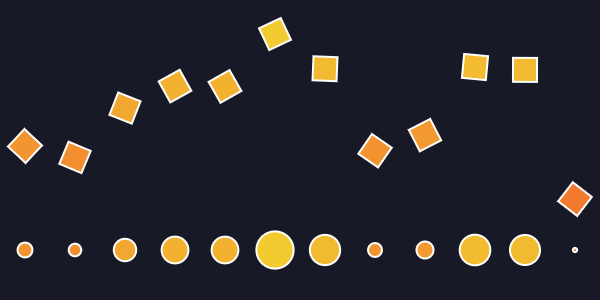
Twelve tiles ride a noise curve above a row of circles: the larger a circle, the higher its tile. The p5.js version first:
functionsetup() {createCanvas(600,300);colorMode(HSB,360,100,100);stroke(0,0,100);strokeWeight(2);}functiondraw() {background(230,40,15);for (let i =0; i <12; i++) {const x =50* i +25;const n =noise(i *0.3, frameCount *0.01);fill(20+30* n,80,95);push();translate(x,120-200* (n -0.5));rotate(n * TWO_PI);rect(-12,-12,24,24);pop();circle(x,250,40* n); }}
The same sketch in Kiln, in the same order:
import mathimport kilndef hsb(h, s, b):"""p5.js's HSB ranges (360, 100, 100) to Kiln's 0-255."""return kiln.Color.from_hsb(h *255/360, s *2.55, b *2.55)class Tiles(kiln.App):def setup(self): kiln.stroke(255, width=2)def draw(self): kiln.background(hsb(230, 40, 15))for i inrange(12): x =50* i +25 n = kiln.noise(i *0.3, kiln.clock.frame *0.01) kiln.fill(hsb(20+30* n, 80, 95))with kiln.transform(): kiln.translate(x, 120-200* (n -0.5)) kiln.rotate(n * math.tau) kiln.rect(-12, -12, 24, 24) kiln.circle(x, 250, 20* n) # a radius: half of p5.js's 40 * n# kiln.run(Tiles(), 600, 300) opens a window. Here we render frame 60 instead.show(Tiles(), frames=60, size=(600, 300))
What changed, apart from spelling:
The sketch is a class. State lives on self, and kiln.run(Tiles(), 600, 300), outside the class, takes the place of createCanvas.
circle takes a diameter and kiln.circle a radius, hence 20 * n.
Kiln has no colorMode: colours are RGB, 0-255. kiln.Color.from_hsb takes hue, saturation and brightness in 0-255 too, so hsb() converts p5.js’s ranges.
fill(c) is kiln.fill(c), and stroke(c) is kiln.stroke(c).
push and pop are one with kiln.transform(): block; the style has its own, with kiln.style():.
noise is a different function (simplex noise), so the tiles sit at different heights than in p5.js, and frameCount is one ahead of kiln.clock.frame.
Pitfalls
Most of these change a drawing without raising an error.
circle and ellipse take diameters, kiln.circle and kiln.ellipse radii. Halve the sizes: ellipse(x, y, w, h) is kiln.ellipse(x, y, w / 2, h / 2).
rectMode and ellipseMode.kiln.rect_mode has kiln.RectMode.CORNER (the default) and kiln.RectMode.CENTER; there is no CORNERS or RADIUS. Circles and ellipses are always centred, and there is no ellipseMode. Images follow the rect mode, which also stands in for imageMode.
colorMode(HSB) ranges. p5.js’s HSB defaults to hue 0-360 and saturation and brightness 0-100. Kiln has no colour mode: kiln.fill and kiln.background take RGB in 0-255, and kiln.Color.from_hsb takes all three HSB channels in 0-255 (hue 85 is green). Alpha is 0-255 everywhere, never 0-1.
Global setup and draw become methods of a kiln.App subclass. Variables shared between them become attributes (self.angle), and kiln.run(app, width, height) starts the sketch. App.update runs before each draw, for the state changes.
The background is cleared every frame. p5.js keeps the canvas between frames unless you call background; Kiln starts every frame from the background colour, which the last kiln.background call set (dark gray before any). For trails and drawings that accumulate, pass auto_clear=False to kiln.run (or set kiln.window.auto_clear = False).
mouseX, frameCount, keyIsDown. The mouse is kiln.mouse.x and kiln.mouse.y. kiln.clock.frame is 0 in the first draw, where frameCount is 1. keyIsDown(LEFT_ARROW) is kiln.Key.LEFT in kiln.keys. In App.key_pressed(key) the key is a number: test key == ord("a"), not key === 'a'. deltaTime is in milliseconds, kiln.clock.dt in seconds.
No preload and no await.kiln.Image("photo.jpg"), kiln.Font and mesh = kiln.Mesh(); mesh.load(path) read the file before the next line runs. Load in setup, or anywhere: there is no callback to wait for.
WEBGL mode’s centred origin. Kiln’s origin is always the top-left corner, with y down, as in p5.js’s default 2D mode. A sketch written for WEBGL around (0, 0) needs kiln.translate(kiln.window.width / 2, kiln.window.height / 2) first.
kiln.rotate is always in radians. Kiln has no angleMode: where a sketch uses angleMode(DEGREES), convert with math.radians (kiln.rotate(math.radians(45))). Positive angles turn clockwise on screen in both.
pixelDensity and the pixels array. Kiln measures everything in points and renders a Retina display at twice the resolution by itself; there is nothing to set. kiln.Image.pixels is an (h, w, c) numpy array, indexed pixels[y, x], not a flat list indexed 4 * (y * width + x) (at pixel density 1). A loaded file gives c = 4 (RGBA) when it has transparency, 1 when it is gray and 3 (RGB) otherwise, a JPEG included; an image made from an array keeps the array’s channels. Edit it in place and call kiln.Image.update. For the canvas itself, kiln.Image.grab_screen copies a rectangle of it into an image, with w * pixel_ratio pixels across.
push and pop save the transform and the style together. Kiln splits them: a with kiln.transform(): block for the transform, and a with kiln.style(): block for the colours, line width and modes.
Fill and stroke.kiln.fill(c) and kiln.stroke(c, width=) work as in p5.js, and None turns either off (noFill() is kiln.fill(None)). The defaults differ: p5.js fills white and strokes 1-pixel black; Kiln fills white with no stroke until kiln.stroke sets one. Images, Fbos and meshes take kiln.tint, never the fill. kiln.stroke’s width is in points on screen and does not grow under kiln.scale, where strokeWeight scales with the shape (in p5.js’s 2D mode).
Vocabulary
Each table maps a p5.js name to its Kiln name. The Processing column is filled only where Processing’s name differs; a few p5.js names (the DOM controls, deltaTime, keyIsDown, and the WebGL-only createFramebuffer and buildGeometry) have no Processing counterpart. scripts/check_p5_map.py checks that every Kiln name here exists, and the API reference documents each one in full.
Sketch and time
p5.js
Processing
Kiln
Notes
setup
App.setup
A method of your kiln.App subclass.
draw
App.draw
App.update runs before it, every frame.
createCanvas
size
kiln.run
kiln.run(Sketch(), width, height), outside the class.
width, height
kiln.window.width, kiln.window.height
Properties, in points.
frameRate
kiln.clock.target_fps
kiln.clock.fps reads it.
frameCount
kiln.clock.frame
0 in the first draw.
deltaTime, millis
kiln.clock.dt, kiln.clock.time
The first in seconds, not milliseconds.
saveCanvas
save
kiln.save_screen
Takes a file name with its extension.
Shapes
p5.js
Processing
Kiln
Notes
background, clear
kiln.background, kiln.clear
background also sets the colour every frame is cleared to. kiln.clear takes a colour: clear() is kiln.clear(0, 0, 0, 0), transparent black.
circle
kiln.circle
A radius, not a diameter.
ellipse
kiln.ellipse
Radii, half the width and height; always centred.
rect, square
kiln.rect
rect’s fifth argument (a corner radius) is kiln.rect(x, y, w, h, radius=r); four radii are radius=(tl, tr, br, bl).
line, triangle
kiln.line, kiln.triangle
kiln.lines draws many lines from an array.
point
kiln.circle
point draws a dot strokeWeight across in the stroke colour; kiln.circle(x, y, d / 2) draws one d across in the kiln.fill colour. kiln.circles for many.
bezier, curve
kiln.bezier, kiln.curve
Same argument order. Filled under kiln.fill(): call kiln.fill() for a curve line.
beginShape, vertex, endShape
kiln.shape, kiln.vertex
with kiln.shape(): holds the vertices; endShape(CLOSE) is kiln.shape(close=True). A quad is a shape of four vertices.
bezierVertex, curveVertex
kiln.bezier_vertex, kiln.curve_vertex
beginContour, endContour
kiln.next_contour
One call between contours. A contour inside another is a hole under the default winding rule, whichever way it turns.
Colour and style
p5.js
Processing
Kiln
Notes
fill(c)
kiln.fill
Sets the fill colour of shapes and text.
noFill
kiln.fill
kiln.fill(None): outlines in the stroke colour, or nothing without one.
stroke, noStroke
kiln.stroke
kiln.stroke(None) is noStroke, the default.
strokeWeight
kiln.stroke
kiln.stroke(width=w), in points on screen, whatever the transform.
rectMode
kiln.rect_mode
kiln.RectMode.CORNER or kiln.RectMode.CENTER.
color
kiln.Color
RGBA, 0-255.
colorMode(HSB)
kiln.Color.from_hsb
Every channel in 0-255.
lerpColor
kiln.Color.lerp
a.lerp(b, amount), a new colour.
blendMode
kiln.blend
kiln.Blend.ADD, SUBTRACT, MULTIPLY, SCREEN, ALPHA (p5.js’s BLEND) or REPLACE; kiln.blend(None) is REPLACE too.
Transforms
p5.js
Processing
Kiln
Notes
push, pop
kiln.transform, kiln.style
Two with blocks: with kiln.transform(): for the transform, with kiln.style(): for the style.
translate
kiln.translate
rotate
kiln.rotate
Radians; there is no angleMode, so convert degrees with math.radians.
scale
kiln.scale
Line widths don’t scale.
resetMatrix
kiln.reset_matrix
Input
p5.js
Processing
Kiln
Notes
mouseX, mouseY
kiln.mouse.x, kiln.mouse.y
Live objects: they stay current after from kiln import mouse.
If you come from Processing, the table above is yours too: Processing and p5.js share most names, and the Processing column gives the ones that differ. size becomes the kiln.run call, a PGraphics (with beginDraw and endDraw) is a kiln.Fbo used as with fbo:, PVector is a numpy array, and PShape is a kiln.Mesh. HSB needs no converting: Processing’s colorMode(HSB) and py5’s color_mode keep every channel in 0-255 by default, so kiln.Color.from_hsb takes their values unchanged. py5 brings Processing itself to Python, in snake_case (frame_count, rect_mode), through the Java virtual machine. Kiln is a separate framework with its own renderer, so py5 code doesn’t run unchanged, but the names translate the same way: find the Processing name in the table and read across.
Checking this page
uv run python scripts/check_p5_map.py
prints 0 unknown names when every Kiln name on this page exists in kiln.