Agents: a flock that decides
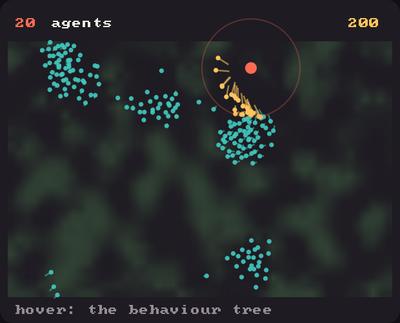
Showcase panel 20: kiln.agents: a flock of about 200 and a predator in one Population, steered by separate, align, cohere, evade and pursue; the prey graze a moss Field, pay for living (metabolize), breed (reproduce) and die, and a behaviour tree decides for all of them (hover to see it).
Try it live: run uv run python examples/showcase.py, then hover panel 20, or see the showcase.
An agent perceives, decides and acts. A thousand of them can do it sixty times a second if you keep them as arrays instead of objects. kiln.agents gives you the pieces: a Population of arrays, senses, Reynolds’ steering forces, and a behaviour tree that decides for every agent at once. This page builds a flock that runs from the mouse, then a shoal with hunters.
from kiln import agentsHow it fits together
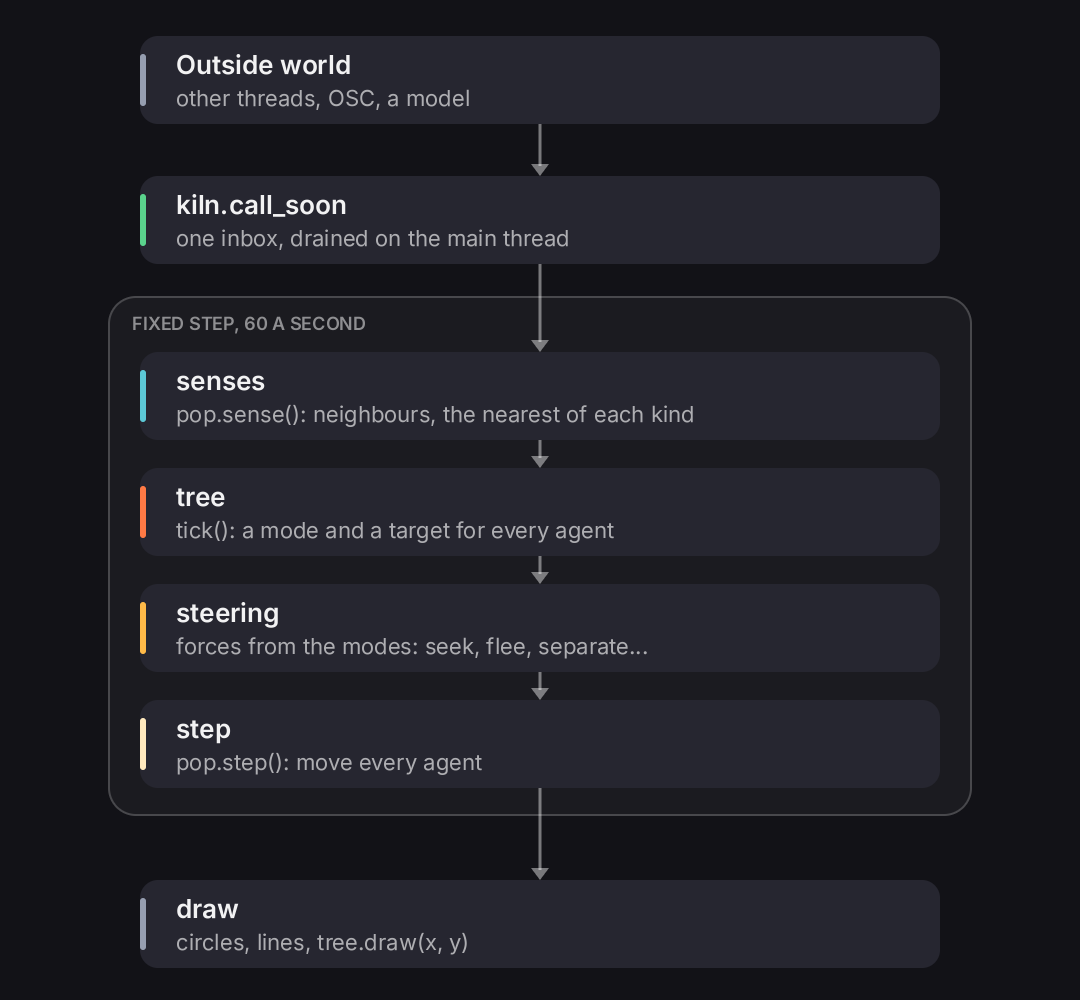
Everything in kiln.agents is one pipeline. Something outside the sketch may ask for a change. The sketch looks, decides, steers, moves, and draws.
The agents themselves are arrays: one row per agent in pop.pos, pop.vel and every field you add. The rest of the design is five rules, so that the flock, the hunters and whatever listens to them from outside share one model.
- One perception step.
pop.sense(radius)runs once per simulation step. It fillspop.senseswith each agent’s neighbour count, nearest neighbour and the nearest of each kind. The tree’s tests and the steering forces all read those arrays, so the neighbours are searched once. - Species are a column.
Population(n, kinds=("prey", "predator"))gives every agent a kind. One population and one tree hold the whole ecosystem, and aSelectorbranches onagents.is_kind(...). - One inbox for other threads. Anything that comes from outside the main thread goes through
kiln.call_soon, which runs it at the start of the next frame (see Interaction).pop.writeuses it, and so would a network handler. - A fixed step.
kiln.fixed_steps(60)hands you the steps due this frame (see Interaction). Sense, tree, steering and move all run inside it, so a run looks the same at any frame rate. - The outside owns intent.
Population(..., intent=("goal",))declares fields that something outside sets, withpop.write. The tree reads them and never writes them.pop.intent_age("goal")says how old each one is, so the tree can fall back when it goes stale.
A population is arrays
A Population holds the agents. pos and vel are always there. Give it fields with keyword arguments, and any field is an array with one row per agent.
import numpy as np
import kiln
from kiln import agents

rng = np.random.default_rng(3)
pop = agents.Population(300, pos=rng.uniform((20, 20), (380, 280), (300, 2)))
print(pop)
print(pop.pos.shape, pop.id[:5])


def draw():
    kiln.background(18, 18, 23)
    kiln.circles(pop.pos, 3.5, (92, 200, 214, 230))


show(draw, size=(400, 300))
<Population of 300 in 2D, kinds ['agent'], fields [], intent []>
(300, 2) [0 1 2 3 4]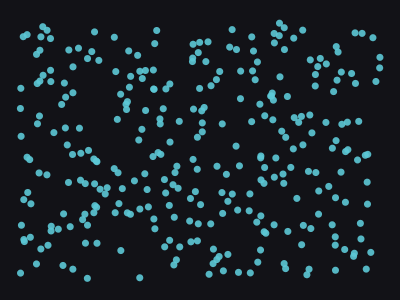
Each agent also has an id that never changes and is never reused. An index is not an identity: kill closes the gaps, so everything after a dead agent moves down a row. Use ids when you need to name an agent later, and index_of to find its row now.
doomed = pop.pos[:, 0] > 300  # a mask over the agents
pop.kill(doomed)
print(len(pop), "agents left; ids start", pop.id[:6])
print("rows of ids 0, 1 and 299:", pop.index_of([0, 1, 299]))  # -1 if the agent has died
239 agents left; ids start [0 2 3 4 5 6]
rows of ids 0, 1 and 299: [ 0 -1 238]Senses: look once per step
pop.sense(radius) finds every agent’s neighbours within radius (Senses), using a grid. Ten thousand agents spread over a 1280 by 800 window cost about 7 ms at a radius of 40 and about 2 ms at 20, and fewer agents or a smaller radius cost much less. The cost grows with how many neighbours each agent has. Call it once at the top of each step. Then pop.senses holds the answers as arrays.
pop.sense(40)
senses = pop.senses
print("neighbours of agent 0:", senses.count[0], "nearest:", senses.nearest[0],
      "at", round(senses.nearest_dist[0], 1))


def draw():
    kiln.background(18, 18, 23)
    near = senses.nearest
    has = near >= 0
    kiln.stroke(width=1)
    kiln.lines(pop.pos[has], pop.pos[near[has]], (92, 200, 214, 110))
    crowd = np.clip(senses.count / 6, 0, 1)[:, None]
    colours = np.array([92, 200, 214]) * (1 - crowd) + np.array([255, 186, 72]) * crowd
    kiln.circles(pop.pos, 3.5, colours)


show(draw, size=(400, 300))
neighbours of agent 0: 14 nearest: 113 at 10.0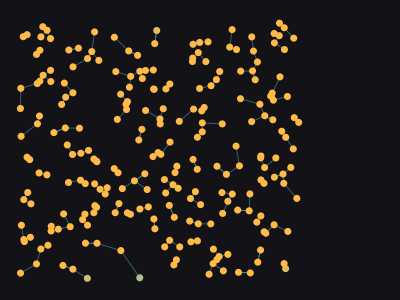
Each agent is joined to its nearest neighbour, and glows more orange the more neighbours it has. Nothing here loops over agents: senses.count and senses.nearest are arrays with one value per agent.
Steering: forces from the neighbours
A steering function takes the population and returns one force for every agent: an array of shape (n, 2). You weigh the forces, add them to the velocities, and call pop.step(dt, max_speed), which caps the speed and moves everyone. Craig Reynolds’ three rules for a flock are separate (keep clear), align (fly the way your neighbours fly) and cohere (stay with them). They reuse the neighbours that sense found. separate(pop, radius, mask) takes a boolean mask to keep only some agents apart: the ones outside it neither push nor are pushed.
W, H = 480, 300


class Flock(kiln.App):
    def build(self):
        rng = self.rng = np.random.default_rng(7)
        n = 900
        heading = rng.uniform(0, 2 * np.pi, n)
        self.pop = agents.Population(
            n,
            pos=rng.uniform((0, 0), (W, H), (n, 2)),
            vel=np.column_stack([np.cos(heading), np.sin(heading)]) * 60,
            mode=0,  # what each agent is doing: a field for a tree to set
        )

    def setup(self):
        self.build()
        for _ in range(480):  # let the flock settle before the first frame
            self.step(1 / 60)

    def think(self):
        """Where a tree will go: decisions made after sensing, before steering."""

    def forces(self):
        pop = self.pop
        return (
            3.0 * agents.separate(pop, 12)
            + 1.2 * agents.align(pop, 40)
            + 0.6 * agents.cohere(pop, 40)
            + agents.wander(pop, 40, self.rng)
        )

    def step(self, dt):
        pop = self.pop
        pop.sense(40)  # once per step
        self.think()
        pop.vel += self.forces() * dt
        pop.step(dt, max_speed=70)
        pop.pos %= (W, H)  # the world wraps around

    def update(self):
        for dt in kiln.clock.fixed_steps(60):
            self.step(dt)

    def draw(self):
        kiln.background(20, 13, 11)
        pop = self.pop
        kiln.blend(kiln.Blend.ADD)  # overlapping sparks add up to light
        kiln.stroke(width=1.6)
        kiln.lines(pop.pos - pop.vel * 0.16, pop.pos, (240, 120, 50, 150))
        kiln.circles(pop.pos, 1.6, (255, 226, 170, 255))


show_video(Flock(), frames=90, size=(W, H))
Each step senses, steers and moves, and fixed_steps(60) runs that 60 times a second however fast the frames come. The flock holds together and turns as one, though no agent leads. The world wraps around the edges, but neighbours are found in plain space, so agents on opposite edges do not see each other.
The other forces are seek, arrive, flee and wander. Each takes the population and returns forces. seek, arrive and flee take a speed, one for all agents or one per agent (arrive takes its slow_radius the same way); wander takes a strength and a random generator.
The tree: decide for every agent
A force says how to move. A behaviour tree (Tree) says what to do now. It is built from two kinds of composite node and from leaves you write.
- A
Sequenceruns its children in order and stops at the first that fails or is running. Use it for “if this is true, do that”. - A
Selectorruns its children in order and stops at the first that succeeds or is running. Use it for “try this, else that”. - A leaf is a function marked
@agents.leaf. It acts, and returns whether itSUCCESSed,FAILUREd or is stillRUNNING. - A
@agents.conditionis a leaf that only tests. It returns booleans.
The one difference from a tree written for a single character is that a leaf gets idx: the indices of all the agents that reach it this tick. It works on them as arrays and returns one status per agent. The whole tree costs a few array operations for thousands of agents.
Let the flock run from the mouse. A spark close to the mouse flees it; every other spark flocks.
FLOCK, FLEE, FEAR = 0, 1, 70


@agents.condition
def mouse_near(pop, idx):
    return np.linalg.norm(pop.pos[idx] - pop.mouse, axis=1) < FEAR


@agents.leaf
def flee_mouse(pop, idx):
    pop.mode[idx] = FLEE  # a leaf records what it decided
    return agents.Status.RUNNING


@agents.leaf
def flock(pop, idx):
    pop.mode[idx] = FLOCK
    return agents.Status.RUNNING


brain = agents.Selector(agents.Sequence(mouse_near, flee_mouse), flock)


class Skittish(Flock):
    def build(self):
        super().build()
        self.pop.mouse = np.array([-1e4, -1e4])  # a plain attribute: far away, for now
        self.tree = agents.Tree(self.pop, brain)

    def think(self):
        self.tree.tick()  # every agent picks its mode

    def forces(self):
        pop = self.pop
        fleeing = (pop.mode == FLEE)[:, None]
        run = agents.flee(pop, pop.mouse, 200, FEAR * 2)
        return np.where(fleeing, 2 * run, super().forces())

    def mouse_moved(self, x, y):
        self.pop.mouse[:] = x, y


sketch = Skittish()
sketch.setup()  # no window needed to step a simulation
sketch.pop.mouse[:] = 200, 150  # the mouse arrives in the middle of the flock
sketch.step(1 / 60)
tree = sketch.tree
for (depth, name), (failure, success, running) in zip(tree.nodes, tree.counts):
    print(f"{'  ' * depth}{name:<{20 - 2 * depth}} success {success:>3}, running {running:>3}, failure {failure:>3}")
Selector success 0, running 900, failure 0
Sequence success 0, running 102, failure 798
mouse_near success 102, running 0, failure 798
flee_mouse success 0, running 102, failure 0
flock success 0, running 798, failure 0tree.nodes lists the nodes with their depth, and tree.counts says how many agents each returned FAILURE, SUCCESS and RUNNING for at the last tick. Of the 900 sparks, 102 were near the mouse and took the Sequence; the other 798 fell through to flock.
A composite can also have memory: Sequence(a, b, c, memory=True) resumes at the child it was running instead of starting again at a. When a higher-priority branch takes an agent away from a leaf it was running, the leaf’s optional halt hook is called, so it can undo what it started. Both follow the behaviour tree library py_trees, which Kiln’s tests compare against on random trees.
The overlay
tree.draw(x, y) draws the tree on screen: a panel in the look of kiln.Gui with one row per node, indented by depth, and the live counts. Each row has a bar of the three statuses and the numbers: green for SUCCESS, ember for RUNNING, slate for FAILURE. It leaves your colour, blend mode and transform as they were, so call it last.
class Watched(Skittish):
    def draw(self):
        super().draw()
        self.tree.draw(12, 12)


path = [(i, MouseMove(110 + 260 * i / 45, 190 - 80 * np.sin(i / 6))) for i in range(45)]
show_video(Watched(), frames=45, fps=20, size=(W, H), events=path)
The counts change as the mouse moves through the flock: the RUNNING bar of flee_mouse grows when the mouse is among the sparks, and the rest of the flock stays in flock.
Predators and prey
Now two species in one world. Kinds are a column of the population, and the tree starts with a branch for each.
pop = agents.Population(
    5,
    kinds=("prey", "predator"),
    kind=["prey", "prey", "prey", "predator", "predator"],
    pos=[[10, 10], [30, 12], [90, 40], [60, 20], [100, 60]],
)
pop.sense(60)
index, distance = pop.senses.nearest_of("predator")
print("nearest predator:", index)
print("at distance:     ", distance.round(1))
nearest predator: [3 3 4 4 3]
at distance: [51. 31. 22.4 56.6 56.6]Each agent gets the nearest agent of one kind, its index and its distance, or -1 and inf if none is in range. A prey uses it to flee and a predator to chase, both from the same sense. A predator also finds the other predators, but never itself. The tree sends each kind down its own branch with agents.is_kind. This is the tree of the example below (its leaves, such as hunt and flee, are defined in examples/17_predators.py):
brain = agents.Selector(
    agents.Sequence(
        agents.is_kind("predator", name="is ember"),
        agents.Selector(
            agents.Sequence(is_hungry, prey_in_sight, hunt, name="chase"),  # a seen minnow first
            agents.Sequence(goal_is_fresh, go_to_goal, name="answer the call"),  # then the outside
            prowl,  # else stalk around
            name="hunt or prowl",
        ),
        name="embers",
    ),
    agents.Sequence(
        agents.is_kind("prey", name="is minnow"),
        agents.Selector(
            agents.Sequence(predator_near, flee, name="bolt"), school, name="bolt or school"
        ),
        name="minnows",
    ),
    name="by kind",
)
The name= keywords are for the overlay (tree.draw) and tree.nodes: a leaf shows its function’s name and a composite its type, so name the composites to make the panel read like the tree above. Sequence, Selector, leaf, condition and is_kind all take it, as a keyword. Set it when you build the node: the tree takes the names when it is built, so assigning .name afterwards changes nothing.
Every agent has its own speed limit, so predators can be faster than prey: pop.step(dt, pop.max_speed) takes an array.
Kill and spawn. A predator that reaches a prey eats it with pop.kill(...), and the shoal breeds with pop.spawn(...). The tree follows each agent by its id, so the survivors keep what they were doing and the newborns start at the top of the tree.
print("ids before:", pop.id)
pop.kill([0])  # prey 0 is eaten
new = pop.spawn(2, kind="prey", pos=[[5, 5], [8, 9]])  # two are born
print("ids after: ", pop.id)
print("rows of ids 0, 1 and 5:", pop.index_of([0, 1, 5]))
ids before: [0 1 2 3 4]
ids after: [1 2 3 4 5 6]
rows of ids 0, 1 and 5: [-1 0 4]Do the killing between ticks, never inside a leaf. A leaf marks the agent, and the step kills it after the tick.
Intent. Some of what an agent does is decided by something outside the simulation: a person clicking, a network message, later a language model. Declare those fields with intent= and set them with pop.write, which is safe from any thread. The write lands at the start of the next frame, so a step never sees half of it.
pop = agents.Population(3, intent=("goal",), goal=np.full((3, 2), np.nan))
pop.write(pop.id[:2], goal=[[100, 50], [20, 80]])  # from any thread
print("before the next frame:", pop.goal[0], pop.intent_age("goal")[0])
kiln.testing.drain_calls()  # a running sketch does this at the start of every frame
print("after:                ", pop.goal[0], pop.intent_age("goal") < 1)
before the next frame: [nan nan] inf
after: [100. 50.] [ True True False]The tree reads the field and never writes it. intent_age is the seconds since the last write, inf for an agent that was never told. So a leaf can obey a goal while it is fresh and give it up when it is stale:
@agents.condition
def goal_is_fresh(pop, idx):
    return pop.intent_age("goal")[idx] < GOAL_TTL
All together
examples/17_predators.py puts it all together: 800 minnows and 7 embers in one population with one tree. The minnows school and bolt, the embers hunt, eat and rest, the shoal breeds, and a click calls the embers to a spot. In the video a click lands at second 2 and the embers that see no prey head for it. After 6 seconds without a new click they give the goal up and go back to prowling; the clip is too short to show that. The panel is tree.draw.
shoal = example("17_predators.py")
click = [(0, MouseMove(300, 480)), (48, MousePress(x=300, y=480)), (49, MouseRelease())]
show_video(shoal.Predators(), frames=96, size=(1280, 800), fps=24, events=click, width=560)
Run it with uv run python examples/17_predators.py. Press t to hide the tree, space to pause, and click to call the embers.
Try this
Every name on this page is in the reference, under Agents and Behaviour trees.
- Add a third kind,
"grass", that prey eat and that regrows, with its own branch. - Give the flock a
goalintent field and write it from a thread that listens to the mouse. - Make a leaf with a
halthook: a predator that was resting when it saw prey stops resting. - Open
examples/16_flocking.py: the same flock with two thousand sparks, ribbons of light and a tree.