import pathlib

import numpy as np

import kiln

jar_path = pathlib.Path("../assets/images/ming-jar-dragon.jpg")Offscreen drawing
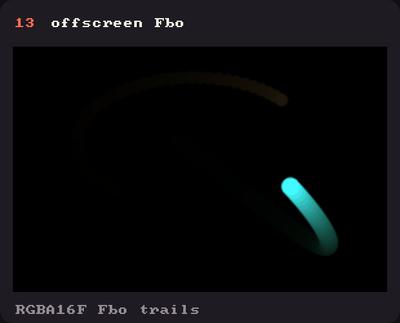
Showcase panel 13: a float Fbo with feedback trails.
Try it live: run uv run python examples/showcase.py, then hover panel 13, or see the showcase.
Everything so far has been drawn straight onto the window. A kiln.Fbo (a framebuffer object) is a canvas of its own, off screen. Draw into it with the usual functions, then show it, as many times as you like, at any size, tinted or turned like an image. And since it keeps its pixels from frame to frame, it can also remember things: trails, glows, simulations.
Draw once, show many times
Create the Fbo in setup, draw into it inside a with fbo: block, and show it with fbo.draw(x, y, w, h). Here the scene (the Ming jar with a ring drawn over it) is drawn once, then shown four times as a tinted poster. Drawing the scene again for every tile would cost four times as much; drawing the Fbo is one textured rectangle each.
class Poster(kiln.App):
    def setup(self):
        self.jar = kiln.Image(jar_path)
        # Twice the size it is shown at, so it stays crisp on a 2x (Retina) screen.
        self.fbo = kiln.Fbo(300, 430)

    def draw(self):
        with self.fbo:  # until the block ends, everything is drawn into the Fbo
            kiln.clear(250, 245, 235)
            self.jar.draw(0, 0, 300, 430)
            kiln.fill(None)
            kiln.stroke(20, 20, 30, width=6)
            kiln.circle(150, 200, 120)
            kiln.fill(20, 20, 30)
            kiln.stroke(None)

        kiln.background(20)
        tints = [(255, 255, 255), (255, 150, 140), (140, 210, 255), (255, 225, 120)]
        for i, tint in enumerate(tints):
            with kiln.style(tint=tint):
                self.fbo.draw(10 + i * 157.5, 42, 150, 215)  # shown at half its size

show(Poster(), size=(640, 300), pixel_ratio=2)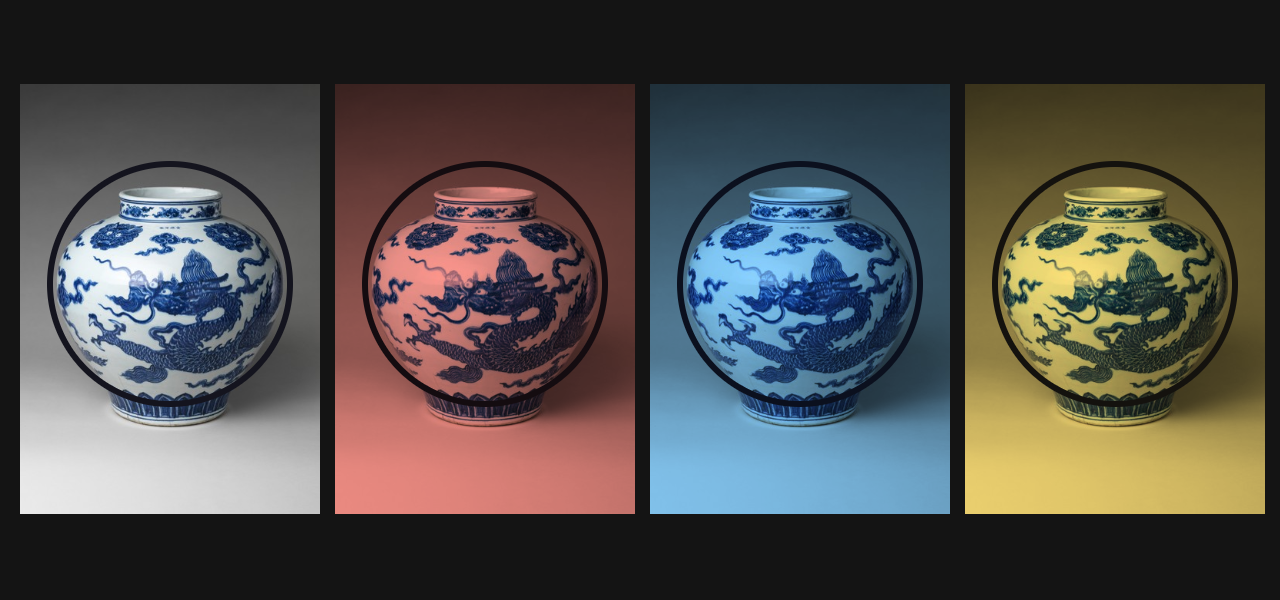
Inside the block the Fbo is its own little world: the origin is its top-left corner, y points down, and the transform starts from scratch, so a translate made before the block doesn’t move what you draw inside. When the block ends, the transform and the style come back as they were. Fbos nest: open another with inside, and its end comes back to this one.
An Fbo’s size is in its own pixels, whatever the screen: a 300 × 430 Fbo is 300 × 430 pixels on any display, and fbo.read() returns exactly that as a numpy array. fbo.draw(x, y) without a size shows it at 300 × 430 points, which on a 2× screen is magnified a little softly, like an image. So, as here, allocate it at twice the size and show it at half size when crispness matters.
Inside with fbo:, everything that reads “the screen” reads the Fbo instead: image.grab_screen(x, y, w, h) copies part of the Fbo, in its pixels, and kiln.save_screen("fbo.png") writes the whole Fbo to a file.
An Fbo can be transparent too: kiln.clear(0) inside it clears to transparent black, and whatever you draw on top keeps its own transparency. A half-transparent shape drawn into it looks exactly as it would drawn straight onto the window once the Fbo is shown, soft edges included, which makes Fbos good for sprites and masks. (Under the hood blending stores premultiplied colour, colour times alpha; Kiln knows, so when you read an 8-bit Fbo back, or save it as a PNG, you get ordinary straight alpha.)
Feedback trails
An Fbo keeps its pixels until you clear it: the automatic background clears only the window. So each frame can start from the previous one. Draw last frame’s picture slightly darker, a little larger and a little turned, then add new shapes on top, and every shape leaves a spiral trail behind it.
There’s one rule: an Fbo can’t be drawn into itself (the GPU can’t read and write one image at once, and Kiln raises a ValueError if you try). So use two Fbos and swap them each frame, reading from one while drawing into the other. This is called ping-pong.
class Trails(kiln.App):
    def setup(self):
        self.read = kiln.Fbo(400, 300)
        self.write = kiln.Fbo(400, 300)

    def draw(self):
        t = kiln.clock.frame / 30  # seconds, at the video's 30 fps
        with self.write:
            kiln.clear(8, 6, 16)
            # Last frame, a bit darker, grown by 3% and turned 2 degrees around the centre.
            kiln.tint(246, 240, 250)
            kiln.translate(200, 150)
            kiln.rotate(math.radians(2))
            kiln.scale(1.03, 1.03)
            self.read.draw(-200, -150)
            kiln.reset_matrix()
            # Something new on top: three dots on an orbit.
            for i in range(3):
                angle = t * 2 + i * 2.094
                kiln.fill(kiln.Color.from_hsb((i * 85 + t * 40) % 255, 200, 255))
                kiln.circle(200 + 60 * np.cos(angle), 150 + 60 * np.sin(angle), 7)
        self.read, self.write = self.write, self.read  # swap: what we drew is read next

        kiln.tint(255)
        self.read.draw(0, 0)

show_video(Trails(), frames=90)
kiln.clear and kiln.background inside the block clear the Fbo, not the window, and they happen exactly where you call them, even in the middle of other drawing.
Light that doesn’t clip: float Fbos
Pile up a few hundred faint additive dots and the brightest spots soon pass white. The window stores each channel in 8 bits, so everything past white is lost, and a normal Fbo does the same. A float Fbo, kiln.Fbo(w, h, kiln.TextureFormat.RGBA16F), stores real numbers instead: values above 1.0 (and below 0) are kept.
Both halves below add up the same 600 dots, a spiral galaxy, then show the result at a quarter of its brightness (tint(64)). On the left the 8-bit Fbo had already clipped, so the core is a flat, dull patch. On the right the float Fbo still knows how bright each spot was, and the galaxy keeps its glowing core.
class Galaxy(kiln.App):
    def setup(self):
        self.clipped = kiln.Fbo(300, 300)
        self.float = kiln.Fbo(300, 300, kiln.TextureFormat.RGBA16F)

    def draw(self):
        rng = np.random.default_rng(3)
        for fbo in (self.clipped, self.float):
            with fbo:
                kiln.clear(0, 0, 0, 255)
                kiln.blend(kiln.Blend.ADD)
                for i in range(600):
                    arm = i % 2 * np.pi
                    r = rng.gamma(2.0, 28)
                    angle = arm + r / 40 + rng.normal(0, 0.25)
                    x, y = 150 + r * np.cos(angle), 150 + r * np.sin(angle)
                    kiln.fill(255, 190, 120, 60)
                    kiln.circle(x, y, 18 - min(r, 120) / 10)
        self.peak = self.float.read()[..., 0].max()

        kiln.background(0)
        kiln.tint(64)  # a quarter of the brightness: an exposure control
        self.clipped.draw(10, 0)
        self.float.draw(330, 0)
        kiln.fill(200)
        kiln.text("8-bit Fbo", 20, 290)
        kiln.text(f"float Fbo, peak {self.peak:.1f}", 340, 290)

galaxy = Galaxy()
show(galaxy, size=(640, 300))
print(f"The brightest red value in the float Fbo is {galaxy.peak:.2f}, far above 1.0.")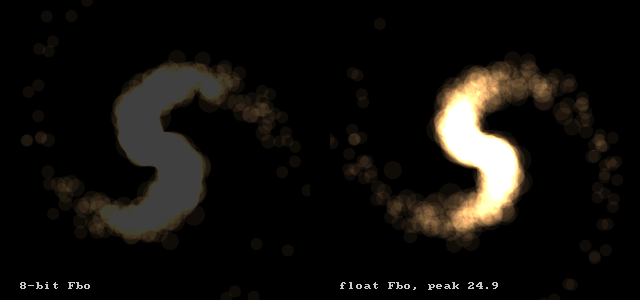
The brightest red value in the float Fbo is 24.92, far above 1.0.Ping-pong as computation
The same trick computes things. Store numbers in a float Fbo, one per pixel, and each step draw it into a second Fbo through some drawing operation, then swap. Here the operation is diffusion: each step adds up five copies of the Fbo, one at half its value and four shifted one pixel up, down, left and right at an eighth each, so every pixel becomes a blend of itself and its neighbours, and heat spreads out. Nothing here is special to graphics: it’s the discrete heat equation, and numpy agrees with the GPU.
One rule makes numbers survive: keep alpha at 255, or draw with Blend.REPLACE. Blended modes store colour times alpha, so a value drawn at alpha 128 is stored halved (and alpha itself is blended “over”). Here every colour, the clear and the loaded data are opaque, so the values pass through untouched. To keep four independent numbers per pixel, alpha included, use DISABLED, which writes and copies them exactly from Fbo to Fbo. To read such data back on the CPU, use a float Fbo: it returns the values as stored. An 8-bit Fbo’s read always returns straight alpha (what a PNG holds), so it divides the colour by an alpha below 255.
size = 64
heat = np.zeros((size, size, 4), np.float32)
heat[..., 3] = 1.0
heat[20, 20, :3] = 400.0   # three hot spots, far brighter than white
heat[40, 44, :3] = 250.0
heat[48, 16, :3] = 150.0

def diffuse(src, dst):
    """One step: dst = src / 2 + (the sum of src's four neighbours) / 8."""
    with dst:
        kiln.clear(0, 0, 0, 255)
        kiln.blend(kiln.Blend.ADD)
        kiln.tint(127.5, 127.5, 127.5, 255)  # a tint of 0.5: half of itself
        src.draw(0, 0)
        kiln.tint(31.875, 31.875, 31.875, 255)  # 0.125: an eighth of each neighbour
        for dx, dy in [(1, 0), (-1, 0), (0, 1), (0, -1)]:
            src.draw(dx, dy)

class Heat(kiln.App):
    def setup(self):
        fmt = kiln.TextureFormat.RGBA32F
        self.src, self.dst = kiln.Fbo(size, size, fmt), kiln.Fbo(size, size, fmt)
        self.src.texture.upload(heat)  # numpy -> Fbo

    def draw(self):
        for _ in range(4):
            diffuse(self.src, self.dst)
            self.src, self.dst = self.dst, self.src
        kiln.background(0)
        kiln.tint(255, 120, 30)  # tint the heat: red first, then orange, then yellow
        self.src.draw(0, 0, 300, 300)

show_video(Heat(), frames=60, size=(300, 300))
To check it, run three steps and compare with the same sum in numpy (where the edges are left empty, as the shifted copies leave them):
class Check(kiln.App):
    def setup(self):
        fmt = kiln.TextureFormat.RGBA32F
        self.src, self.dst = kiln.Fbo(size, size, fmt), kiln.Fbo(size, size, fmt)
        self.src.texture.upload(heat)

    def draw(self):
        for _ in range(3):
            diffuse(self.src, self.dst)
            self.src, self.dst = self.dst, self.src
        self.result = self.src.read()  # Fbo -> numpy

def numpy_diffuse(a):
    out = a / 2
    out[:, 1:] += a[:, :-1] / 8
    out[:, :-1] += a[:, 1:] / 8
    out[1:] += a[:-1] / 8
    out[:-1] += a[1:] / 8
    return out

expected = heat[..., 0]
for _ in range(3):
    expected = numpy_diffuse(expected)

from kiln.testing import render_frames

check = Check()
render_frames(check, frames=1, size=(64, 64))
print("largest difference from numpy:", np.abs(check.result[..., 0] - expected).max())
largest difference from numpy: 0.0This is the idea behind GPU simulations on hardware without compute shaders, the classic OpenGL technique: particle positions and velocities live in float Fbos, and each step is a full-screen draw from one Fbo into the other. With your own shaders the step can be any formula, for a quarter of a million particles at once: see GPGPU particles.
Try this: a kaleidoscope
Mix the two ideas. A slowly turning Ming jar feeds a trail Fbo, and the Fbo is shown four times, mirrored (a negative width or height flips a draw), into a kaleidoscope. Try other turns and scales in the feedback, a float Fbo with Blend.ADD, or six tiles.
class Kaleidoscope(kiln.App):
    def setup(self):
        self.jar = kiln.Image(jar_path)
        self.jar.anchor = (0.5, 0.5)
        self.read = kiln.Fbo(200, 150)
        self.write = kiln.Fbo(200, 150)

    def draw(self):
        t = kiln.clock.frame / 30
        with self.write:
            kiln.clear(6, 4, 14)
            # The trail: last frame, faded, turned and grown around the bottom-right
            # corner, which becomes the kaleidoscope's centre.
            kiln.tint(236, 232, 244)
            kiln.translate(200, 150)
            kiln.rotate(math.radians(1.2))
            kiln.scale(1.012, 1.012)
            self.read.draw(-200, -150)
            kiln.reset_matrix()
            # The jar, tinted with a slowly changing hue.
            kiln.translate(150 + 35 * np.cos(t * 0.9), 108 + 28 * np.sin(1.4 * t))
            kiln.rotate(math.radians(t * 50))
            kiln.tint(kiln.Color.from_hsb(t * 25 % 255, 170, 255))
            self.jar.draw(0, 0, 42, 60)
        self.read, self.write = self.write, self.read

        kiln.tint(255)
        w, h = 200, 150
        self.read.draw(0, 0, w, h)
        self.read.draw(2 * w, 0, -w, h)            # mirrored left-right
        self.read.draw(0, 2 * h, w, -h)            # mirrored top-bottom
        self.read.draw(2 * w, 2 * h, -w, -h)       # both

show_video(Kaleidoscope(), frames=120)
Picture: “Jar with dragon”, China, Ming dynasty, Xuande mark and period (1426–35), porcelain painted with cobalt blue under a transparent glaze. The Metropolitan Museum of Art, Gift of Robert E. Tod, 1937 (37.191.1), public domain via Open Access.