Coming from openFrameworks

Every openFrameworks name Kiln implements, and where Kiln does things differently

If you have written an openFrameworks (oF) sketch, you can write a Kiln sketch. The structure is the same (an App with setup, update and draw) and the drawing defaults follow oF, but the names are Kiln’s own, chosen for Python: see Naming. This page is the lookup table and the list of places where Kiln deliberately does something else.

Only kiln, kiln.agents, kiln.testing and kiln.typing are public API: import from those four. Internal modules (kiln._window, kiln.graphics.renderer, kiln.graphics.tessellate and so on) may change in any release.

Naming rules

Kiln follows the Google Python Style Guide and its own naming rules.

In oF In Kiln Example
The of prefix Dropped. The module is the namespace. ofDrawCircle becomes kiln.circle
ofDraw* functions Nouns ofDrawRectangle becomes kiln.rect
ofGet* and ofSet* Properties, mostly on kiln.mouse, kiln.keys, kiln.clock and kiln.window ofGetMouseX becomes kiln.mouse.x, ofSetWindowTitle(t) becomes kiln.window.title = t
ofEnable* / ofDisable* pairs One call, None for off ofDisableAlphaBlending becomes kiln.blend(None)
ofPushMatrix / ofPopMatrix, begin / end pairs with blocks with kiln.transform():, with kiln.style():, with fbo:
camelCase methods snake_case getNumVertices becomes vertex_count
Classes CapWords, no prefix ofColor becomes kiln.Color
OF_* constants StrEnum members named after their setting; a string works too OF_BLENDMODE_ADD becomes kiln.Blend.ADD (or "add"), OF_RECTMODE_CENTER becomes kiln.RectMode.CENTER, OF_KEY_LEFT becomes kiln.Key.LEFT
ofBaseApp methods App methods, in snake_case keyPressed becomes key_pressed
ofBaseApp members kiln.mouse mouseX becomes kiln.mouse.x
ofSetupOpenGL and ofRunApp One call, kiln.run(app, width, height, **settings)

Modes are strings, not oF’s integers: kiln.Blend.ADD == "add". Keys and mouse buttons stay integers: printable keys have no Key member, and as in oF a key’s code is its character, so key == ord("a").

Drawing functions take plain numbers (kiln.circle(x, y, radius)), not glm::vec or ofRectangle objects. Where oF overloads a name, Kiln uses keywords: ofDrawRectRounded(x, y, w, h, tl, tr, br, bl) is kiln.rect(x, y, w, h, radius=(tl, tr, br, bl)).

A sketch, side by side

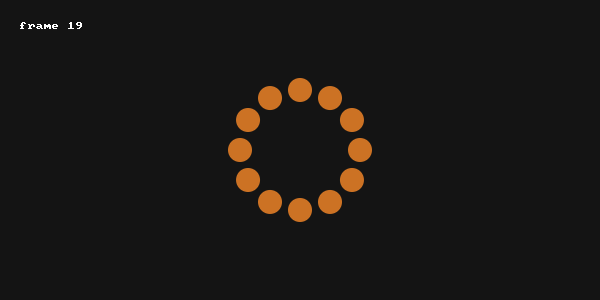
A ring of twelve circles that spins around the mouse. The oF version first:

// ofApp.cpp
void ofApp::setup() {
    ofSetFrameRate(60);
    ofBackground(20);
    angle = 0;
}

void ofApp::update() {
    angle += 1.5;
}

void ofApp::draw() {
    ofPushMatrix();
    ofTranslate(mouseX, mouseY);
    ofRotateDeg(angle);
    ofSetColor(255, 140, 40, 200);
    for (int i = 0; i < 12; i++) {
        ofRotateDeg(30);
        ofDrawCircle(60, 0, 12);
    }
    ofPopMatrix();

    ofSetColor(255);
    ofDrawBitmapString("frame " + ofToString(ofGetFrameNum()), 20, 30);
}

// main.cpp
int main() {
    ofSetupOpenGL(600, 300, OF_WINDOW);
    ofRunApp(new ofApp());
}

The same sketch in Kiln. Every line has an oF twin, in the same order:

import kiln

class Ring(kiln.App):
    def setup(self):
        kiln.clock.target_fps = 60
        kiln.background(20)
        self.angle = 0

    def update(self):
        self.angle += 1.5

    def draw(self):
        with kiln.transform():
            kiln.translate(kiln.mouse.x, kiln.mouse.y)
            kiln.rotate(math.radians(self.angle))
            kiln.fill(255, 140, 40, 200)
            for _ in range(12):
                kiln.rotate(math.radians(30))
                kiln.circle(60, 0, 12)

        kiln.fill(255)
        kiln.text(f"frame {kiln.clock.frame}", 20, 30)

# kiln.run(Ring(), 600, 300) opens a window. Here we render one frame instead,
# with the mouse moved to (300, 150).
from kiln.testing import MouseMove
show(Ring(), frames=20, size=(600, 300), events=[(0, MouseMove(300, 150))])

What changed, apart from spelling:

  • ofToString(n) is an f-string (or str(n)).
  • mouseX is kiln.mouse.x, inside the class and out.
  • There is no header file and no new. kiln.run(Ring(), 600, 300) replaces ofSetupOpenGL and ofRunApp.

Name table

Each table lists the oF name and the Kiln name. scripts/check_api_map.py parses these tables and fails if a Kiln name here does not exist in kiln, or if a public name of kiln is missing from them. The API reference documents each Kiln name in full; it is generated from the docstrings.

App and window

oF Kiln Notes
ofBaseApp kiln.App Subclass it.
ofSetupOpenGL + ofRunApp kiln.run run(app, width=1024, height=768, *, title, fullscreen, vsync). ESC closes the window, as in oF.
ofBaseApp::setup App.setup
ofBaseApp::update App.update
ofBaseApp::draw App.draw
ofBaseApp::exit App.exit Runs when the loop ends, including on an exception.
ofBaseApp::keyPressed(int) App.key_pressed
ofBaseApp::keyReleased(int) App.key_released
ofBaseApp::keyPressed(ofKeyEventArgs&) App.key_pressed_event Receives a kiln.KeyEvent. The default calls key_pressed(event.key).
ofBaseApp::keyReleased(ofKeyEventArgs&) App.key_released_event
ofBaseApp::mouseMoved(int, int) App.mouse_moved
ofBaseApp::mouseDragged(int, int, int) App.mouse_dragged
ofBaseApp::mousePressed(int, int, int) App.mouse_pressed
ofBaseApp::mouseReleased(int, int, int) App.mouse_released
ofBaseApp::mouseScrolled(int, int, float, float) App.mouse_scrolled
ofBaseApp::mouseMoved(ofMouseEventArgs&) and its siblings App.mouse_moved_event, App.mouse_dragged_event, App.mouse_pressed_event, App.mouse_released_event, App.mouse_scrolled_event Receive a kiln.MouseEvent.
ofBaseApp::mouseEntered App.mouse_entered
ofBaseApp::mouseExited App.mouse_exited
ofBaseApp::windowResized App.window_resized Size in points.
ofBaseApp::dragEvent App.files_dropped Receives a kiln.DropInfo.
ofBaseApp::mouseX kiln.mouse.x
ofBaseApp::mouseY kiln.mouse.y
ofExit kiln.exit Stops after the current frame.
ofGetWidth kiln.window.width Points.
ofGetHeight kiln.window.height Points.
ofGetWindowSize kiln.window.size Returns a (width, height) tuple, not a glm::vec2.
ofSetWindowTitle kiln.window.title
ofSetFullscreen kiln.window.fullscreen
ofToggleFullscreen kiln.window.fullscreen
ofSetVerticalSync kiln.window.vsync
ofSetFrameRate kiln.clock.target_fps
ofGetFrameRate kiln.clock.fps
ofGetFrameNum kiln.clock.frame
ofGetLastFrameTime kiln.clock.dt
ofGetElapsedTimef kiln.clock.time Seconds.
ofGetElapsedTimeMillis kiln.clock.time Seconds: kiln.clock.time * 1000 for milliseconds.
ofResetElapsedTimeCounter kiln.clock.reset

Graphics: background and drawing

oF Kiln Notes
ofBackground kiln.background Sets the background colour and clears.
ofSetBackgroundColor kiln.window.background
ofGetBackgroundColor kiln.window.background Returns a kiln.Color.
ofSetBackgroundAuto kiln.window.auto_clear
ofGetBackgroundAuto kiln.window.auto_clear
ofClear kiln.clear
ofClearAlpha kiln.clear_alpha
ofDrawCircle kiln.circle
ofDrawEllipse kiln.ellipse Radii, half oF’s width and height: kiln.ellipse(x, y, w / 2, h / 2).
ofDrawRectangle kiln.rect Follows the rect mode.
ofDrawRectRounded(x, y, w, h, r) kiln.rect kiln.rect(x, y, w, h, radius=r).
ofDrawRectRounded(x, y, w, h, tl, tr, br, bl) kiln.rect radius=(tl, tr, br, bl).
ofDrawLine kiln.line
ofDrawTriangle kiln.triangle
ofDrawBezier kiln.bezier Follows fill() and stroke(); use fill(None) and a stroke for a curve line.
ofDrawCurve kiln.curve Same.
ofDrawBitmapString kiln.text Without a font=, the 8x8 pixel font. Takes an optional scale.
ofDrawBitmapStringHighlight kiln.text background= draws the box behind the text.

TrueType text

oF Kiln Notes
ofTrueTypeFont kiln.Font Font("Inter", 14) loads; Inter (Regular, Medium, SemiBold) is bundled.
ofTrueTypeFont::load kiln.Font The constructor loads: Font(name_or_path, size). There is no load method (see Behaviour differences).
ofTrueTypeFont::drawString kiln.text y is the baseline. Text drawn in a row is one draw call, in any number of fonts.
ofTrueTypeFont::stringWidth kiln.Font.text_width The advance width (Pillow’s getlength), not the ink’s.
ofTrueTypeFont::getStringBoundingBox kiln.Font.text_bounds Returns a kiln.Rect.
ofTrueTypeFont::getLineHeight, ofTrueTypeFont::setLineHeight kiln.Font.line_height An attribute: read it or set it.
ofTrueTypeFont::getAscenderHeight kiln.Font.ascent An attribute, in points.
ofTrueTypeFont::getDescenderHeight kiln.Font.descent An attribute, negative as in oF.
ofTrueTypeFont::getSize kiln.Font.size An attribute, in points.
ofRectangle kiln.Rect A named tuple (x, y, width, height); none of oF’s methods yet.

Shapes: with shape() and vertices

oF Kiln Notes
ofBeginShape kiln.shape
ofVertex kiln.vertex z accepted and ignored.
ofVertices kiln.vertices An (n, 2) array-like.
ofCurveVertex kiln.curve_vertex z accepted and ignored.
ofBezierVertex kiln.bezier_vertex
ofNextContour kiln.next_contour
ofEndShape kiln.shape
ofSetPolyMode kiln.winding
ofPolyWindingMode kiln.Winding ODD, NONZERO, POSITIVE, NEGATIVE, ABS_GEQ_TWO.
ofSetCurveResolution kiln.curve_resolution
ofSetCircleResolution none Not needed: circles are exact at any size.

Style

oF Kiln Notes
ofSetColor kiln.fill 0-255, not clamped. Accepts a gray level, r, g, b, a, or a kiln.Color.
ofSetHexColor kiln.fill
ofFill kiln.fill With a stroke colour set, shapes are filled and then outlined.
ofNoFill kiln.fill fill(None): outlines in the stroke colour, or nothing without one.
none kiln.stroke Outlines shapes in a second colour, on top of their fill. Same forms as fill, plus width=.
none kiln.stroke stroke(None): back to oF’s one colour per shape, the default.
ofSetLineWidth kiln.stroke Points on screen, under any transform. Also the stroke colour’s width.
ofSetColor before ofImage::draw kiln.tint Multiplies images, textures, Fbos, meshes, Vbos and fields as they draw; white by default.
ofSetRectMode kiln.rect_mode
ofGetRectMode kiln.current_style kiln.current_style().rect_mode.
ofRectMode kiln.RectMode CORNER (the default) and CENTER; "corner" and "center" work too.
ofStyle kiln.Style
ofGetStyle kiln.current_style Returns a copy.
ofSetStyle kiln.style
ofPushStyle kiln.style
ofPopStyle kiln.style

Transforms

oF Kiln Notes
ofPushMatrix kiln.transform
ofPopMatrix kiln.transform
ofTranslate kiln.translate z accepted and ignored.
ofRotateDeg kiln.rotate Positive is clockwise on screen, as in oF.
ofRotateRad kiln.rotate
ofRotateZDeg kiln.rotate rotate(math.radians(d)).
ofRotateZRad kiln.rotate Radians.
ofScale kiln.scale scale(s) scales both axes.
ofLoadIdentityMatrix kiln.reset_matrix
ofGetCurrentMatrix(OF_MATRIX_MODELVIEW) kiln.current_matrix A 3x3 numpy array, not a glm::mat4.
ofMultMatrix kiln.apply_matrix Takes a 3x3 or 2x3 array-like.
ofLoadMatrix kiln.reset_matrix Takes a 3x3 or 2x3 array-like.

Blending

oF Kiln Notes
ofBlendMode kiln.Blend
OF_BLENDMODE_DISABLED kiln.Blend.REPLACE
OF_BLENDMODE_ALPHA kiln.Blend.ALPHA The default.
OF_BLENDMODE_ADD kiln.Blend.ADD
OF_BLENDMODE_SUBTRACT kiln.Blend.SUBTRACT
OF_BLENDMODE_MULTIPLY kiln.Blend.MULTIPLY
OF_BLENDMODE_SCREEN kiln.Blend.SCREEN
ofEnableBlendMode kiln.blend
ofDisableBlendMode kiln.blend
ofEnableAlphaBlending kiln.blend
ofDisableAlphaBlending kiln.blend

Events and input

oF Kiln Notes
OF_KEY_* kiln.Key Non-printable keys only; printable keys are their character code.
OF_KEY_RETURN kiln.Key.RETURN
OF_KEY_ESC kiln.Key.ESCAPE
OF_KEY_LEFT kiln.Key.LEFT UP, RIGHT and DOWN likewise.
OF_KEY_F1 kiln.Key.F1 Up to F12.
OF_KEY_SHIFT kiln.Key.SHIFT CONTROL, ALT, SUPER (COMMAND) and their LEFT_ and RIGHT_ forms likewise. The generic codes are oF’s modifier bits: test event.modifiers & kiln.Key.COMMAND, or kiln.Key.SHIFT in kiln.keys.
OF_MOUSE_BUTTON_LEFT kiln.MouseButton.LEFT
OF_MOUSE_BUTTON_MIDDLE kiln.MouseButton.MIDDLE
OF_MOUSE_BUTTON_RIGHT kiln.MouseButton.RIGHT
ofKeyEventArgs kiln.KeyEvent
ofMouseEventArgs kiln.MouseEvent
ofDragInfo kiln.DropInfo
ofGetMouseX kiln.mouse.x
ofGetMouseY kiln.mouse.y
ofGetPreviousMouseX kiln.mouse.previous_x
ofGetPreviousMouseY kiln.mouse.previous_y
ofGetMousePressed kiln.mouse.pressed
ofGetKeyPressed kiln.keys.pressed
ofSetEscapeQuitsApp kiln.window.exit_on_escape

Color

oF Kiln Notes
ofColor kiln.Color Channels are floats in 0-255, not clamped.
ofColor::red, ofColor::blue and the other named colours kiln.Color.RED, kiln.Color.BLUE, … Thirty values, equal to oF’s.
ofColor::fromHsb kiln.Color.from_hsb
ofColor::fromHex kiln.Color.from_hex
ofColor::getHex kiln.Color.hex
ofColor::getHue kiln.Color.hue
ofColor::getSaturation kiln.Color.saturation
ofColor::getBrightness kiln.Color.brightness
ofColor::setHsb kiln.Color.from_hsb
ofColor::setHue kiln.Color.hue
ofColor::setSaturation kiln.Color.saturation
ofColor::setBrightness kiln.Color.brightness
ofColor::lerp kiln.Color.lerp Returns a new colour; this one does not change.
ofColor::getLerped kiln.Color.lerp Returns a new colour.
ofColor::invert kiln.Color.invert Returns a new colour.
ofColor::getInverted kiln.Color.invert
ofColor::clamp kiln.Color.clamp Returns a new colour.
ofColor::getClamped kiln.Color.clamp
ofColor::limit none Channels run from 0 to 255.

Math

oF Kiln Notes
ofRandom(max), ofRandom(min, max) kiln.random random(max) is in [0, max); random(min, max) is in [min, max).
ofRandomuf kiln.random random() is in [0, 1]; random(-1, 1) is ofRandomf.
ofSeedRandom kiln.random_seed
ofNoise kiln.noise 1D to 4D, scalar or numpy array. Equal to oF’s within 1e-5.
ofSignedNoise kiln.signed_noise
ofMap kiln.map Has an optional clamp argument. Shadows the builtin inside kiln only.
ofClamp kiln.clamp
ofLerp kiln.lerp Also accepts numpy arrays.
ofDist kiln.dist
ofDistSquared kiln.dist_squared
ofDegToRad none math.radians (np.radians for arrays).
ofRadToDeg none math.degrees (np.degrees for arrays).
ofWrap kiln.wrap
ofNormalize kiln.normalize
ofInRange kiln.in_range
ofSign kiln.sign Returns 0 for 0.
ofIsPow2 kiln.is_power_of_two
ofNextPow2 kiln.next_power_of_two

Images and textures

oF Kiln Notes
ofImage kiln.Image Keeps its pixels in memory and draws through a Texture. Reads any file Pillow reads.
ofImage::load kiln.Image.load Returns False and warns when the file can’t be read, as oF does. kiln.Image(path) loads too. 16-bit gray keeps its top 8 bits; EXIF orientation is ignored, as in oF.
ofImage::draw kiln.Image.draw draw(x, y, w=None, h=None). Tinted by tint, and placed by RectMode and the anchor, as in oF. Edges are anti-aliased, as oF’s default 4× MSAA does. On a 2× display, one image pixel per point is magnified with linear filtering.
ofImage::getWidth, ofImage::getHeight kiln.Image.width, kiln.Image.height Properties.
ofImage::getTexture kiln.Image.texture
ofImage::isAllocated kiln.Image.allocated
ofImage::clear kiln.Image.release Frees the pixels and the texture (named like Texture.release and Fbo.release). Draws made earlier in the frame are kept.
ofImage::setAnchorPercent kiln.Image.anchor
ofImage::setAnchorPoint kiln.Image.anchor_point
ofImage::resetAnchor kiln.Image.anchor
ofTexture kiln.Texture Texture(width, height, format) allocates right away. getWidth and getHeight are the width and height attributes.
ofTexture::allocate kiln.Texture.allocate
ofTexture::loadData kiln.Texture.upload Takes a numpy array, (h, w) or (h, w, 1-4), uint8 or float, top row first.
ofTexture::draw kiln.Texture.draw One draw call for any number of consecutive draws of one texture.
ofTexture::clear kiln.Texture.release Frees the GPU storage (oF’s clear, not clearing pixels). The image goes back to a pool that the next texture of a similar size reuses, so per-frame textures are cheap. Also happens when the texture is garbage collected.
ofTexture::isAllocated kiln.Texture.allocated
ofTexture::setAnchorPercent kiln.Texture.anchor
ofTexture::setAnchorPoint kiln.Texture.anchor_point
ofTexture::resetAnchor kiln.Texture.anchor
ofTexture::bind, ofTexture::unbind kiln.Texture with texture: makes Mesh.draw sample the texture. Texture coordinates are normalised (see Behaviour differences).
ofImage::bind, ofImage::unbind kiln.Image As for Texture: with image:.
GL_RGBA8, GL_RGBA16F, GL_RGBA32F kiln.TextureFormat RGBA8, RGBA16F, RGBA32F, with the GL values. RGBA16F is stored as 32-bit floats for now (a zengl 2.7.3 bug).
ofImage::getPixels kiln.Image.pixels Returns the image’s own (h, w, c) numpy array: edit it in place, then call update.
ofImage::setFromPixels kiln.Image.pixels Copies a uint8 or float array, (h, w) or (h, w, 1-4), and uploads at once. A float array makes a float image (an RGBA32F texture).
(allocate + setFromPixels) kiln.Image.from_pixels Static constructor from a numpy array.
ofImage::update kiln.Image.update Uploads the pixels again.
ofImage::save kiln.Image.save Returns True or False (with a warning). Format from the extension; float pixels are written as 8 bits; JPEG drops alpha.
ofImage::grabScreen kiln.Image.grab_screen Coordinates in points (see Behaviour differences). Flushes pending draws first. Inside an Fbo, grabs from the Fbo. Never includes Gui panels.
ofSaveScreen kiln.save_screen Writes the frame so far, in framebuffer pixels. Inside an Fbo, writes the Fbo. Never includes Gui panels.
ofImage::drawSubsection kiln.Image.draw Source rectangle in image pixels; with TextureWrap.REPEAT it tiles.
ofTexture::drawSubsection kiln.Texture.draw
ofTexture::readToPixels kiln.Texture.read Returns an (h, w, 4) numpy array of the texture’s own pixels.
ofTexture::setTextureMinMagFilter kiln.Texture.filter Takes a TextureFilter or a name ("nearest"); mag_filter defaults to the min filter.
ofTexture::setTextureWrap kiln.Texture.wrap Takes a TextureWrap or a name ("repeat"); wrap_t defaults to wrap_s.
ofTexture::enableMipmap, ofTexture::disableMipmap, ofTexture::generateMipmap kiln.Texture.mipmaps, kiln.Texture.generate_mipmaps texture.mipmaps = True or False; enabled mipmaps are rebuilt on every upload.
GL_NEAREST, GL_LINEAR, GL_LINEAR_MIPMAP_LINEAR, … kiln.TextureFilter NEAREST, LINEAR and the four *_MIPMAP_* filters, with the GL values.
GL_CLAMP_TO_EDGE, GL_REPEAT, GL_MIRRORED_REPEAT kiln.TextureWrap CLAMP_TO_EDGE, REPEAT, MIRRORED_REPEAT, with the GL values.

Offscreen drawing

oF Kiln Notes
ofFbo kiln.Fbo Fbo(width, height, format) allocates right away. getWidth and getHeight are the width and height attributes, in Fbo pixels on any display.
ofFbo::allocate kiln.Fbo.allocate RGBA8, RGBA16F (stored as 32-bit floats for now) or RGBA32F. Starts transparent black.
ofFbo::begin, ofFbo::end kiln.Fbo with fbo:, which nests and ends the Fbo even when the block raises.
ofFbo::draw kiln.Fbo.draw draw(x, y, w=None, h=None), like Texture.draw: tinted, RectMode, transforms, and the anchor set on texture (Fbo has no anchor methods of its own). A negative w or h mirrors.
ofFbo::getTexture kiln.Fbo.texture A Texture that always shows the Fbo’s pixels. upload on it writes into the Fbo. It takes filters and wrap modes and binds to meshes; mipmaps raise.
ofFbo::readToPixels kiln.Fbo.read An (h, w, 4) numpy array, top row first: uint8 in straight alpha, or float32 for float Fbos, as stored (premultiplied).
ofFbo::clearColorBuffer kiln.Fbo.clear Takes kiln.clear’s arguments; fbo.clear() is transparent black. Works outside with fbo:.
ofFbo::clear kiln.Fbo.release Frees the storage, as Texture.release does. Also as soon as the last reference to the Fbo (or its texture) goes.
ofFbo::isAllocated kiln.Fbo.allocated

Meshes

oF Kiln Notes
ofMesh kiln.Mesh Mesh(vertices=, colors=, tex_coords=, indices=, mode=, normals=, attributes=) builds one from numpy arrays in a single call. Kiln’s drawing is 2D: z is stored and reaches raw shaders, never Kiln’s own drawing.
ofPrimitiveMode kiln.PrimitiveMode TRIANGLES, TRIANGLE_STRIP, TRIANGLE_FAN, LINES, LINE_STRIP, LINE_LOOP, POINTS, with oF’s values. The adjacency and patch modes are not supported.
ofMesh::addVertex, addColor, addTexCoord, addIndex kiln.Mesh.add_vertex, kiln.Mesh.add_color, kiln.Mesh.add_tex_coord, kiln.Mesh.add_index add_color takes a Color or an (r, g, b[, a]) tuple, 0-255.
ofMesh::addVertices, addColors, addTexCoords, addIndices kiln.Mesh.add_vertices, kiln.Mesh.add_colors, kiln.Mesh.add_tex_coords, kiln.Mesh.add_indices Take numpy arrays.
ofMesh::getVertices, getColors, getTexCoords, getIndices kiln.Mesh.vertices, kiln.Mesh.colors, kiln.Mesh.tex_coords, kiln.Mesh.indices Return numpy arrays: (n, 3), (n, 4) in 0-255, (n, 2), flat.
(no oF equivalent) kiln.Mesh.vertices, kiln.Mesh.colors, kiln.Mesh.tex_coords, kiln.Mesh.indices Replace the data from numpy; oF clears and re-adds.
ofMesh::getNumVertices, getNumIndices, hasColors, hasTexCoords, hasIndices, clear kiln.Mesh.vertex_count, kiln.Mesh.index_count, kiln.Mesh.has_colors, kiln.Mesh.has_tex_coords, kiln.Mesh.has_indices, kiln.Mesh.clear
ofMesh::addNormal, addNormals, getNormals, hasNormals kiln.Mesh.add_normal, kiln.Mesh.add_normals, kiln.Mesh.normals, kiln.Mesh.has_normals Normals are for raw shaders (in vec3 normal;); mesh.normals = array replaces them from numpy.
(no oF equivalent) kiln.Mesh.normals, kiln.Mesh.attributes Named per-vertex attributes for raw shaders: mesh.attributes["age"] = a reaches in float age; (oF has them on ofVbo only, by location).
ofMesh::load kiln.Mesh.load Reads .obj (ASCII) and .ply (ASCII, binary little-endian); oF reads PLY only. Returns False with a warning when the file can’t be read, as Image.load.
ofMesh::draw kiln.Mesh.draw Tinted, never stroked: fill(None) does not make it a wireframe.
ofMesh::drawWireframe kiln.Mesh.draw draw(wireframe=True) strokes each triangle edge once, stroke(width=) points wide.

Vbos

oF Kiln Notes
ofVbo kiln.Vbo Vbo(mesh) or Vbo(vertices=, colors=, tex_coords=, indices=, mode=, normals=, attributes=) fills it from numpy in one call; the oF setters below also work. Vbo(mesh) takes the mesh’s normals and named attributes too.
ofVbo::setMesh kiln.Vbo.upload_mesh Copies the mesh’s data and mode; the usage argument is optional.
ofVbo::setVertexData, setColorData, setTexCoordData, setIndexData kiln.Vbo.upload_vertices, kiln.Vbo.upload_colors, kiln.Vbo.upload_tex_coords, kiln.Vbo.upload_indices Take numpy arrays (no pointer and count) and replace one attribute, whatever its new size.
ofVbo::updateVertexData, updateColorData, updateTexCoordData, updateIndexData kiln.Vbo.write_vertices, kiln.Vbo.write_colors, kiln.Vbo.write_tex_coords, kiln.Vbo.write_indices Upload only the range given: write_vertices(data, offset), offset in vertices (indices).
ofVbo::draw kiln.Vbo.draw draw(mode=None, first=0, count=None); the mode defaults to the Vbo’s own. Draws the indices when there are any (see Behaviour differences).
ofVbo::drawElements kiln.Vbo.draw_elements draw_elements(mode=None, count=None, offset=0).
ofVbo::getNumVertices, getNumIndices, getUsingColors, getUsingTexCoords, getUsingIndices kiln.Vbo.vertex_count, kiln.Vbo.index_count, kiln.Vbo.has_colors, kiln.Vbo.has_tex_coords, kiln.Vbo.has_indices
ofVbo::setNormalData, updateNormalData, getUsingNormals kiln.Vbo.upload_normals, kiln.Vbo.write_normals, kiln.Vbo.has_normals Normals for raw shaders (in vec3 normal;).
ofVbo::setAttributeData, updateAttributeData, hasAttribute kiln.Vbo.upload_attribute, kiln.Vbo.write_attribute, kiln.Vbo.attribute_names By GLSL name, not location: upload_attribute("age", a) reaches in float age;; "age" in vbo.attribute_names tests for one. float32, int32 or uint32, 1-4 components (see Behaviour differences).
ofVbo::setAttributeDivisor kiln.Vbo.upload_attribute upload_attribute(name, data, divisor=1) makes an attribute per instance; or Vbo(..., instance_attributes={...}). Divisors 0 and 1 only.
ofVbo::drawInstanced, drawElementsInstanced kiln.Vbo.draw, kiln.Vbo.draw_elements draw(mode, first, count, instances=n) and draw_elements(mode, count, instances=n); one draw call; needs a raw shader. Without instances, a raw shader draws as many copies as the per-instance attributes have rows.
(no oF equivalent) kiln.Vbo.instance_count The rows of the per-instance attributes (the smallest if they differ).
ofVbo::clear kiln.Vbo.release Frees the buffers to a pool. Also on garbage collection.
GL_STATIC_DRAW, GL_DYNAMIC_DRAW, GL_STREAM_DRAW kiln.BufferUsage STATIC, DYNAMIC, STREAM, with GL’s values. A hint; Apple’s drivers ignore it.

Shaders

Kiln’s shaders are materials: one GLSL function, vec4 shade(Material m), that colours everything drawn inside with shader:. A Shader can instead hold a raw program, a whole vertex and fragment shader as in oF, which draws Vbos and Meshes. See Shaders, GPGPU particles and the behaviour differences below.

oF Kiln Notes
ofShader kiln.Shader Shader(material) or Shader(vertex=..., fragment=...) loads right away. with shader: is begin/end.
ofShader::setupShaderFromSource kiln.Shader.load_material Takes a material (a shade() function), not a fragment shader with main(). A material that doesn’t compile raises and keeps the previous one.
ofShader::load(vertName, fragName) kiln.Shader.load A raw program: a whole vertex and fragment shader, as sources or files (a Path, or a one-line string with no {, ; or newline). Draws Vbos and Meshes; shapes, text and images under it raise.
ofShader::setupShaderFromSource(GL_VERTEX_SHADER, …) + (GL_FRAGMENT_SHADER, …) + linkProgram kiln.Shader One step: Shader(vertex=source, fragment=source).
oF’s default attributes and uniforms kiln.Shader The same names in a raw program: inputs position (0), color (1), normal (2), texcoord (3); uniforms modelViewProjectionMatrix, modelViewMatrix, projectionMatrix, textureMatrix (always the identity), globalColor. Kiln adds resolution, pixelRatio, time and mouse; set one of those yourself and yours wins.
ofShader::load(fragName) kiln.Shader.load_material Loads a material from a file.
ofShader::begin kiln.Shader with shader:. Shaders don’t nest: entering one while another is active raises.
ofShader::end kiln.Shader
ofShader::setUniform1f … setUniform4f, setUniform1i … setUniform4i, setUniform1fv, setUniformMatrix3f, setUniformMatrix4f kiln.Shader One method for every type, checked against the declaration. shader["name"] = value does the same.
ofShader::setUniformTexture kiln.Shader Takes a Texture, Image or Fbo; the unit is optional. Sample it with texture, textureLod, texelFetch or textureSize on the uniform’s name; other lookups raise.
ofShader::isLoaded kiln.Shader.loaded
ofShader::unload kiln.Shader.release
none kiln.ShaderError Raised when a material or raw program doesn’t compile, with your line numbers (and the stage).

Sound

oF Kiln Notes
ofSoundStream kiln.SoundStream Optional: the first instrument opens the default device by itself.
ofSoundStream::setup(ofSoundStreamSettings) kiln.SoundStream.open setup(sample_rate=48000, buffer_size=256, output_channels=2, input_channels=0, device=None): the settings are arguments, not a settings object.
ofSoundStream::start kiln.SoundStream.start
ofSoundStream::stop kiln.SoundStream.stop
ofSoundStream::close kiln.SoundStream.close
ofSoundSetVolume kiln.master.volume Clamped to 0..1. The analysis is taken before it, so muting keeps master.spectrum() alive.
ofSoundGetVolume kiln.master.volume
ofSoundGetSpectrum kiln.master.spectrum kiln.master.spectrum(bands=128) (kiln.mic.spectrum for the microphone): log-spaced pitch bands from 40 Hz to 16 kHz, each 0 to 1 (-80 dB to 0 dB), smoothed. ofSoundGetSpectrum returns raw linear FFT bins; Kiln returns these ready-to-draw bands.
ofBaseApp::audioOut kiln.Instrument No Python audio callback: instruments run compiled on the audio thread.
STK Instrmnt kiln.Instrument The base class of every instrument.
STK Instrmnt::noteOn kiln.Instrument.note_on note_on(freq, velocity=1.0).
STK Instrmnt::noteOff kiln.Instrument.note_off note_off(freq=None, velocity=0.0).
STK Instrmnt::controlChange kiln.Instrument.control_change Controls have names, not MIDI numbers, and are attributes too.
STK Plucked kiln.Pluck A synth pluck on the analog voice (two detuned saws, a sub, a ladder filter with a fast envelope snap), with decay and brightness controls; polyphonic (6 notes by default) and an analog voice each. Not a string model, so no pick.

GUI

Kiln’s panel takes the place of the ofxGui addon. Every control returns its Parameter, which reads like the value it holds: pass a slider’s to kiln.circle or add it to a float, as ofParameter converts implicitly in C++; unpack an xy or range pair; hand a colour to kiln.fill. Set it through param.value. See the behaviour differences below.

oF Kiln Notes
ofxPanel kiln.Gui Gui(title="Controls", x=16, y=16, width=260), made in setup. Draws itself after draw: there is no gui.draw().
ofxPanel::setup kiln.Gui The constructor sets the panel up. ofxPanel’s save and load buttons don’t exist; see Gui.save and Gui.load.
ofxPanel::add(ofxFloatSlider), ofxPanel::add(ofxIntSlider) kiln.Gui.slider slider(name, value, min, max, *, format=None, tip=None) adds the row and returns its Parameter; all-int arguments make an int slider. format is a str.format pattern such as '{:.2f}' for the shown value.
ofxToggle kiln.Gui.toggle toggle(name, value=False, *, tip=None) returns a bool Parameter (if toggle: reads it). A pill switch whose knob eases across.
ofxButton kiln.Gui.button button(name, on_click, *, tip=None); on_click() runs once, on release inside the button (ofxButton sets a bool you poll or listens to). Returns nothing.
ofxLabel kiln.Gui.label label(name, value="", *, tip=None) returns a text Parameter; set its value (any value, shown as text) from the sketch, every frame if you like.
ofxColorSlider, ofxColorPicker kiln.Gui.color color(name, value, *, tip=None) returns a colour Parameter holding a kiln.Color; the row opens an HSV square, a hue bar and an alpha bar.
ofxVec2Slider (ofxSlider<glm::vec2>) kiln.Gui.xy xy(name, value=(0.0, 0.0), min=-1.0, max=1.0, *, tip=None) returns an (x, y) tuple Parameter; a square pad with a crosshair, where ofxVec2Slider is two bars. y grows downward.
none (ofxGui has no range slider; ofxRangeSlider is a third-party addon) kiln.Gui.range range(name, value, min, max, *, format=None, tip=None) returns a (low, high) tuple Parameter; two handles, the nearer one grabs, they never cross. Shown as low to high.
none (ofxGui has no knob; ofxKnob and ofxDial are third-party addons) kiln.Gui.knobs knobs(*knobs, tip=None) takes one (name, value, min, max) per knob and returns their Parameters; vertical drag (150 pt for the whole range), Shift for fine, double-click resets, scroll nudges.
none (ofxGui has no step grid) kiln.Gui.steps steps(name, tracks, steps=16, value=None, *, tip=None) returns a grid Parameter (rows of 0 off, 1 hit, 2 accent) with patterns[track] (read and assign) and a playhead; click toggles, Shift-click accents, drag paints, double-click on a name clears the row.
ofxDropdown (addon), a group of exclusive ofxToggles (radio buttons) kiln.Gui.choice choice(name, options, value=None, *, tip=None) returns a Parameter whose value is the chosen option, a str (options is a list or tuple of strings; a bare string raises TypeError). Up to four short options show as a segmented control, otherwise a dropdown whose list opens above every panel.
ofxInputField (ofxTextField) kiln.Gui.text text(name, value="", *, tip=None) returns a str Parameter that changes as you type. Click to edit; Return, Esc, Tab or a click elsewhere ends it.
ofxGuiGroup kiln.Gui.folder with gui.folder(name, collapsed=False, *, tip=None): groups the controls made inside it under a caption that folds them, and folders nest.
ofxPanel::saveToFile, ofxPanel::loadFromFile kiln.Gui.save, kiln.Gui.load save(path) / load(path). JSON instead of XML: one object of Parameter.path to value. save writes the file whole or not at all. load converts and clamps through the Parameter’s setter (so on_change runs), skips an unknown key or a value the control can’t take (a text field takes only a string) with a warning, and keeps the value of any control the file leaves out. Labels, graphs, meters, keyboards and pads are not saved.
ofxValuePlotter kiln.Gui.graph graph(name, fn, min, max, *, tip=None): Kiln calls fn() once per frame and draws the last 120 values as one line, with the current value as text; read-only.
none kiln.Gui.meter meter(name, fn, *, tip=None): a segmented level of fn() in [0, 1] with a peak marker that holds, then falls; read-only.
none kiln.Gui.spectrum spectrum(name, fn, *, bands=None, log=True, tip=None): one bar per value of fn(), magnitudes in [0, 1] (clamped, NaN and infinity read as 0), with peak caps that hold, then fall; bands reduces a longer input to fewer bars (largest value per bar; as many bars as values are drawn as given), log makes those groups grow on a log scale; bars and caps are one bulk call each; read-only.
none kiln.Gui.scope scope(name, fn, *, tip=None): the samples of fn(), in [-1, 1] (clamped), as one polyline over a centre line; read-only.
none (ofxGui has no keyboard; ofxPiano is a third-party addon) kiln.Gui.keyboard keyboard(name, low="C3", octaves=2, *, on_note=None, on_release=None, tip=None): a piano strip. on_note(note, velocity) gets a MIDI number ("C4" is 60) and a velocity in (0, 1] from the press height; on_release(note) follows. Dragging glides; hiding the panel or the window losing focus releases held notes. While clicked, A W S E D F T G Y H U J K play and Z, X shift the octave. Holds no Parameter; not saved.
none kiln.Gui.pads pads(name, rows=4, cols=4, *, base=36, on_note=None, on_release=None, tip=None): a grid of square pads; pad i, row by row from the top left, plays base + i. Same callbacks and velocity as keyboard; no Parameter.
ofxPanel (several panels) kiln.Gui Make as many as you like; each takes the clicks and the hover where it is on top, and a click raises it.
ofxPanel::minimize, ofxPanel::maximize kiln.Gui.collapsed An attribute; the header’s chevron toggles it too.
ofxPanel::getHeight kiln.Gui.height Read only, in points.
ofxPanel::setPosition, ofxPanel::getPosition kiln.Gui.x, kiln.Gui.y Attributes, in window points. Dragging the header moves the panel.
none (hiding a panel means not drawing it) kiln.Gui.visible Tab toggles it on every panel.
~ofxPanel (the panel’s destructor) kiln.Gui.remove Takes the panel off the window; its Parameters keep working.
none kiln.Gui.accent The theme’s one accent colour, ember orange by default.
ofParameter<float>, ofParameter<int>, ofParameter<bool>, ofParameter<string> kiln.Parameter Parameter(name, value, min=None, max=None); its kind is fixed by its arguments (int, float, bool, str or colour) or, for xy, range and choice, by the Gui control that makes it; a bool, str or colour has no bounds.
ofParameter::get, ofParameter::set kiln.Parameter.value An attribute. Setting it clamps to [min, max].
ofParameter’s implicit conversion to its value (operator const T&) the Parameter itself Arithmetic, comparisons, float(), int(), round(), abs(), math.floor(), math.ceil(), bool() and (int Parameters) range() work on it directly and give plain numbers. Builtins that return one of their arguments (max, min, sorted, kiln.clamp) can hand back the Parameter itself, and json.dumps does not know it: use float(p) or p.value to keep a number. f-strings (f"{p:.2f}"), str() and numpy (np.sin(p), arr * p) read the value. A bool, str, colour, pair or choice Parameter does no arithmetic; a pair or colour unpacks and indexes.
ofParameter::getName kiln.Parameter.name
ofParameter::getMin, ofParameter::getMax kiln.Parameter.min, kiln.Parameter.max
none kiln.Parameter.default The starting value.
none kiln.Parameter.path The name with its folders, "Flow/speed"; unique in its Gui (a duplicate raises ValueError), so presets key by it.
none kiln.Parameter.kind "float", "int", "bool", "str", "color", "xy", "range" or "choice".
ofParameter::addListener kiln.Parameter.on_change on_change(fn): fn(value) runs after each change.
none kiln.Parameter.reset Back to the default, as a double-click on its slider does.

Kiln-only names

These have no oF counterpart.

oF Kiln Notes
none kiln.circles Bulk drawing: one call, many shapes, from numpy arrays.
none kiln.ellipses Bulk.
none kiln.rects Bulk.
none kiln.lines Bulk.
none kiln.random_gaussian A normally distributed random number.
none kiln.call_soon Queues a call to run on the main thread at the start of the next frame, before update. Safe from any thread: how a worker, a listener or a model reaches the sketch.
none kiln.clock.fixed_steps for dt in kiln.clock.fixed_steps(rate=60): gives each fixed simulation step due this frame, so behaviour does not depend on the frame rate. At most max_steps a frame; .dropped counts the excess.
none kiln.run(frames=) Stop after a given number of frames, for scripts and smoke tests.
none kiln.testing.render_frames Runs an App in a hidden window and returns the pixels. Used by the docs and the tests. with_gui=True keeps the Gui panels in the frames.
none kiln.testing.drain_calls Runs the queued kiln.call_soon calls now, on the calling thread: how a simulation stepped without a window lets Population.write land.
none kiln.testing.pinned_clock with kiln.testing.pinned_clock(60): runs Kiln’s clock off the frame number: frame n starts at n / 60 s, every frame lasts exactly 1/60 s, and nothing is paced. For deterministic tests and renders; the docs render on it.
none kiln.testing.MouseMove Scripted event for render_frames(events=...).
none kiln.testing.MousePress Scripted event.
none kiln.testing.MouseRelease Scripted event.
none kiln.testing.MouseScroll Scripted event.
none kiln.testing.MouseEnter Scripted event.
none kiln.testing.MouseExit Scripted event.
none kiln.testing.KeyPress Scripted event.
none kiln.testing.KeyRelease Scripted event.
none kiln.testing.Drop Scripted event, a file drop.
none kiln.typing.ColorLike Type alias: anything fill, stroke and Color take (a Color, a name or hex string, a gray level, an RGB(A) sequence or array).
none kiln.typing.BlendValue Type alias: Blend’s lower-case values, a Literal ("add"), which blend takes in place of the member.
none kiln.typing.RectModeValue Type alias: RectMode’s values ("corner", "center").
none kiln.typing.WindingValue Type alias: Winding’s values ("odd", "nonzero", …).
none kiln.typing.TextureFormatValue Type alias: TextureFormat’s values.
none kiln.typing.TextureFilterValue Type alias: TextureFilter’s values.
none kiln.typing.TextureWrapValue Type alias: TextureWrap’s values.
none kiln.typing.PrimitiveModeValue Type alias: PrimitiveMode’s values.
none kiln.typing.BufferUsageValue Type alias: BufferUsage’s values.
none kiln.Synth A virtual-analog subtractive synth: two drifting oscillators, sub and noise, a resonant ladder or SVF filter with drive, amp and filter envelopes, an LFO and glide.
none kiln.sound.offline.render Renders the next seconds of sound into an array, with no device. Used by the docs and the tests.
none kiln.master.level The loudness of the sound, 0 to 1 (RMS over about 21 ms, smoothed).
none kiln.master.waveform The newest samples of the sound, from a rising zero crossing, for an oscilloscope line.
none kiln.Kick A synthesised bass drum (TR-808/909): hit(velocity); tune, decay, drop, drop_time, click, tone, drive.
none kiln.Snare A snare: two struck resonators and noise for the wires; tune, decay, tone, snappy.
none kiln.Clap A hand clap: band-passed noise struck four times; tune, decay, tone.
none kiln.HiHat A hi-hat, HiHat(open=False): the 808’s six metallic squares; a closed hat chokes an open one.
none kiln.Tom A tom, tuned: note_on(freq) plays it at a pitch; tune, decay, drop, drop_time, tone, click.
none kiln.Rimshot A rimshot: two short resonators, a click and drive.
none kiln.Cowbell The 808 cowbell: two squares, band-passed.
none kiln.Cymbal A cymbal: the metallic bank in two bands.
none kiln.Instrument.polyphony How many notes an instrument holds at once, 1 to 16 (clamped); 1 is mono legato.
none kiln.Sequencer A step sequencer: patterns and notes on the beat, to the sample (lookahead scheduling), with swing and a tempo.
none kiln.Sequencer.pattern One instrument’s rhythm, one character a step: x hit, X accent, . rest.
none kiln.Sequencer.notes One instrument’s line of notes (“A1”, MIDI numbers, None rest, "-" tie).
none kiln.Sequencer.chords One instrument’s chord progression: a step is a list of notes, None rest, "-" tie; a chord starts and releases together.
none kiln.Sequencer.ramp Long automation: a control moves from one bar line to another, or from bar at_bar, to the sample.
none kiln.Sequencer.start Plays from step 0; stop() stops scheduling.
none kiln.Sequencer.beat Beats since start(), as heard (output latency taken off); bar and phase too, for visuals.
none kiln.Instrument.bind bind(name, param) makes a control follow a kiln.Gui Parameter, now and on every slider move or preset load; a choice Parameter drives a waveform or filter-type control. Binding a control again replaces the first binding, and the Parameter lets go when the instrument goes away.
none kiln.Instrument.unbind unbind(name) stops a control following its Parameter.
none kiln.Effect.bind bind(name, param) for an effect’s parameters, as for an instrument’s controls; a bool Parameter drives an on/off parameter such as ping_pong.
none kiln.Effect.unbind unbind(name) stops a parameter following its Parameter.
none kiln.note_to_freq note_to_freq(note): Hz from a name ("A4", "C#3") or a MIDI number (69), for note_on.
none kiln.Instrument.pan Stereo position, -1 to 1, equal power; it glides like every control.
none kiln.Instrument.fx The instrument’s effects, a list processed in order; kiln.master.fx processes everything.
none kiln.Effect The base class of the effects; every effect has mix, and its attributes glide.
none kiln.Delay Stereo or ping-pong echo, with feedback and tone (STK’s DelayL and Echo).
none kiln.Reverb Dattorro’s plate reverb: size, decay (RT60), damping.
none kiln.Chorus The Juno-60’s bucket-brigade chorus.
none kiln.Flanger A short swept delay with feedback.
none kiln.Phaser Four swept all-passes with feedback.
none kiln.Drive Oversampled, anti-aliased tanh saturation.
none kiln.Bitcrush Fewer bits and a lower sample rate.
none kiln.master The master bus: kiln.master.fx and kiln.master.limiter.
none kiln.Master The class of kiln.master.
none kiln.mic The microphone read back, as kiln.master reads the mix: kiln.mic.level(), .spectrum() and .waveform().
none kiln.master.gain The mix’s gain in dB just before the limiter, -24 to +24 (default 0): push a mix into the limiter.
none kiln.Limiter The always-on lookahead brickwall limiter on the output (kiln.master.limiter).
none kiln.Sfx Retro game sound effects, after DrPetter’s sfxr: a one-shot whose controls are sfxr’s parameter set, in seconds, Hz and octaves.
none kiln.Sfx.play play(preset="random", seed=None): rolls a sound from one of sfxr’s generators (coin, jump, hit, laser, powerup, blip, explosion, random) and plays it; the same seed is the same sound.
none kiln.Sfx.hit Plays the current sound again, at tune.

Agents

kiln.agents (from kiln import agents) is Kiln’s own: agents kept as arrays, their senses, steering forces and a vectorized behaviour tree. None of it has an oF counterpart. The Agents tutorial builds a flock and a shoal with it.

oF Kiln Notes
none kiln.agents.Population Agents kept as numpy arrays, one row per agent: pos, vel, a stable id, a kind and your own fields. Population(n, dim=2, kinds=("agent",), intent=(), **fields).
none kiln.agents.Population.pos (n, dim) positions.
none kiln.agents.Population.vel (n, dim) velocities, in world units per second.
none kiln.agents.Population.id (n,) stable ids, read-only: an agent keeps its id until it dies, and an id is never reused.
none kiln.agents.Population.kind (n,) index of each agent’s kind in kinds.
none kiln.agents.Population.kinds The kind names, a tuple.
none kiln.agents.Population.intent The names of the intent fields: the ones set from outside the simulation with write.
none kiln.agents.Population.dim The number of dimensions.
none kiln.agents.Population.senses What the agents perceived at the last sense; None before the first and after a spawn or kill.
none kiln.agents.Population.sense pop.sense(radius, *, fov=None) finds every agent’s neighbours once per simulation step and fills pop.senses; fov (radians) limits them to a view cone around each heading.
none kiln.agents.Population.spawn pop.spawn(k, kind=None, **values) adds k agents at the end, with new ids; returns their indices.
none kiln.agents.Population.kill pop.kill(mask) removes agents (a boolean mask or indices) and closes the gaps, keeping the survivors in order.
none kiln.agents.Population.index_of Turns stable ids into current indices; -1 for an agent that has died.
none kiln.agents.Population.write pop.write(ids, **intent) sets intent fields from any thread, through kiln.call_soon; they land at the start of the next frame.
none kiln.agents.Population.intent_age pop.intent_age(field) is the seconds, on Kiln’s clock, since each agent’s last write of an intent field; inf if never.
none kiln.agents.Population.add_field pop.add_field(name, value) adds a field after construction, taking the array as it is (no copy); spawn and kill keep it in step from then on.
none kiln.agents.Population.has_field pop.has_field(name) is whether name is a field (pos, vel, kind or the sketch’s own), not a plain attribute.
none kiln.agents.Population.step pop.step(dt, max_speed) caps each speed (one limit, or one per agent) and moves every agent: pos += vel * dt.
none kiln.agents.Senses What every agent perceives within a radius: neighbour count, nearest neighbour, nearest of each kind.
none kiln.agents.Senses.radius The radius the neighbours were sensed within.
none kiln.agents.Senses.fov The width of the view cone in radians, or None for all around.
none kiln.agents.Senses.count (n,) how many neighbours each agent has.
none kiln.agents.Senses.nearest (n,) index of each agent’s nearest neighbour; -1 for none.
none kiln.agents.Senses.nearest_dist (n,) distance to the nearest neighbour; inf for none.
none kiln.agents.Senses.nearest_of nearest_of(kind) returns (index, distance) of each agent’s nearest neighbour of one kind.
none kiln.agents.seek Steering force toward a target at full speed.
none kiln.agents.arrive Steering force toward a target that slows down to stop on it.
none kiln.agents.flee Steering force straight away from a threat.
none kiln.agents.wander A random sideways push, so agents meander; takes a generator, so a seed repeats.
none kiln.agents.separate Pushes neighbours apart, harder the closer they are.
none kiln.agents.align Steers toward the mean velocity of the neighbours.
none kiln.agents.cohere Steers toward the centre of the neighbours.
none kiln.agents.follow Steering force along a FlowField, at max_speed where the flow is 1 long or more and slower where it is weaker.
none kiln.agents.pursue Steering force toward where a moving target will be: pursue(pop, target, target_vel, max_speed, *, max_lead=None).
none kiln.agents.evade Steering force away from where a moving threat will be, within a radius: evade(pop, threat, threat_vel, max_speed, radius=inf, *, max_lead=None).
none kiln.agents.follow_path Steering force along a path of points, keeping within radius of it; closed=True loops it.
none kiln.agents.contain Steering force that turns agents back from the walls of a box, harder the nearer the wall, within a margin.
none kiln.agents.avoid Steering force round the round obstacles ahead, looking look_ahead seconds along the velocity: avoid(pop, centers, radii, *, look_ahead=1.0).
none kiln.agents.Field Amounts on a grid over the world (food, pheromone, heat) that agents deposit, sample and take; wraps around its edges or is walled in. Field(shape, extent, *, diffusion=0, decay=0, regrowth=0, cap=None, edge=FieldEdge.WRAP).
none kiln.agents.Field.values (nx, ny) amount in each cell; edit it in place.
none kiln.agents.Field.shape (nx, ny), the number of cells across and down.
none kiln.agents.Field.extent (width, height) of the world the grid covers.
none kiln.agents.Field.cell The width and height of one cell, in world units.
none kiln.agents.Field.edge What happens at the edges of the world, a FieldEdge.
none kiln.agents.Field.diffusion How fast it spreads, in world units squared per second.
none kiln.agents.Field.decay How fast it fades, per second.
none kiln.agents.Field.regrowth How fast it grows back toward cap, per second.
none kiln.agents.Field.cap The most a cell holds: one number, an (nx, ny) array with one per cell (a fertility map; barren cells may be 0), or None.
none kiln.agents.Field.deposit field.deposit(pos, amount) adds amounts, split bilinearly between the four nearest cells.
none kiln.agents.Field.sample field.sample(pos) is the field at each position, interpolated bilinearly.
none kiln.agents.Field.gradient field.gradient(pos) is the (n, 2) slope at each position: which way it rises.
none kiln.agents.Field.take field.take(pos, amount) removes up to amount per agent from its cell; never more than is there.
none kiln.agents.Field.step field.step(dt) diffuses, decays and regrows the field over dt seconds.
none kiln.agents.Field.draw field.draw(x, y, w, h, *, scale=None) draws it as a picture in the current colour, as opaque as each cell is full.
none kiln.agents.FieldEdge What a Field or FlowField does at the edges of its world.
none kiln.agents.FieldEdge.WRAP The edges wrap round like a torus, and so do positions outside the world. The default.
none kiln.agents.FieldEdge.CLOSED The edges are walls: nothing diffuses through them, and positions outside the world move to the nearest point inside.
none kiln.agents.FlowField A direction on a grid over the world, for follow. FlowField(shape, extent, *, edge=FieldEdge.WRAP).
none kiln.agents.FlowField.vectors (nx, ny, 2) flow in each cell; edit it in place.
none kiln.agents.FlowField.shape (nx, ny), the number of cells across and down.
none kiln.agents.FlowField.extent (width, height) of the world the grid covers.
none kiln.agents.FlowField.cell The width and height of one cell, in world units.
none kiln.agents.FlowField.edge What happens at the edges of the world, a FieldEdge.
none kiln.agents.FlowField.fill_noise flow.fill_noise(scale, t=0) fills it, in place, with unit vectors turning smoothly with signed_noise.
none kiln.agents.FlowField.sample flow.sample(pos) is the flow at each position, interpolated bilinearly.
none kiln.agents.Genome Genes in [0, 1] for every agent, a genome field of the population that follows spawn and kill, mapped to traits through ranges. Genome(pop, genes, *, weight_count=0), with genes={"size": (2, 9), ...}; genome["speed"] is one gene, a writable view of its column, in [0, 1].
none kiln.agents.Genome.pop The population whose agents carry the genes.
none kiln.agents.Genome.names The named genes, in column order.
none kiln.agents.Genome.ranges Each named gene’s trait range, {name: (lo, hi)}.
none kiln.agents.Genome.gene_count Genes per agent: the named ones plus the weights.
none kiln.agents.Genome.weight_count How many genes follow the named ones, kept for a brain’s weights.
none kiln.agents.Genome.weights (n, weight_count) view of the genes after the named ones, for a brain.
none kiln.agents.Genome.trait genome.trait(name) is every agent’s trait, lo + gene * (hi - lo).
none kiln.agents.Genome.randomize genome.randomize(rng) gives every agent fresh uniform genes.
none kiln.agents.Crossover How reproduce mixes a child’s genes from its parent and a mate.
none kiln.agents.Crossover.UNIFORM Each gene from one parent or the other, at even odds.
none kiln.agents.metabolize metabolize(pop, dt, cost) takes the cost of living out of every agent’s energy: energy -= cost * dt.
none kiln.agents.reproduce reproduce(pop, mask, *, rng, share=0.5, mutation=0.05, sigma=0.1, crossover=None, mates=None, spread=0) gives each picked agent a child with a share of its energy and its genes, mutated (and crossed with a mate’s: its nearest of its kind at the last sense, or one per agent given in mates); energy is conserved. Returns the children’s indices.
none kiln.agents.die die(pop, mask, *, leave=None, amount=1.0) kills agents and deposits their bodies in a field; returns where they died.
none kiln.agents.Brains The shape of a small neural network every agent runs, its weights per agent from genes in [0, 1] (2 g - 1, so in [-1, 1]). Brains(layers=(16, 16, 4), activation=Activation.TANH, *, output=Activation.TANH).
none kiln.agents.Brains.layers The layer sizes, inputs first and outputs last.
none kiln.agents.Brains.activation The hidden layers’ Activation.
none kiln.agents.Brains.output The output layer’s Activation.
none kiln.agents.Brains.weight_count Genes each agent’s network needs: its weights and biases. Pass it to Genome(..., weight_count=).
none kiln.agents.Brains.forward brains.forward(weights, inputs, *, dtype=np.float64) runs every agent’s network at once, one batched matrix product per layer: (n, weight_count) genes and (n, layers[0]) inputs give (n, layers[-1]) outputs. dtype=np.float32 is about twice as fast, to within 1e-5; cast the genes to float32 once a generation.
none kiln.agents.Activation What a layer of a Brains does to its sums.
none kiln.agents.Activation.TANH tanh, in (-1, 1). The default.
none kiln.agents.Activation.RELU max(0, x).
none kiln.agents.Activation.SIGMOID 1 / (1 + exp(-x)), in (0, 1).
none kiln.agents.Activation.LINEAR The sums as they are.
none kiln.agents.rays rays(pop, k, fov, reach, *, kinds=(), fields=(), radii=1.0, who=None) casts k rays per agent across fov radians about its heading: per kind, the closeness of the first body hit, 1 - distance / reach (0 for none, 1 touching); per field, the value at each tip, which follows the field’s edge. who= is a boolean mask of the agents that cast rays. Returns (n, k * (len(kinds) + len(fields))), one row per agent cast from.
none kiln.agents.ray_directions ray_directions(pop, k, fov, *, who=None) gives the (n, k, 2) unit directions rays casts along, to draw the rays an agent sensed with.
none kiln.agents.drive drive(pop, outputs, dt, *, max_speed, max_turn) turns two outputs per agent in [-1, 1] into velocities: the first turns the heading, the second sets the speed. The heading lives in the velocity, so zeroing vel resets it to +x.
none kiln.agents.next_generation next_generation(genomes, fitness, rng, *, elite=0.05, selection=Selection.TOURNAMENT, crossover=Crossover.UNIFORM, mutation=0.03, sigma=0.15, tournament_size=3) breeds the next generation’s genes from this one’s scores: the elite kept, the rest children of selected parents, crossed and mutated.
none kiln.agents.Selection How next_generation picks each parent.
none kiln.agents.Selection.TOURNAMENT The fittest of tournament_size agents drawn at random. The default.
none kiln.agents.Selection.ROULETTE An agent drawn with odds in proportion to its fitness above the lowest.
none kiln.agents.Status FAILURE, SUCCESS and RUNNING: what a tree node returns for an agent.
none kiln.agents.Sequence A tree node that runs its children in order while they succeed. memory=True resumes at the running child.
none kiln.agents.Selector A tree node that tries its children in priority order until one succeeds or runs.
none kiln.agents.leaf Decorator: makes a tree leaf from fn(pop, idx), which acts on the agents idx and returns a Status per agent. halt= runs when a higher branch cuts the leaf off.
none kiln.agents.condition Decorator: makes a tree leaf from a test fn(pop, idx) that returns booleans: SUCCESS or FAILURE.
none kiln.agents.is_kind A condition that succeeds for the agents of one kind: branches a tree by species.
none kiln.agents.Tree A behaviour tree that every agent of a population runs, ticked all at once; follows the population’s ids through kill and spawn.
none kiln.agents.Tree.pop The population the tree ticks.
none kiln.agents.Tree.root The root node.
none kiln.agents.Tree.tick Ticks the tree once for every agent; returns the root’s status per agent.
none kiln.agents.Tree.nodes The nodes in pre-order as (depth, name) pairs.
none kiln.agents.Tree.counts (len(nodes), 3) how many agents each node returned FAILURE, SUCCESS and RUNNING for at the last tick.
none kiln.agents.Tree.draw tree.draw(x, y) draws the tree on screen with its live counts: a panel in the look of Gui.

Behaviour differences

Kiln follows oF’s defaults and semantics. These are the places where it does not, on purpose.

Drawing

  • Anti-aliasing is always on. Shapes are drawn as signed distance fields, so their edges are smooth. There is no ofEnableAntiAliasing/ofDisableAntiAliasing. A shape’s edge coverage is part of the colour you get, so Blend.REPLACE is the one mode without smooth edges: it draws a pixel when the shape covers at least half of it.
  • Strokes are constant in points under any transform. stroke(width=2) draws a 2-point outline whatever scale, rotate or a shear is in effect, so strokes never thin out or stretch with the transform. This holds for shapes and for custom shapes alike.
  • Circles and ellipses are exact. There is no circle resolution. curve_resolution does work. It is part of the style, so it stays set until you change it, and with style(): saves and restores it.
  • Stroke geometry. Lines have butt caps. Rectangle outlines have sharp corners. Triangle and rounded-rectangle outlines have round joins. Custom-shape outlines use mitred joins with a miter limit of 4 (a very sharp angle bevels); oF’s outlines are joinless GL lines.
  • Custom-shape fills are exact for every winding rule. Winding.ODD, NONZERO, POSITIVE, NEGATIVE and ABS_GEQ_TWO all work, including self-crossing and overlapping contours. Under fill(None) the outline follows the rule’s boundary as in oF (NONZERO outlines the union, ABS_GEQ_TWO the intersection). One difference: a contour that bounds the filled area whole keeps its open end, where oF closes every outline when the rule is not ODD.
  • Fill, stroke and tint are three colours. oF fills a shape or outlines it, in the one ofSetColor colour. In Kiln, kiln.fill(c) fills shapes and text, kiln.stroke(c, width=) outlines shapes on top of their fill, and kiln.tint(c) colours images, textures, Fbos, meshes and Vbos. None turns a colour off: fill(None) with a stroke draws outlines only, and a shape with neither draws nothing. Each works for every shape, custom shapes, bezier and curve stretches and bulk calls, under materials, blend modes, transforms and inside an Fbo. ofSetColor before a shape is fill, before an outline (after ofNoFill) stroke, and before an image or mesh tint. Under a material, shade() runs once for the fill and once for the stroke, with m.color set to each colour in turn.
  • A stroke adds a second record per shape, so a stroked bulk call (circles and its siblings) builds about 4x slower than the same call without a stroke. Why: each filled shape is a fill record and a stroke record, as in the single-shape calls; the bulk path already copies them with numpy, so there is no cheaper form.
  • Lines take the stroke colour, or the fill colour when there is no stroke (line, lines). Text is never outlined. Why: a line is a stroke; text is filled.
  • A translucent stroke shows the fill through its inner half. The stroke is centred on the outline, as every Kiln stroke is, and drawn over the fill, as in SVG. Blend modes apply to the fill and then to the stroke, so under Blend.ADD the inner half adds both. Why: the same model as SVG, and the same geometry as a fill(None) outline.
  • A colour passed to a bulk call is each shape’s own colour: its fill, or its outline under fill(None) (in place of the stroke colour), and a line’s colour in lines. Why: a colour you pass explicitly should always show.
  • Blending. The six blend modes use oF’s formulas, and match oF on opaque, fully covered pixels. On anti-aliased edges MULTIPLY and SCREEN weight the source by the pixel’s coverage, so shapes leave no halo.
  • Colours. Values are 0-255 everywhere, current_style().fill included (a tuple of four numbers), and are not clamped.
  • Scalars only. Draw functions take numbers, not glm::vec, ofPoint or ofRectangle. Rounded corners are a keyword (rect(..., radius=)).

Images and textures

Kiln takes inspiration from oF rather than copying it, so where a clearer API exists it uses that.

  • Filters and wrap take names as well as enums. texture.filter = "nearest" and TextureFilter.NEAREST are the same, and the second argument is optional. Strings read better in a sketch and cost nothing.
  • grab_screen takes points, not pixels. Everything else in Kiln is in points, so a grab of (x, y, w, h) covers what you drew at those coordinates at any pixel ratio, and drawing the image back at (x, y, w, h) lines up. The grabbed image has the rectangle’s pixels (w * pixel_ratio wide), so nothing is lost on a Retina display. save_screen writes framebuffer pixels.
  • save returns a bool and warns, like load, rather than failing silently.
  • Mipmaps are on or off, never half-built. A mipmap minification filter turns mipmaps on by itself, and they are rebuilt after every upload, where oF needs a generateMipmap call after each change.
  • REPEAT, MIRRORED_REPEAT and mipmaps use an exact-size GPU image. Ordinary textures share larger pooled images, which would tile or average in unrelated pixels. Meshes sample the same image, so wrap and mipmaps work on them too. You never see this, apart from a little more memory.
  • 16-bit gray files keep their top 8 bits. Kiln does not stretch the image’s own minimum and maximum, so the result does not depend on the file’s contents. (We could not confirm what oF’s FreeImage path does, and make no claim about it.)

Offscreen drawing (Fbo)

  • with fbo: draws into an Fbo, in place of begin()/end(): the block can’t forget its end, even when it raises.
  • background() inside an Fbo clears the Fbo and leaves the window’s background colour alone, where ofBackground would also change the colour every later frame starts from. Clearing an Fbo shouldn’t repaint the window.
  • fbo.clear(...) clears the pixels (oF’s clearColorBuffer), inside with fbo: or not; freeing the storage is release, as for textures. “Clear” means pixels everywhere else in Kiln.
  • Drawing an Fbo into itself raises ValueError. In oF it reads and writes one image at once, which GL leaves undefined; the error points to the two-Fbo ping-pong instead.
  • end() must end the Fbo begun last and raises RuntimeError otherwise. An Fbo left begun at the end of a frame is ended there, after the frame’s draws, with a warning once, so the next frame’s events and update draw to the window. oF ends whatever is bound.
  • with fbo: exiting on an exception ends the Fbo quietly, with any Fbo begun inside it, and lets your exception through unchanged.
  • Draws made in setup or update are kept, into Fbos and onto the window alike. Kiln batches drawing, so it renders them before the next frame starts instead of losing them. With the automatic background on, the frame’s clear then covers the window’s, as in oF; with it off, they stay on screen.
  • Fbos composite transparency correctly. Blending stores premultiplied colour (colour times alpha) in an Fbo, and Kiln samples Fbos as premultiplied, so a half-transparent or anti-aliased shape drawn into a transparent Fbo looks the same, once the Fbo is drawn, as drawn directly; a float glow keeps its value through any number of passes. oF has no such step: it blends with GL_SRC_ALPHA, GL_ONE_MINUS_SRC_ALPHA for all four channels (ofGLProgrammableRenderer::setBlendMode, ofGLProgrammableRenderer.cpp line 1185), so a translucent pixel lands in an Fbo as colour times alpha with alpha squared; ofFbo.cpp has no blend or alpha code; and the texture shaders multiply the texel by the colour as it is (FRAG_COLOR = TEXTURE(src_tex_unit0, texCoordVarying) * globalColor;, line 2690), to be blended by GL_SRC_ALPHA again. So oF treats Fbo pixels as straight alpha, which darkens such edges (line numbers at openFrameworks commit 04d2e08). clear inside an Fbo stores its colour premultiplied too, read, grab_screen and save_screen of an 8-bit Fbo return straight alpha (what a PNG holds) and upload takes it; float Fbos read and write the stored values as they are. For data passes, keep alpha at 255 or use Blend.REPLACE, which writes and copies values unchanged on the GPU; read data with alpha below 255 back from a float Fbo, since 8-bit readback always un-premultiplies.
  • As in oF: entering with fbo: resets the transform to identity and saves the style (ofGLProgrammableRenderer::begin calls pushStyle), and leaving it restores both, so the Fbo has its own coordinates (top-left origin, y down) and nothing done inside leaks out. An Fbo is sized in its own pixels whatever the window’s pixel ratio, so it holds the same pixels on any display, which simulations and readback rely on.
  • Grabbing inside an Fbo reads the Fbo. Inside with fbo:, grab_screen takes the Fbo’s coordinates (one unit per Fbo pixel, top-left origin) and returns its pixels upright, float for a float Fbo, and save_screen writes the whole Fbo. oF also reads whichever framebuffer is bound, but in GL’s bottom-up rows; Kiln keeps one convention everywhere.
  • Meshes draw into Fbos like every other shape, and an Fbo’s texture binds to a mesh upright, with normalised coordinates. Binding an Fbo’s texture while drawing a mesh into that same Fbo raises ValueError, as drawing the Fbo into itself does.
  • An Fbo’s texture takes filters and wrap modes, but not mipmaps. NEAREST and REPEAT work as on any texture. Mipmaps would have to be rebuilt after every pass, so mipmaps = True, generate_mipmaps and a mipmap filter raise ValueError for now. To shrink an Fbo smoothly, allocate it at the size you draw it, or copy it once into a mipmapped Texture with upload(fbo.read()).

Meshes and textures

  • Mesh colours multiply the current colour. oF’s default shader uses a mesh’s vertex colours instead of the ofSetColor colour. In Kiln tint(255, 128) fades a coloured mesh, and a mesh without colours takes the current colour. It is one rule for every shape, and a coloured mesh can be tinted or faded without editing its data.
  • Texture coordinates are normalised. (0, 0) is the texture’s top-left and (1, 1) its bottom-right, whatever its size. oF’s default rectangle textures take pixel coordinates, but its programmable renderer uses normalised ones, and a mesh then works with any size of image.
  • with texture: / with image: bind and unbind for you, next to bind() and unbind(). An exception can’t leave a texture bound.
  • Mesh construction from numpy. Mesh(vertices=..., colors=..., indices=...) builds a mesh in one call; oF needs a call per vertex or a vector copy.
  • Named attributes, bound by name. oF’s ofVbo::setAttributeData(location, ...) needs the shader’s getAttributeLocation. In Kiln a Mesh or Vbo holds attributes by name (mesh.attributes["age"] = ages), and a raw shader’s in float age; gets them: Kiln gives each such input a location from 4 up (or the layout one you write) and binds it at the draw. A declared input the mesh lacks, or holds with other components or number type, raises ValueError at the draw; an attribute the shader doesn’t read warns once. Why: the name is the contract between data and shader, so a typo is loud and there is no location bookkeeping.
  • Mesh.load reads OBJ as well as PLY, and flips v. Files put texture v = 0 at the bottom; Kiln’s texture coordinates start at the top. Polygons become triangle fans. Why: OBJ is the most common exchange format, and every Kiln texture coordinate means the same thing.
  • Mesh triangles are not anti-aliased (oF relies on MSAA). Lines and points are, and keep their width and size under any transform. Coloured line modes have no mitred joins, and POINTS are round dots as wide as the stroke width (oF’s glPointSize).

Vbos

  • A Vbo draws like the Mesh it came from: vertex colours times the current colour, the bound texture with normalised coordinates, any blend mode, inside Fbos and under Shader materials. The matrix is applied by the GPU at each draw, so one Vbo is drawn many times with different transforms, colours and textures, and no vertex data moves.
  • draw follows the indices. oF’s draw(mode, first, total) always reads vertices and drawElements reads indices. In Kiln draw reads the indices when the Vbo has any (so Vbo(mesh).draw() does what mesh.draw() does), and draw_elements is there for the explicit form.
  • Constructor from numpy and a remembered mode. Vbo(vertices=..., colors=..., indices=..., mode=...) replaces the call-per-attribute setup, and draw() needs no mode argument. The oF setters are kept for ports.
  • Lines are one pixel wide and points are squares. The GPU draws only hairlines and square points, which is what LINES, LINE_STRIP, LINE_LOOP and POINTS give a Vbo (the points stroke(width=) pixels across). Mesh strokes real, constant-width lines and draws round dots; use it when width matters. Triangle edges are not anti-aliased, as for Mesh.
  • Vertex colours are stored as 8 bits per channel: values are rounded and clamped to 0-255 when the Vbo is filled, as a Mesh clamps them when it is drawn.
  • Earlier draws keep their data, and rewrites don’t wait. A Vbo drawn and then changed in the same frame draws the old data first and the new data after, as oF’s immediate mode does. Replacing a whole attribute (upload_*, or a write_* of all of it) costs only its upload, even right after a draw: Kiln writes it into another copy of the buffer (one per rewrite in a frame, reused every frame) instead of into one the GPU is still reading, which on macOS waits about 0.1 ms. Two cases render the frame so far first: a rewrite once all 16 copies of an attribute were drawn in the frame, and new data that outgrows the Vbo’s buffers. A partial write_* after a draw in the same frame still renders the frame so far and then waits; do those at the top of the frame. Vbo.uploads and Vbo.uploaded_bytes count the writes: drawing never adds to them. Why: per-frame instance data (a swarm) is rewritten whole, often between draws.
  • Instancing needs a raw shader, and counts itself. draw(instances=n) without one raises (Kiln’s own drawing has nothing to tell the copies apart), and without instances a raw shader draws as many copies as the per-instance attributes have rows. Built-in inputs the Vbo lacks (color, normal, texcoord) read their constants in every instance. Why: the table of copies is the data, so its length is the natural count.
  • Dropped Vbos are cheap. Released or garbage-collected Vbos give their buffers, and the pipelines built for them, to the next Vbo of a similar size, so creating Vbos every frame does not leak or recompile anything.

Text

  • The bitmap font is 8x8, not oF’s 8x13. Kiln uses the public-domain font8x8 glyphs, so letter shapes differ. Line spacing (13.6 points), tab stops, truncation of (x, y) to whole points and the highlight box are oF’s numbers.
  • The baseline moved. y is the baseline of the first line: a glyph occupies the 8 rows above it (y - 8 to y - 1), where oF’s glyphs span y - 11 to y + 2. Text ported from oF sits about 3 points higher, and in a highlight box it is centred vertically.
  • Characters above 127 draw as ?, where oF skips them.
  • Text follows the current matrix, as oF’s default bitmap mode does. It is crisp at integer scales on an untransformed matrix and jagged when rotated or scaled by a fraction.
  • Font loads in its constructor, Font("Inter", 14), where oF declares an ofTrueTypeFont and calls load: one way to make a font, and it is never half-made. Metrics need no window, so a font can be made at import time; the glyphs are rasterized on its first draw.
  • Fonts by name are Kiln’s bundled ones. "Inter", "Inter Medium" and "Inter SemiBold" ship with Kiln, so sketches render the same on every machine; any other string is a file path. oF looks in bin/data and loads system fonts by name.
  • Sizes are points and the pixel ratio is automatic. oF’s dpi and setGlobalDpi are gone: glyphs are rasterized at the window’s pixel ratio (again when it changes, and at one pixel per unit in an Fbo), so text is crisp at 1x and 2x.
  • Glyphs are unhinted. They are drawn at four times their size and averaged down, the shape of the true outline as on macOS, where oF’s FreeType hints them. On an untransformed matrix each glyph still lands on whole device pixels.
  • All fonts share one glyph atlas per window and pixel ratio, where each oF font has its own texture: text drawn in a row is one draw call whatever its fonts, sizes and weights. A font also works in every window, rasterizing its glyphs again in a new one.
  • text_width is the advance width, where the next character would go (kerning included), not the ink’s width; text_bounds gives the ink. A tab advances by four spaces and characters outside the font’s set (printable ASCII and ° · × – — • … −) draw as ?. There are no full_character_set, contours or getStringMesh yet.

Colour and maths

  • Color.lerp, invert and clamp return a new colour, where ofColor::lerp and its siblings change the colour in place (ofColor::getLerped is lerp).
  • Named colours are fresh objects. Color.RED.hue = 10 changes a copy, never the constant.
  • kiln.map, kiln.random and kiln.exit share names with a builtin or stdlib function. They shadow it only if you from kiln import * or from kiln import map.
  • current_matrix() returns a 3x3 column-vector numpy array, where oF returns a glm::mat4.

Transforms and styles

  • No unbalanced push or pop. ofPushMatrix/ofPopMatrix and ofPushStyle/ofPopStyle are with kiln.transform(): and with kiln.style():, so a block always restores what it saved, even when it raises.
  • 3D arguments are accepted and ignored. translate, vertex and curve_vertex take a z for parity, vertices accepts (n, 3) points, and ofRotateZ* is rotate. Kiln is 2D.

Shaders

Kiln takes inspiration from oF’s ofShader and changes it where a simpler API exists.

  • Materials instead of whole programs. You write vec4 shade(Material m), not a fragment shader with main(), and Kiln compiles it into its shaders for shapes, custom shapes, text, images and meshes, applying the anti-aliased edge after it. Why: one short function then works on everything Kiln draws and keeps smooth edges, which a raw fragment shader would have to rebuild for every shape.

  • The Shadertoy basics come free. Material carries the pixel’s colour, uv, position, the time, the window size and the mouse, so the usual setUniform1f("time", ofGetElapsedTimef()) lines aren’t needed. Why: the shortest path from an idea to a moving pattern.

  • One shader[name] = value for every type, checked. The values must fit the uniform’s declared GLSL type, or Kiln raises; a name the material doesn’t declare warns once. oF has a method per type and silently ignores mismatches. shader["name"] = value is the same call. Why: Python has no overloads to pick from, and typos should be loud.

  • Matrices from numpy are in maths order: a 2-D array m uploads so that M * v in GLSL equals m @ v. Flat values stay in GLSL’s column order. Why: that’s how numpy users write matrices.

  • texture(name, uv) covers a texture’s pixels with uv 0-1, top-left first, for any texture, Image or Fbo, clamped at the edges, or tiled by the texture’s REPEAT and MIRRORED_REPEAT wrap modes, with its mipmaps for textureLod. An Fbo’s texture reads upright and in straight alpha, as Fbo.draw shows it. oF’s default (ARB) textures take pixel coordinates. The unit of a texture uniform is optional. Why: one convention for every texture, and units are bookkeeping Kiln can do.

  • Only texture, textureLod, texelFetch and textureSize, called on a sampler’s own name, can read a material’s texture. texelFetch counts texels from the top-left and clamps to the texture. textureOffset, textureGrad, textureGather and textureProj, a sampler2D function parameter, or a lookup inside a #define raise a ShaderError on your line. Why: Kiln may keep a small texture inside a larger image and rewrites those four calls to see only its pixels; anything it can’t rewrite would read the wrong pixels silently.

  • A material’s #defines and names stay in the material. Kiln puts your code after its own, so #define a 1.0 can’t break it. Why: short macros are idiomatic in Shadertoy code.

  • Inside an Fbo, Material.position and Material.resolution are in the Fbo’s pixels, top-left first, as everything else drawn there is. Why: one coordinate system per target, whatever the display’s pixel ratio.

  • Sampling the Fbo being drawn into raises ValueError, from shader[name] = fbo.texture inside the Fbo or when a shaded draw starts, as drawing the Fbo into itself does. oF leaves the result undefined.

  • with shader: begins and ends the shader, even if the drawing raises.

  • Shaders don’t nest. Entering with shader: while another shader is active raises, where oF silently switches programs.

  • Compile errors raise ShaderError with the line numbers of your material and its code, where oF logs the driver’s message and returns false. A load_material that fails keeps the shader’s working material, and loading while the shader is active raises. Why: a live-coding reload with a typo shouldn’t blank the sketch.

  • Uniform changes apply per draw, as in oF: draws before a change keep the old value. Each change between draws costs one more draw call.

  • A Shader is a material or a raw program, not both. Raw programs draw Vbos and Meshes only; a shape, text or image drawn under one raises RuntimeError. A Mesh is drawn through a Vbo made at the draw, so its lines and points are GPU lines and points. Why: Kiln’s shapes come from its own vertex shaders (signed distance fields), which a user’s vertex shader would replace.

  • Raw programs write straight alpha, and Kiln premultiplies it after your main(), except under Blend.REPLACE, which writes your value unchanged. Why: every blend mode then composes as for Kiln’s own drawing (oF’s results for opaque colour), and data passes keep every channel exactly.

  • Attributes are bound by name. in vec4 position; (oF’s names) is enough: Kiln adds the layout(location = …), binds what the Vbo has and gives a constant for what it lacks (white colour, (0, 0) texcoord, (0, 0, 1) normal). Any other input is a named attribute (see Meshes and textures). A built-in input of the wrong type or a oF built-in uniform (the matrices and globalColor) declared with another type raises ShaderError on your line, and setting one yourself raises ValueError. The four Kiln adds (time, mouse, resolution, pixelRatio) are looser: once you set one (shader["time"] = t), Kiln stops filling it for that shader, and declared with another type (Shadertoy’s uniform vec3 resolution;) it is simply yours, never filled. Why: oF shaders port unchanged and typos are loud, but oF has no time, so ports often declare and set their own.

  • projectionMatrix is 2D: drawing units (points, or an Fbo’s pixels) with y down, and z dropped. resolution is in pixels, like gl_FragCoord, which counts from the bottom-left. Why: a raw program draws into the same coordinates as everything else, and gl_FragCoord.xy / resolution is 0-1.

  • Textures read top-left first and as stored in a raw program. Lookups on a bound sampler2D cover the texture’s own pixels as in a material, but an Fbo’s texels are not divided by their alpha. Texture.bind doesn’t reach a raw program (it warns once); use shader[name] = texture. Why: a GPGPU state texture holds data, not colour, and must come back bit for bit. To read an Fbo’s colour back as straight alpha (a translucent Fbo shown under Blend.ALPHA would otherwise darken, because Kiln premultiplies your output again), un-premultiply the lookup; both stages have the helper:

    fragColor = kiln_unpremultiply(texture(canvas, uv));
  • load takes sources or files. A one-line string without {, ; or \n (or a Path) is a file, anything else is GLSL; an empty string raises ValueError, and a string that is neither GLSL with a main() nor an existing file raises FileNotFoundError. #version is 330 core unless you ask for 400 or 410; if an older #version (such as 120) fails to compile, the error reminds you to use in/out instead of attribute/varying. Why: oF code passes file names, Python code often inlines the source.

Window and input

  • One window at a time. Opening a second window while the first is still open makes the first unusable. Run windows one after another, not side by side.
  • Coordinates are in points. On a Retina display the window renders at twice the resolution with the same coordinates, and kiln.window.width, mouse positions and window_resized are all in points.
  • Shifted symbols assume the US layout. Letters follow shift and caps lock. For other printable keys, Kiln reads the layout’s unshifted character and applies a US shift table, so shift+2 types @ even on a layout where it would not.
  • Modifier keys call key_pressed once, with the side-specific code (Key.LEFT_SHIFT). oF calls it a second time with the generic code (Key.SHIFT). The generic code is still held, so Key.SHIFT in kiln.keys is true while either shift is down, as in oF. KeyEvent.modifiers and MouseEvent.modifiers use oF’s bits and leave out Caps Lock and Num Lock.
  • Key repeats do not call key_pressed. Keys without a mapping (caps lock, menu, print screen) call nothing.
  • exit() finishes the frame. kiln.exit lets the current draw complete, then App.exit runs.
  • kiln.mouse.x and kiln.mouse.y are seeded before setup from the real cursor position.
  • ESC quits unless you pass exit_on_escape=False to kiln.run, as in oF.

Sound

  • No audioOut callback. A Python callback has to take the GIL, and a busy draw() holds it for longer than one 5 ms audio buffer, so sound would drop out. Instruments run as compiled code on the audio thread instead, and Python only sets their notes and controls.
  • No setup needed. The first instrument opens the default output device. SoundStream.setup is for other settings or another device. KILN_AUDIO=offline keeps instruments off the device (tests and docs render with kiln.sound.offline.render).
  • Controls glide. Every control write reaches the sound over about 5 ms, so setting one every frame never clicks.
  • Chords, and mono legato for bends. An instrument holds polyphony notes (8 by default); one more releases the oldest held note. With polyphony=1 a note_on while a note is held glides that note to the new pitch: that is how to bend a note, rather than a separate pitch-bend control, so pitch always comes from note_on.
  • Notes are never dropped. They are queued in order, and a note that starts and stops within one frame still sounds for one audio buffer.
  • A fixed voice budget. At most 16 voices sound per instrument and 24 synth voices’ worth in all (a drum hit costs a fraction of one); past that the quietest release tail, else the oldest held note, fades out within 5 ms, and a burst of new notes waits a buffer for room. Fixed rather than CPU-adaptive, so a sketch sounds the same offline, live and on another machine.
  • The stream reopens itself. If the output device goes away, Kiln reopens the stream within about a second, on the default device if the chosen one is gone.
  • Analysis is bands, not bins. master.spectrum(bands) returns log-spaced bands (equal musical intervals) on a 0 to 1 decibel scale with fast attack and slow release, ready to draw; oF returns raw linear FFT bins. It reads the analysis ring on the main thread, so it never touches the audio thread.
  • Sound is an optional extra: pip install "kiln-gl[sound]".
  • A sequencer, timed to the sample. oF leaves note timing to the app’s frame clock, which jitters by up to a frame (16.7 ms), audible on hats and basslines. kiln.Sequencer schedules about 0.1 s ahead from the main thread, and every note starts on its exact sample. Steps missed by a main thread stalled for longer are skipped rather than played late in a burst.
  • Sfx controls are queued with the notes. An Sfx‘s controls travel in order with its hits, so sfx.tune = 440; sfx.hit(); sfx.tune = 880; sfx.hit() in one frame plays both pitches; other instruments’ controls apply to every note at the next buffer. A sound effect reads its whole parameter set at the hit.
  • Choices are names. Controls that pick an option, such as synth.filter_type or synth.osc1_wave, take and return a name ("ladder", "saw") and only a name, not a number: names read better than STK’s numbered control changes.
  • Effects are objects in lists. oF leaves effects to addons; in Kiln an effect is an object with gliding attributes, put in synth.fx (that instrument only) or kiln.master.fx (everything). Assigning a new list crossfades: effects that leave fade out and new ones fade in over 20 ms, so changing effects while playing never clicks.
  • Stereo, and an always-on limiter. Instruments are panned with equal power (pan, unity in the centre). The output goes through a lookahead brickwall limiter at -1 dBFS instead of clipping, which delays the sound by its lookahead (2 ms).

GUI

  • A Gui draws itself. Every panel is drawn after App.draw, on top of the frame, with no gui.draw() call; gui.visible = False hides it. It draws on the window in window points with its own style, whatever transform, style, stroke colour, blend mode, shader or Fbo the sketch left set, and puts the sketch’s state back afterwards. Why: a forgotten or misplaced draw() is the commonest ofxGui bug, and a panel drawn inside a transform or an Fbo is never what you want.
  • The panel keeps the whole gesture. As in ofxGui (whose panel listens to the mouse before ofApp and returns true for a press on it, which stops the event), a press on a visible panel never reaches mouse_pressed, and neither does a scroll over it. Kiln goes further: the drags and the release that follow a press on the panel are the panel’s too, even off the panel, where ofxGui lets a release outside the panel through to ofApp. Only a first press (no other button held) can land on a panel, so a drag the sketch began stays the sketch’s. Mouse moves always reach mouse_moved. Polling agrees: kiln.mouse.pressed is False while a panel holds the pointer, and a key a focused text field or an open popup took is not in kiln.keys (kiln.mouse.x/kiln.mouse.y stay truthful). Why: clicking or dragging a slider shouldn’t also paint the canvas, and typing in a field shouldn’t trip a key check.
  • Several panels: the topmost panel under the pointer gets the press and the hover, and a click raises a panel above the others.
  • Tab on its own shows and hides every panel, built in, and the App still gets the key. Tab with Shift, Control, Alt or Super is an ordinary key. Why: the panel is for tuning; a performance wants it gone in one key, and modified Tabs stay free for the sketch.
  • The panels are not part of the picture. They are drawn on a copy of the frame, never into the sketch’s canvas, so a sketch that keeps its frames (auto_clear=False, trails) keeps its art under them, and hiding or moving a panel leaves no trace. save_screen, Image.grab_screen and kiln.testing.render_frames return the sketch without the panels, wherever they are called; render_frames(..., with_gui=True) keeps them, for pictures of a panel. In oF, ofSaveScreen grabs whatever was drawn, panel included if the sketch drew it first. Why: the panel is a tool, not art.
  • Parameter.value clamps to [min, max] whoever sets it, where ofParameter::set stores any value. Why: a value set from code (or later OSC) stays one its slider can show.
  • Parameter is number-like, with .value to set. radius * 2, radius > 10, range(count) and kiln.circle(x, y, radius) all work, and the result is a plain number, never a Parameter; range() needs an int Parameter. Assigning is different: radius += 1 rebinds the name to a number (that is Python), so write radius.value += 1. == compares values (radius == 3.0), but hash stays by identity, so key a dict by .value (PALETTES[palette.value]), not by the Parameter. It is not a float subclass. Why: it matches how ofParameter converts to its value in C++, without a .value in every expression.
  • Sliders: the shown value has decimals from the range (about three significant digits of it), and format='{:.2f}' overrides it. Click jumps to the pointer, drag follows it, Shift drags a tenth as far, and a double-click resets to the default. ofxSlider has no fine drag or reset.
  • Buttons click on release. gui.button(name, on_click) calls on_click() when the mouse is released on the button, and not if it was dragged off first. ofxButton is a bool you read after the click. Why: a callback needs no polling, and release-inside is how every button forgives a slip.
  • Folders are a with block, not a nested ofxGuiGroup object you add controls to. Why: the code reads like the panel, and a folder can’t be forgotten open.
  • Presets are JSON keyed by path, not XML. gui.save(path) / gui.load(path) write and read {"Flow/speed": 0.4}, one entry per control. A key with no control warns and is skipped, and a control the file lacks keeps its value, so presets survive a panel that grew. Why: JSON reads and diffs well, and the key is a name, not a position.
  • Monitors are functions. gui.graph(name, fn, min, max) and gui.meter(name, fn) call your function each frame, where ofxValuePlotter is fed with plotter << value. Why: the panel reads a number the sketch already has; there is nothing to forget to call.
  • The colour picker opens inline. gui.color(name, value) is one row; clicking it unfolds an HSV square, a hue bar and an alpha bar under it, and the panel grows. ofxColorPicker is a separate sub-panel of three sliders. Why: a square is how people choose a colour, and nothing floats off the panel. The value is a kiln.Color (0-255 channels, alpha last). Esc closes an open picker and goes no further; with none open it quits as usual.
  • XY pads hold a tuple and a range keeps its order. gui.xy returns one Parameter with an (x, y) value, where ofxVec2Slider is a glm::vec2 of two bars; the pad’s y grows downward (window coordinates). A gui.range value is (low, high) and setting it with low > high raises ValueError rather than swapping the ends quietly. Why: one control per value, and a mistake that would otherwise be hidden is reported.
  • Knobs drag vertically and are made in a row. gui.knobs((name, value, min, max), ...) makes one row of knobs and returns a list of Parameters; there is no knob on its own. Dragging up turns a knob up (150 pt for the whole range), as on a hardware synth, and a press alone never moves it. Why: knobs are rarely alone, and a press that jumps would make every touch a change.
  • One choice(), two forms. gui.choice(name, options) shows up to four options that fit their segments as a segmented control, and anything else as a dropdown; you don’t pick the widget. Its Parameter holds the option itself, not an index. A press off an open list, or Esc, closes it and goes nowhere else, and while it is open it takes every key but Tab, so the sketch’s key_pressed hears none. Why: one call per idea, and the value reads like what the user clicked.
  • A text field being edited has the keyboard. While you type in gui.text, no key reaches key_pressed or key_released (a key’s release goes where its press went), Esc doesn’t quit and Tab doesn’t hide the panels; Return, Esc, Tab or a click elsewhere ends the editing. A held key repeats in the field, but the sketch’s key handlers never get repeats, with or without a Gui. The value changes as you type, where ofxInputField commits on Return. Why: typing a caption must not also fire the sketch’s shortcuts or quit it, and a live value lets the art follow every key.
  • Cursors and tooltips. Over a control the cursor is a pointing hand (clickable), a horizontal-resize arrow (slider, range), a crosshair (XY pad), a vertical-resize arrow (knob) or an I-beam (text field); it changes only when the pointer enters or leaves a control, so a cursor your sketch sets is left alone. tip="..." on any control shows a tooltip after about 0.6 s of hover, hidden while dragging. ofxGui has neither.

Not yet implemented

Kiln 0.1 draws in 2D and puts the GPU in reach (images, Fbos, shaders, meshes, Vbos, instancing). These openFrameworks features do not exist yet:

  • ofPolyline (custom shapes take its curves and beziers, but there is no polyline object)
  • 3D drawing, cameras and lights
  • Video playback and camera capture (ofVideoPlayer, ofVideoGrabber)
  • Sound files, addons and touch events (microphone input does exist: kiln.mic)
  • Windows and Linux (macOS on Apple Silicon only)

Checking this page

uv run python scripts/check_api_map.py

prints 0 missing when every name in kiln.__all__, in kiln.agents.__all__ and in the public part of kiln.testing is in the tables above and in the API reference, and so is every public method and attribute of the kiln.agents classes (in the tables), and every Kiln name in the tables exists.