import pathlib

import numpy as np

import kiln

jar_path = pathlib.Path("../assets/images/ming-jar-dragon.jpg")Pixels and screen
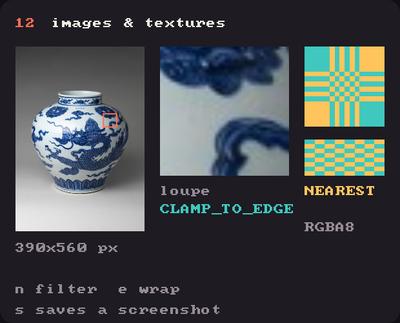
Showcase panel 12: Image, draw(source=), texture filters and wrap modes.
Try it live: run uv run python examples/showcase.py, then hover panel 12, or see the showcase.
Images loaded a picture and drew it. Here you reach inside: change its pixels from numpy, choose how it is sampled when it gets bigger or smaller, tile it, and grab what you have drawn so far back into an image. All of it works on the same picture, a Ming porcelain jar painted with a dragon in cobalt blue.
Editing pixels
image.pixels gives you the image’s pixels as a numpy array of shape (height, width, channels), uint8 from 0 to 255. Change the array in place, then call image.update() to send the change to the GPU. (update() is cheap enough to call every frame.) Keep an untouched copy so each frame starts from the original.
This sketch thresholds a crop of the jar with a level that sweeps up and down, so the dragon’s brushwork turns into pure ink.
class Threshold(kiln.App):
    def setup(self):
        full = kiln.Image(jar_path).pixels
        self.original = full[300:440, 90:300, :3].astype(np.float32)  # a 210 x 140 crop
        self.gray = self.original.mean(axis=2)
        self.image = kiln.Image.from_pixels(self.original.astype(np.uint8))

    def draw(self):
        kiln.background(24, 22, 28)
        level = 140 + 70 * np.sin(kiln.clock.frame / 30 * 2 * np.pi * 0.5)
        paper, ink = np.array([235, 225, 200]), np.array([30, 25, 40])
        out = np.where(self.gray[..., None] > level, paper, ink)
        self.image.pixels[:] = out          # edit in place...
        self.image.update()                         # ...and show it
        kiln.fill(255)
        kiln.tint(255)
        self.image.draw(95, 10, 210, 140)
        kiln.text(f"level {level:.0f}", 10, 165)

show_video(Threshold(), frames=60, size=(400, 180))
kiln.Image.from_pixels(array) makes an image from any array, and image.pixels = array replaces the pixels of an existing one. Both accept float arrays (0 to 1) too. A float image lives on the GPU in a float texture, so values above 1 survive, which is handy for accumulating light. image.save("out.png") writes the pixels to a file.
Posterising is the same idea: snap every channel to a few levels.
class Posterise(kiln.App):
    def setup(self):
        self.original = kiln.Image(jar_path).pixels.copy()
        self.image = kiln.Image.from_pixels(self.original)

    def draw(self):
        kiln.background(24, 22, 28)
        for i, levels in enumerate([2, 3, 5]):
            step = 255 / (levels - 1)
            self.image.pixels = (np.rint(self.original / step) * step).astype(np.uint8)
            kiln.tint(255)
            self.image.draw(10 + i * 130, 10, 120, 172)

show(Posterise(), size=(400, 190), pixel_ratio=2)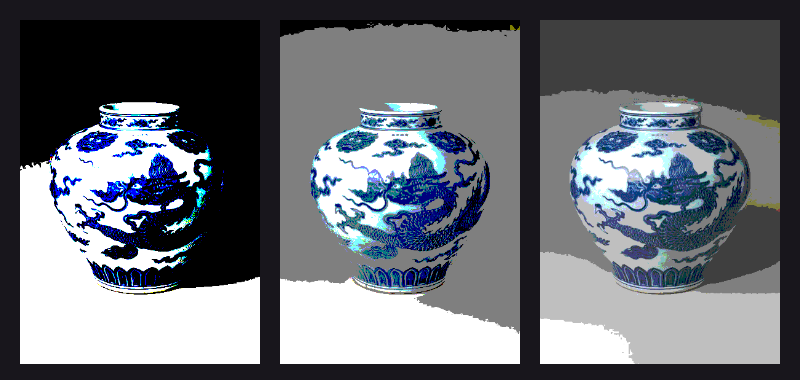
Nearest or linear
When a texture is drawn bigger than it is, the GPU has to invent the pixels in between. The default, LINEAR, blends neighbours, which is smooth. NEAREST copies the closest pixel, which is crisp and blocky, exactly what you want for pixel art or for looking at real pixels. You set it on the image’s texture with names or kiln.TextureFilter members:
class Magnify(kiln.App):
    def setup(self):
        crop = kiln.Image(jar_path).pixels[256:280, 176:200]  # 24 x 24 pixels
        self.linear = kiln.Image.from_pixels(crop)
        self.nearest = kiln.Image.from_pixels(crop)
        self.nearest.texture.filter = "nearest"
        # same as .filter = kiln.TextureFilter.NEAREST

    def draw(self):
        kiln.background(24, 22, 28)
        kiln.fill(255)
        self.linear.draw(10, 10, 192, 192)
        self.nearest.draw(214, 10, 192, 192)
        kiln.fill(230)
        kiln.text("linear", 10, 220)
        kiln.text("nearest", 214, 220)

show(Magnify(), size=(416, 232), pixel_ratio=2)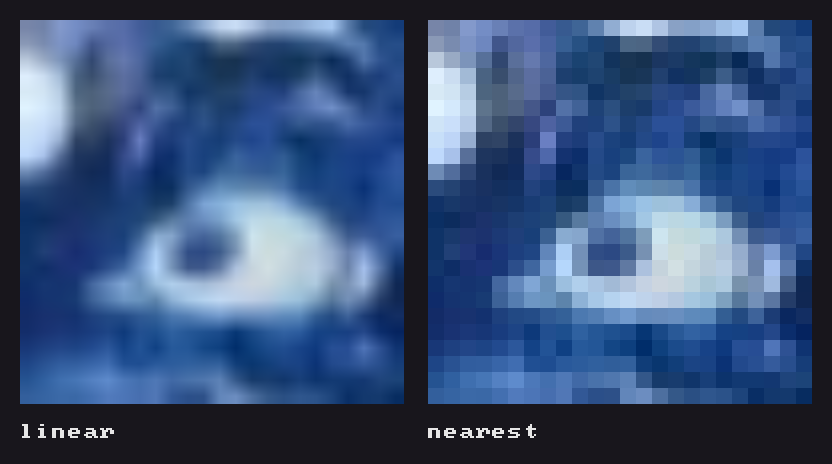
Both are the same 24 × 24 pixels from the jar (the dragon’s eye), drawn 8 times larger. Changing the filter keeps the pixels, so you can switch it when you need to (it reads them back from the GPU, so do it now and then, not every frame).
Mipmaps: shrinking without shimmer
The opposite problem: a large, finely detailed picture drawn much smaller. Plain filtering looks at only a few source pixels for each screen pixel, so the fine lines flicker and break up as the picture moves. Mipmaps are pre-shrunk copies, half the size, then a quarter, and so on. The GPU picks (and blends) the right size for each draw. texture.mipmaps = True turns them on; Kiln rebuilds them whenever the pixels change.
Here is the jar at a quarter of its size, drifting a quarter pixel per frame, without mipmaps on the left and with them on the right. Watch the fine lines on the left crawl.
class Shrink(kiln.App):
    def setup(self):
        pixels = kiln.Image(jar_path).pixels[:, :388]  # 388 x 560
        self.plain = kiln.Image.from_pixels(pixels)
        self.mipped = kiln.Image.from_pixels(pixels)
        self.mipped.texture.mipmaps = True

    def draw(self):
        kiln.background(24, 22, 28)
        drift = kiln.clock.frame * 0.25
        kiln.fill(255)
        self.plain.draw(10 + drift % 4, 10 + drift % 3, 97, 140)
        self.mipped.draw(120 + drift % 4, 10 + drift % 3, 97, 140)
        kiln.text("plain", 10, 165)
        kiln.text("mipmaps", 120, 165)

show_video(Shrink(), frames=48, size=(230, 180))
Mipmaps cost a third more GPU memory, and the texture gets an image of exactly its size (Kiln handles that for you). Changing the filter, wrap or mipmaps moves the pixels to a different GPU image, so set them once in setup, not every frame. They help when drawing at half size or less; for upscaling or 1:1 drawing leave them off.
Tiling with REPEAT
texture.wrap = kiln.TextureWrap.REPEAT (or just "repeat") makes a texture tile instead of repeating its edge pixels. To draw more than one copy, use draw(..., source=), whose source rectangle may reach past the texture. This turns a patch of the jar (the dragon’s head) into a wallpaper that slides:
class Wallpaper(kiln.App):
    def setup(self):
        patch = kiln.Image(jar_path).pixels[220:320, 160:260]  # 100 x 100
        self.tile = kiln.Image.from_pixels(patch)
        self.tile.texture.wrap = "repeat"
        self.tile.texture.filter = "linear"

    def draw(self):
        kiln.background(24, 22, 28)
        t = kiln.clock.frame
        # A 400 x 300 area showing 4 x 3 tiles, scrolled by t pixels each way.
        self.tile.draw(0, 0, 400, 300, source=(t * 1.5, t, 400, 300))

show_video(Wallpaper(), frames=100, size=(400, 300), width=260)
MIRRORED_REPEAT flips every other copy, which hides seams in textures that don’t tile.
Behind the scenes Kiln keeps the GPU images of released textures in a pool, so creating and releasing textures is cheap. The pool holds up to 64 MB of free images (a soft cap: it always keeps the most recently released one, however big). If your sketch makes new textures faster than they can be reused, Kiln warns once and suggests keeping one Texture and calling upload() on it. A texture that repeats, mirrors or has mipmaps (and every Fbo) has an image of exactly its size, which only a texture of the same size reuses: the pool keeps 32 of those, and if each frame brings a new size, Kiln warns that a fixed size would be cheaper.
Grabbing the screen: feedback
image.grab_screen(x, y, w, h) copies a rectangle of what you have drawn so far into an image, including everything drawn earlier in the same frame. Coordinates are in points, like all drawing. kiln.save_screen("shot.png") writes the whole frame to a file. Inside an Fbo, both read the Fbo instead of the window.
Grab the frame at the end of draw, and draw it again, slightly bigger and turned, at the start of the next one: every frame is a copy of the last, so whatever you add near the centre streams outwards into a tunnel. Here the only new thing in each frame is a small dot that changes hue as it orbits, and the spiral trail is all feedback.
class Tunnel(kiln.App):
    def setup(self):
        self.last = kiln.Image()
        self.have_last = False

    def draw(self):
        w, h = kiln.window.width, kiln.window.height
        kiln.background(8, 8, 16)
        t = kiln.clock.frame
        if self.have_last:
            with kiln.transform():
                kiln.translate(w / 2, h / 2)
                kiln.rotate(math.radians(2))
                kiln.scale(1.05)
                kiln.tint(255, 255, 255, 235)       # fade a little each pass
                self.last.draw(-w / 2, -h / 2, w, h)
        # A small bright dot orbiting the centre: the only new thing in each frame.
        kiln.fill(kiln.Color.from_hsb((t * 6) % 255, 200, 255))
        kiln.circle(w / 2 + 60 * np.cos(t / 7), h / 2 + 40 * np.sin(t / 5), 12)
        self.last.grab_screen(0, 0, w, h)             # keep this frame for the next
        self.have_last = True

show_video(Tunnel(), frames=90, size=(400, 300))
Each pass resamples the grab linearly, rotated and scaled, so edges soften a little more every time; that blur is part of the look. On a Retina display (pixel_ratio=2) the grabbed image has twice as many pixels as the rectangle has points, so it stays sharp; drawing it back at w, h points still lines up.
Try this: the unravelling jar
Put it together: posterise the jar with a level that drifts, tile it as a wallpaper behind, and feed the tunnel with the result.
class Unravel(kiln.App):
    def setup(self):
        self.original = kiln.Image(jar_path).pixels[:, :, :3].astype(np.float32)
        self.jar = kiln.Image.from_pixels(self.original.astype(np.uint8))
        self.jar.anchor = (0.5, 0.5)
        patch = kiln.Image(jar_path).pixels[220:320, 160:260]
        self.tile = kiln.Image.from_pixels(patch)
        self.tile.texture.wrap = "repeat"
        self.last = kiln.Image()
        self.have_last = False

    def draw(self):
        w, h = kiln.window.width, kiln.window.height
        t = kiln.clock.frame
        levels = 2 + (t // 20) % 4
        step = 255 / levels
        tint = np.array([1.0, 0.8 + 0.2 * np.sin(t / 9), 0.7])
        self.jar.pixels = np.minimum(np.rint(self.original / step) * step * tint, 255).astype(np.uint8)
        kiln.background(10, 8, 14)
        kiln.tint(110)                           # the wallpaper, dimmed, behind everything
        self.tile.draw(0, 0, w, h, source=(t, t * 0.5, w, h))
        if self.have_last:
            with kiln.transform():
                kiln.translate(w / 2, h / 2)
                kiln.rotate(math.radians(-1.5))
                kiln.scale(1.04)
                kiln.tint(255, 255, 255, 230)
                self.last.draw(-w / 2, -h / 2, w, h)
        kiln.fill(255)
        kiln.tint(255)
        self.jar.draw(w / 2, h / 2, 78, 112)
        self.last.grab_screen(0, 0, w, h)
        self.have_last = True

show_video(Unravel(), frames=100, size=(400, 300), width=280)
Picture: “Jar with dragon”, China, Ming dynasty, Xuande mark and period (1426–35), porcelain painted with cobalt blue under a transparent glaze. The Metropolitan Museum of Art, Gift of Robert E. Tod, 1937 (37.191.1), public domain via Open Access.