import kiln

with record():
    lead = kiln.Pluck()
    for note in ("E3", "G3", "A3", "B3", "D4", "E4"):
        lead.note_on(kiln.note_to_freq(note))
        wait(0.25)
    wait(1.0)
![Showcase panel 21: silent until clicked: a Synth note (x sets the pitch), a Pluck, and a bar of Kick, Snare and HiHat in a Sequencer with its playhead and a Reverb on the master, with master.spectrum() and master.level() drawn live; needs kiln-gl[sound].](../media/showcase-21.jpg)
Showcase panel 21: silent until clicked: a Synth note (x sets the pitch), a Pluck, and a bar of Kick, Snare and HiHat in a Sequencer with its playhead and a Reverb on the master, with master.spectrum() and master.level() drawn live; needs kiln-gl[sound].
Try it live: run uv run python examples/showcase.py, then click panel 21, or see the showcase.
Two instruments for games and toys. kiln.Pluck is a synth pluck, the short, bright note of melodic techno and trance: every note snaps and fades on its own. kiln.Sfx makes retro game sounds, the coins, jumps and lasers of 8-bit games, from about twenty numbers, the way DrPetter’s sfxr does, and rolls new ones for you from a seed.
You need the sound extra: pip install "kiln-gl[sound]". As on the Sound page, the examples are recorded with with record(): and wait(seconds), and each recording is raised to a comfortable listening level.
A Pluck is played like any instrument, with note_on(freq). The note snaps and dies away by itself, so you don’t need a note_off:
import kiln
with record():
lead = kiln.Pluck()
for note in ("E3", "G3", "A3", "B3", "D4", "E4"):
lead.note_on(kiln.note_to_freq(note))
wait(0.25)
wait(1.0)Under the name is the analog voice of Synth: two saws a few cents apart and a sub-oscillator, through a resonant ladder filter with a touch of drive. Each note throws the filter wide open and snaps it shut within a couple of hundred milliseconds, which is the “pluck”; the amp envelope has no sustain, so the note fades away. The patch is fixed (for another sound, use a Synth), and a Pluck costs one analog voice.
A Pluck holds six notes at once, so notes played together make a chord. Here is a strum, then an arpeggio:
import kiln

hz = kiln.note_to_freq
with record():
    lead = kiln.Pluck()
    for note in ("A2", "E3", "A3", "C4", "E4"):      # strum: 30 ms apart
        lead.note_on(hz(note))
        wait(0.03)
    wait(1.0)
    for note in ("A2", "A3", "E3", "C4", "A3", "C4", "E3", "C4"):
        lead.note_on(hz(note))
        wait(0.2)
    wait(1.0)
Two controls shape the note:
decay: how long it lasts, the time to fall 40 dB (half a second by default); the filter’s snap lengthens with it;brightness: 0 is a dull, rounded blip, 1 a bright, biting zap.The same chord three ways: short and dark, the default, then long and bright:
import kiln

hz = kiln.note_to_freq
with record():
    lead = kiln.Pluck()
    for decay, brightness in ((0.2, 0.0), (0.5, 0.5), (1.5, 1.0)):
        lead.decay, lead.brightness = decay, brightness
        for note in ("D3", "A3", "D4", "F#4"):
            lead.note_on(hz(note))
            wait(0.04)
        wait(1.1)
        lead.note_off()
        wait(0.1)
note_off() damps the notes in about 80 ms. Pluck and damp quickly and you get a muted, chugging riff. Put a ping-pong Delay and a Reverb in lead.fx, as in the Effects page, and it sits in a track.
An Sfx plays a game sound. play(preset) rolls one from a preset, the way sfxr’s buttons do: "coin", "jump", "hit", "laser", "powerup", "blip", "explosion" and "random". Here they are, in that order:
import kiln

with record():
    sfx = kiln.Sfx()
    for preset in ("coin", "jump", "hit", "laser", "powerup", "blip", "explosion"):
        sfx.play(preset, seed=3)
        wait(0.6)
    wait(0.3)
Every sound plays once and stops, like a drum: an Sfx is a one-shot. Each one is a waveform ("square", "saw", "sine" or "noise") whose pitch starts at tune, then slides, wobbles or jumps, shaped by a quick envelope and a filter that can sweep. Its oscillators are band-limited, so a high laser stays clean instead of fizzing with aliases, as the originals did.
A preset is a recipe with some randomness in it, so every play("laser") is a new laser. Give it a seed and you always get the same one. That is how a game gives each event its own sound:
import kiln

with record():
    sfx = kiln.Sfx()
    for seed in (1, 1, 2, 2, 3, 3):        # each laser twice: the same sound
        sfx.play("laser", seed=seed)
        wait(0.35)
    wait(0.2)
"random" can be anything at all: sfxr’s “randomize” button. Some seeds are gems, so keep the ones you like:
import kiln

with record():
    sfx = kiln.Sfx()
    for seed in (4, 9, 12, 21):
        sfx.play("random", seed=seed)
        wait(1.0)
The parameters are attributes, in seconds, Hz and octaves: tune (where the pitch starts), slide (octaves per second), attack, sustain, punch, decay, vibrato_depth, arp (a jump in pitch), cutoff, resonance and more; the kiln.Sfx reference lists them all. After a play, they hold that preset’s values. Change any of them and hit() plays the sound again:
import kiln

with record():
    sfx = kiln.Sfx()
    sfx.play("jump", seed=3)
    wait(0.5)
    sfx.slide *= 2              # a steeper jump
    sfx.hit()
    wait(0.5)
    sfx.tune /= 2               # an octave lower
    sfx.wave = "saw"
    sfx.hit()
    wait(0.5)
Controls you set before a hit() are the ones it plays with, even several hits in one frame. note_on(freq) plays the sound transposed so it starts at freq, and kiln.Sequencer plays an Sfx in a pattern at its tune, like a drum.
examples/13_sfx.py puts both together. Five glowing balls bounce on a string and pluck it, each at its own note of A minor pentatonic. They fall from heights chosen so that their bounces keep time, so together they play a looping melody, like a music box. Balls that fly through a coin collect it, with a coin sound; click to add a ball or pop one, and press space to fire a laser at the mouse:
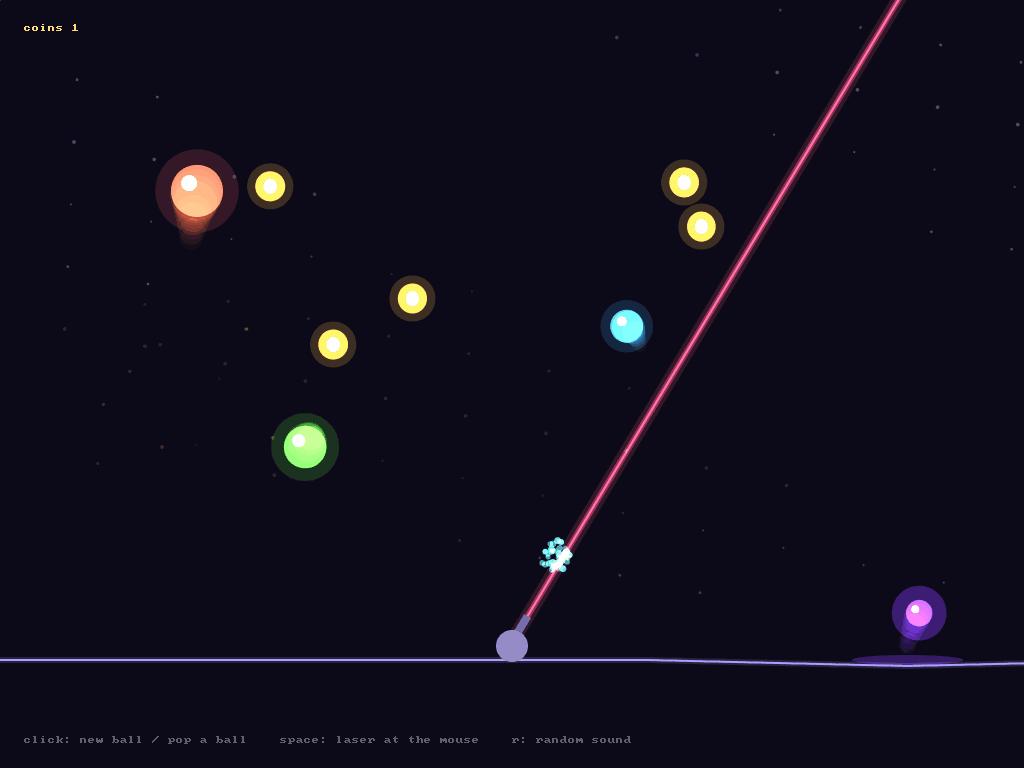
Run it with uv run python examples/13_sfx.py.
Make a little instrument: a click plucks a note whose pitch follows the mouse’s x, and a click in the top half of the window also plays a coin.
import kiln

class Toy(kiln.App):
    def setup(self):
        self.lead = kiln.Pluck()
        self.coin = kiln.Sfx()

    def mouse_pressed(self, x, y, button):
        midi = 40 + int(36 * x / kiln.window.width)   # E2 .. E5
        self.lead.note_on(kiln.note_to_freq(midi))
        if y < kiln.window.height / 2:
            self.coin.play("coin", seed=7)

kiln.run(Toy(), 800, 600)
Then snap the pitch to a scale, so every click sounds good, or give each corner of the window its own "random" seed.
kiln.Pluck is the analog voice of kiln.Synth, with a pluck patch. kiln.Sfx ports the sound model and the preset generators of sfxr by Tomas Pettersson (DrPetter, 2007, MIT licence). kiln.sound.dsp.sfxr has the details.