import kiln


class Pulse(kiln.App):
    def setup(self):
        self.synth = kiln.Synth()
        self.synth.cutoff = 1500

    def update(self):
        frame = kiln.clock.frame
        if frame % 15 == 0:
            self.synth.note_on(110)
        elif frame % 15 == 8:
            self.synth.note_off()

    def draw(self):
        kiln.background(18, 16, 24)
        kiln.fill(255, 107, 82)
        kiln.circle(240, 135, 20 + 500 * kiln.master.level())


record_visual(Pulse(), frames=180)Audio-reactive visuals
![Showcase panel 21: silent until clicked: a Synth note (x sets the pitch), a Pluck, and a bar of Kick, Snare and HiHat in a Sequencer with its playhead and a Reverb on the master, with master.spectrum() and master.level() drawn live; needs kiln-gl[sound].](../media/showcase-21.jpg)
Showcase panel 21: silent until clicked: a Synth note (x sets the pitch), a Pluck, and a bar of Kick, Snare and HiHat in a Sequencer with its playhead and a Reverb on the master, with master.spectrum() and master.level() drawn live; needs kiln-gl[sound].
Try it live: run uv run python examples/showcase.py, then click panel 21, or see the showcase.
A sketch can listen to itself. kiln.master reads the sound that Kiln is playing, and kiln.mic your microphone, and three methods on each hand it to draw() as plain numbers:
kiln.master.level()is how loud it is right now, from 0 to 1.kiln.master.waveform(n)is the shape of the wave itself: the newestnsamples, from -1 to 1.kiln.master.spectrum(bands)is how loud each pitch is, asbandsnumbers from 0 to 1, lowest pitch first.
Everything on this page is real: each animation is drawn from the spectrum of the sound in the same video. Press play to hear it.
You need the sound extra: pip install "kiln-gl[sound]".
Loudness
master.level() is the average loudness over the last 20 milliseconds or so. A circle whose size follows it pumps with the beat. Here a synth plays a short note four times a second, and the circle swells with each one:
The level falls back gently after a note ends instead of dropping to zero in one frame, so the circle shrinks smoothly. Read it once per frame.
Spectrum
master.spectrum(32) splits the sound into 32 bands of pitch. Band 0 is the deepest note you can hear and the last band is the highest, so a bar chart of the bands is the shape of the sound. Here the same synth, with its filter opening and closing (the low-pass cutoff from the Sound tutorial), shown as 32 bars:
import kiln
import numpy as np


class Bars(kiln.App):
    def setup(self):
        self.synth = kiln.Synth()
        kiln.random_seed(3)

    def update(self):
        frame = kiln.clock.frame
        self.synth.cutoff = 300 + 6000 * (0.5 + 0.5 * np.sin(frame * 0.03))
        if frame % 30 == 0:
            self.synth.note_on([110, 165, 220, 147][frame // 30 % 4])
        elif frame % 30 == 22:
            self.synth.note_off()

    def draw(self):
        kiln.background(18, 16, 24)
        bands = kiln.master.spectrum(32)
        x = np.arange(32) * 15 + 0.0
        heights = bands * 230
        kiln.fill(255, 107, 82)
        kiln.rects(np.column_stack([x, 250 - heights]), np.column_stack([np.full(32, 12.0), heights]))


record_visual(Bars(), frames=240)
The bars climb and fall as the filter opens: each saw wave has harmonics all the way up, and the filter decides how many get through. The tall bars on the left are the note itself; the smaller ones to its right are its harmonics.
What the numbers mean
The bands are log-spaced, because that is how pitch works: each octave is the same distance, so a bass note and a whistle both get room. Edge i of n bands is 40 * (16000 / 40) ** (i / n) Hz, from 40 Hz to 16 kHz:
n = 8
edges = 40 * (16000 / 40) ** (np.arange(n + 1) / n)
print("8 bands:", " | ".join(f"{e:,.0f}" for e in edges), "Hz")
8 bands: 40 | 85 | 179 | 378 | 800 | 1,692 | 3,578 | 7,566 | 16,000 HzThe values are in decibels: a band of -80 dB or quieter is 0, and full scale (0 dB) is 1, in between linearly. A sine at half volume reads 0.93, and a faint sound still moves the bars. Rises show at once and falls decay over about a tenth of a second, so bars fall back instead of flickering. Under the hood Kiln takes the newest 2048 samples (43 ms), applies a Hann window and an FFT on the main thread; the audio thread is never involved, so a busy draw() can’t make the sound stutter.
A whole sketch
examples/11_audio_reactive.py puts it together. A bass and a lead synth play a four-chord loop, and you hear it. Every frame the sketch draws three things:
- the spectrum, 64 bands as coloured bars with falling peak caps and a faint reflection;
- the waveform,
kiln.master.waveform(512), a steady oscilloscope line (it starts at a rising zero crossing, like a scope’s trigger, so a held note stands still); - rings and a glowing core that swell with
kiln.master.level().
The sketch is also an instrument. Move the mouse up and down to turn the lead’s filter, and the bars on the right rise and fall; move it left and right to transpose, and the bars slide along the spectrum. Press m to draw your microphone instead.
# the core of update() and draw(): read the sound, then draw it
bands = kiln.master.spectrum(64)                # 64 numbers, 0..1, low pitch to high
level = kiln.master.level()                     # one number, 0..1
wave = kiln.master.waveform(512)                # 512 samples, -1..1
heights = tall * bands ** 1.2                # quiet bands stay low, loud ones leap
kiln.rects(corners, sizes, colors) # all 64 bars in one call
kiln.lines(points[:-1], points[1:])     # the waveform, one segment per sample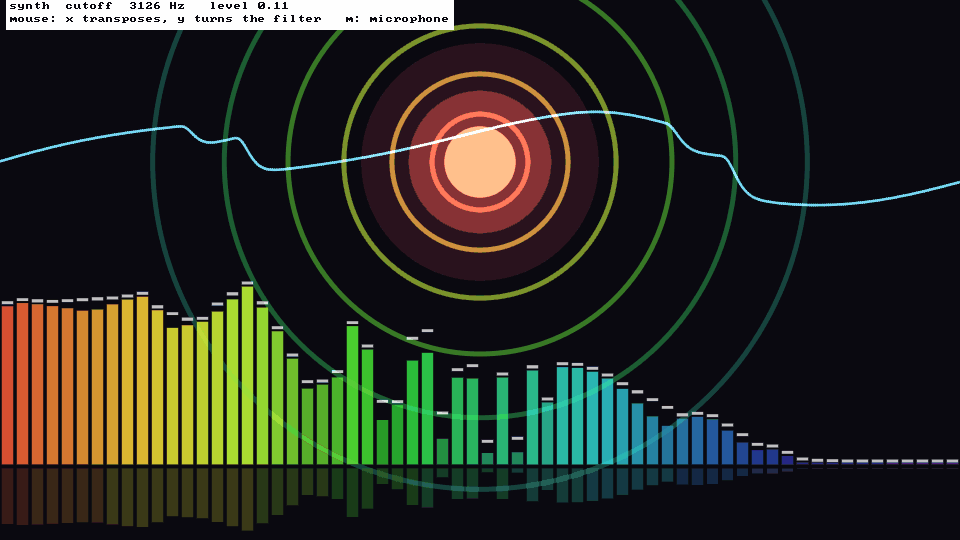
That is the sketch running, 4 seconds in: bars below, the waveform across the middle, and the rings swelling with the loudness. Here is the animation, with its sound:
Run it yourself:
uv run python examples/11_audio_reactive.pyMicrophone
The same two functions read your microphone when you ask for source="input". Open the stream with one input channel first. Nothing is played back, so there is no feedback:
class Mic(kiln.App):
    def setup(self):
        kiln.SoundStream().open(input_channels=1)

    def draw(self):
        kiln.background(18, 16, 24)
        bands = kiln.mic.spectrum(64)
        level = kiln.mic.level()
        ...
examples/11_audio_reactive.py --mic (or the m key) is the whole sketch with the microphone as its source. The first time, macOS asks whether your terminal may use the microphone.
Try this
- Change
n_bandsfrom 64 to 16 and the ring becomes chunky; make it 256 and it turns to velvet. - Colour by level instead of by band, or draw the bands as a line with
kiln.lines. - Use
bands[:8].mean()(the lows) to shake the whole picture withtranslate, andbands[-16:].mean()(the highs) to make sparkles. - Swap the synth for the mouse from the Sound tutorial and draw what you play.