Tutorials

Each tutorial teaches one idea with short sketches you can copy and run. The code on every page is executed when the site is built, and every image is a real render from Kiln. New to Kiln? Start with Getting started.

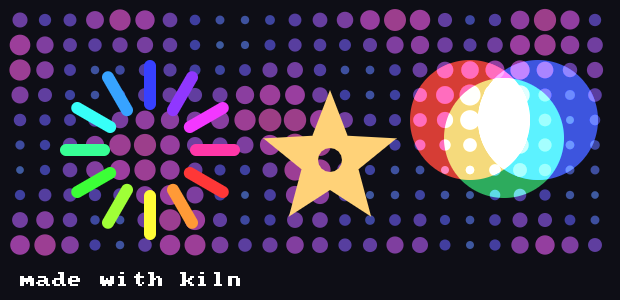
Here is a taste of what the tutorials cover, all in one sketch:

import math

import kiln


def draw():
    kiln.background(14, 14, 22)

    # Noise and colour: a field of circles tinted by hue.
    for i in range(24):
        for j in range(10):
            n = kiln.noise(i * 0.15, j * 0.15)
            kiln.fill(kiln.Color.from_hsb(150 + 80 * n, 160, 255, 150))
            kiln.circle(20 + i * 25, 20 + j * 25, 3 + 9 * n)

    # Blending: additive light.
    kiln.blend(kiln.Blend.ADD)
    for k, (r, g, b) in enumerate(((255, 60, 40), (40, 200, 90), (60, 90, 255))):
        kiln.fill(r, g, b, 200)
        kiln.circle(470 + 34 * k, 120 + 18 * (k % 2), 60)
    kiln.blend(kiln.Blend.ALPHA)

    # Transforms: a ring of rotated rounded rectangles.
    with kiln.transform():
        kiln.translate(150, 150)
        for k in range(12):
            kiln.rotate(math.radians(30))
            kiln.fill(kiln.Color.from_hsb(k * 21, 200, 255))
            kiln.rect(40, -6, 50, 12, radius=6)

    # Custom shapes: a star with a round hole.
    kiln.fill(255, 210, 120)
    with kiln.shape(close=True):
        for k in range(10):
            a = math.radians(k * 36 - 90)
            r = 70 if k % 2 == 0 else 30
            kiln.vertex(330 + r * math.cos(a), 160 + r * math.sin(a))
        kiln.next_contour(close=True)
        for k in range(16):
            a = math.radians(k * 22.5)
            kiln.vertex(330 + 12 * math.cos(a), 160 + 12 * math.sin(a))

    # Text.
    kiln.fill(255, 255, 255)
    kiln.text("made with kiln", 20, 288, scale=2)


show(draw, size=(620, 300))

The tutorials

Drawing

Tutorial What you’ll learn
Shapes Circles, ellipses, rectangles, rounded corners, lines and triangles; fill, outline, and fill and stroke in two colours.
Color kiln.Color, HSB, hex, named colours, gradients, and a stroke colour of its own.
Transforms Translate, rotate and scale; with transform() and with style(); orbits and fractal trees.
Custom shapes Polygons, stars, holes, curves and beziers with with shape().
Blending and trails Additive light, multiply, screen, and fading trails with window.auto_clear = False.
Text The pixel font (labels, highlights, an FPS counter, text on a circle), then TrueType: the bundled Inter weights, measuring and centring, line height, turned text and a type ring.

Images and GPU

Tutorial What you’ll learn
Images Load pictures and draw them scaled, tinted, see-through and as sprites.
Pixels and screen Edit pixels, filter and tile textures, shrink with mipmaps, grab the screen.
Offscreen drawing Draw into an Fbo and reuse it: posters, feedback trails, float glow and ping-pong simulations.
Shaders Colour anything with your own GLSL material: gradients, patterns, duotones.
Meshes Vertices, colours and primitive modes; textured, warped images; generative ribbons and wireframes.
Instancing One shape drawn thousands of times in one call, each copy with its own data: a swarm of 4,096 fish.
GPGPU particles Raw shaders, and a quarter of a million particles simulated on the GPU with ping-pong float Fbos.

Motion and interaction

Tutorial What you’ll learn
Interaction Mouse, keyboard, scrolling and dropped files, shown with scripted input.
Noise and randomness Random scatter, simplex noise fields and animated flow.
GUI: controls and panels kiln.Gui: sliders, toggles, buttons, colour pickers, XY pads, ranges, knobs, choices, text fields, monitors and folders that tune your sketch while it runs; presets, and how panels and your mouse code coexist.

Agents

Tutorial What you’ll learn
Agents: a flock that decides kiln.agents: a population as arrays, senses, steering forces and a behaviour tree that decides for every agent at once; a flock that runs from the mouse, then hunters and prey.
Ecosystems: fields, life and evolved brains Food Fields that agents eat and that grow back; genes, metabolize, reproduce and die, so traits evolve under selection; rays, batched Brains and next_generation, so foragers’ brains evolve to find food.
Sound

Tutorial What you’ll learn
Sound Play a synth from your sketch: notes, pitch, and a filter you can turn with the mouse.
Plucks and sound effects A bright plucked synth for melodies, and game-style sound effects from presets or a seed.
Drums Eight drums synthesized the way the TR-808 and TR-909 make them, no recordings: kick, snare, clap, hats, toms and more.
Sequencer Patterns in steps: 16-step bars, swing, notes per step and automation, timed to the sample.
Effects Echoes, reverb, filters and drive on an instrument or the master bus, to give a sound its place and character.
Audio-reactive visuals Draw the sound: loudness, a spectrum of 64 bands and the waveform, live from a synth or your microphone.
Making a track All the pieces together: synth, drums, sequencer and effects in one track, with visuals on the beat.

Performance

Tutorial What you’ll learn
Performance Why Kiln is fast, the bulk numpy API for hundreds of thousands of shapes, and a stress scene that pushes it to the limit.