Kiln is a small creative-coding framework for Python. Subclass App, fill in setup, update and draw, and call functions like kiln.fill and kiln.circle. Live state reads like data (kiln.mouse.x), and scopes are with blocks (with kiln.transform():). Naming has the rules behind the names.
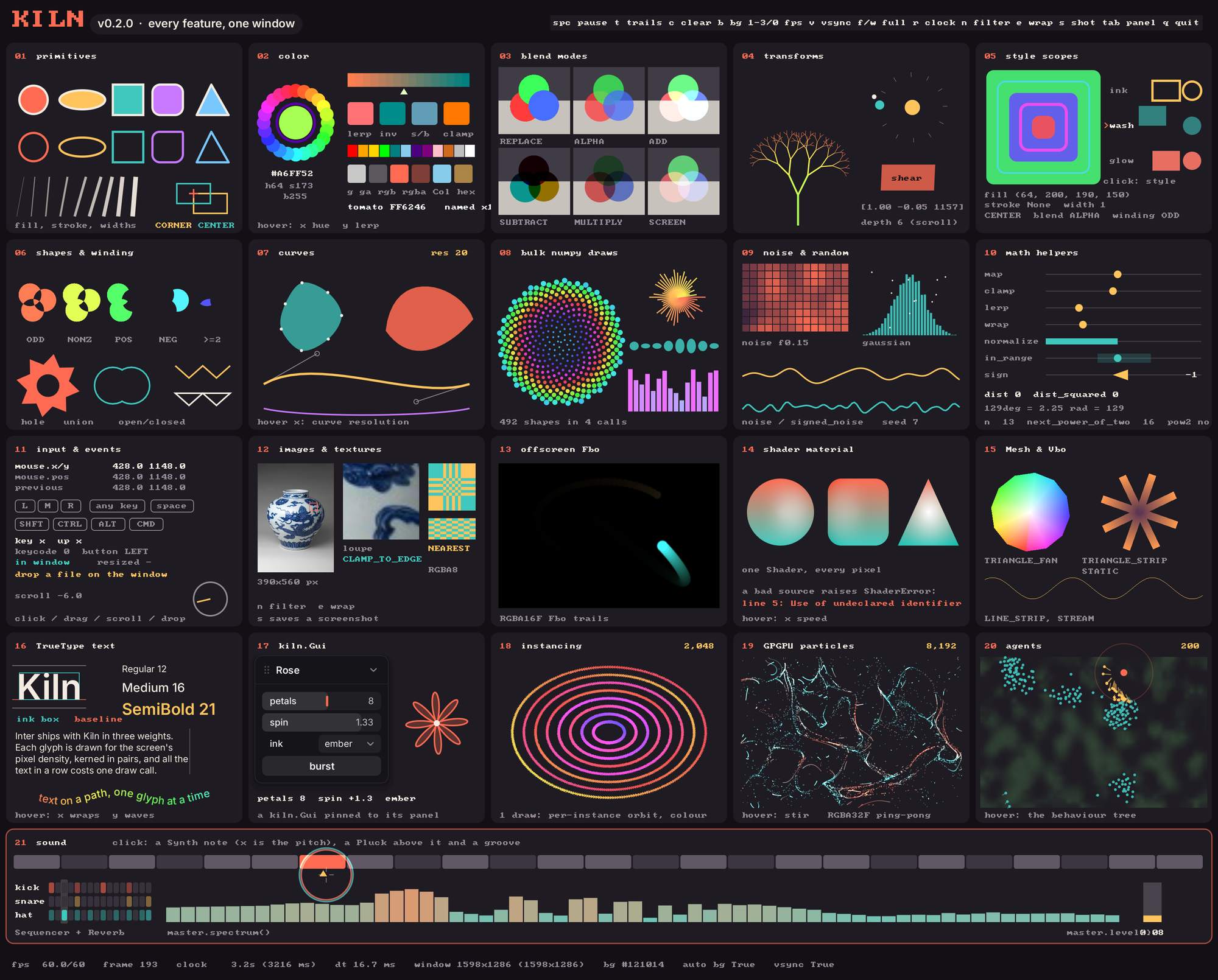
One live window, every API name: examples/showcase.py, twenty panels and a sound row, from primitives to shaders, instancing, GPGPU particles and agents.
The picture above is a single live Kiln window exercising every name in the API. Run it yourself with uv run python examples/showcase.py, and see the gallery for a map of its panels.
It is fast because drawing calls never touch the GPU one by one. Each call adds a record to a batch, and the whole frame is flushed to the GPU, through zengl, in a handful of draw calls.
That is the whole sketch: 400 translucent circles, each with its own colour, size and alpha.
Why Kiln
Sketch with agents. Sketch agents.
Sketch with agents
Kiln is the creative-coding framework your agents can see: a coding agent can write a Kiln sketch, run it, look at what it drew and fix it, without you in the loop. Three things make that work, and they help you as much as the agent.
A sketch renders to an array.kiln.testing.render_frames runs any App in a hidden window, with scripted mouse and keyboard input, and returns the last frame as a numpy array (every frame through on_frame). An agent, a test or a notebook on a Mac with a display session gets pixels back. This sketch draws a disc wherever the mouse is; the script moves the mouse at frame 10 and reads the pixel under it at the end:
The frame is 300 rows of 400 RGBA pixels, and the pixel at the mouse is the disc’s orange: the sketch saw the mouse move and drew where it went, with no one at the window.
Every example takes --frames N to run N frames and exit. A shader that fails to compile raises an error that names the lines of your own GLSL.
Arrays in, arrays out. The bulk draw calls take numpy arrays and an image’s pixels are an array you edit in place, so anything in Python that produces arrays, from PyTorch or MLX to a data frame, can feed a sketch from the same file.
One obvious way. One name per concept, a small public API (kiln, kiln.agents and kiln.testing), names a model already knows, and docs whose every code cell is executed (this one included), so the examples an agent learns from are known to run.
Sketch agents
kiln.agents puts agents inside the sketch: a Population kept as arrays, senses, steering forces and a behaviour tree that decides for every agent at once, so a thousand of them can perceive, decide and act sixty times a second. The agents tutorial builds a flock that runs from the mouse, and the ecosystems tutorial lets agents eat, breed and evolve small brains.
What it does
Shapes with a fill and a stroke of their own colour, custom paths, transforms, blending, bitmap and TrueType text, mouse and keyboard, GUI panels, noise and colour make up the 2D core. On top of it Kiln puts the GPU in reach:
Pictures. Load an image, draw it scaled, tinted and cropped, edit its pixels as a numpy array, and send thousands of sprites in one batch.
Offscreen buffers. Draw into an Fbo with with fbo:, in 8 bits or float, and use it as a texture: posters, feedback trails, simulations.
Your own shaders. Colour anything with one GLSL function, and keep every shape’s anti-aliasing; or write whole programs.
Meshes and Vbos. Draw meshes, load .obj and .ply models, and keep geometry on the GPU in a Vbo.
Sound. Play instruments from Python, add effects, a sequencer and drums, and draw from the sound (audio-reactive visuals). Install it with pip install "kiln-gl[sound]", then, in a Python shell:
import kilnsynth = kiln.Synth()synth.note_on(220) # an A, through your speakers; synth.note_off() lets it go
The Gallery shows the examples running: the showcase above, six original scenes (Abyss, after Haeckel, Pilgrim, inspired by thatgamecompany’s Journey, and four agent scenes) and nine ported sketches, and it lists the seven sound examples; nine remixes of well-loved sketches, read through the kiln, have a page of their own. The Performance page has a stress scene that drives all of it as hard as it goes. Coming from openFrameworks or p5.js? A page for each maps its names to Kiln’s.
Install
Kiln needs macOS on Apple Silicon, Python 3.11 or newer and OpenGL 4.1. Install it from PyPI:
pip install kiln-gl# or, with uv:uv add kiln-gl
For sound, add the extra: pip install "kiln-gl[sound]" (or uv add "kiln-gl[sound]"). To work from source, use uv add "kiln-gl @ git+https://github.com/slegroux/kiln".
Status
Kiln is 0.x: a minor version may break the API, and every break is listed in the changelog. The App lifecycle, shapes, Style and transforms, Color, Image, Texture, Fbo, Mesh, Font, the math helpers and run() are stable for 0.x. kiln.agents, kiln.sound, the Shader material API (shade(Material), raw GLSL, custom Vbo attributes and instancing), kiln.testing, the more advanced Gui widgets and the presets JSON format are experimental and may change in any release.